No, this is giving you a command loop…
Your save report action triggers send email rule, and the send email action triggers send email rule which triggers itself agin and again.
No, this is giving you a command loop…
Your save report action triggers send email rule, and the send email action triggers send email rule which triggers itself agin and again.
Thanks all,Yes i managed to send the emails but i cant open them on iphone. Is there a way i can save the report as PDF .I don’t want to use a third party application to convert xps to pdf
Could could use a print to pdf virtual printer, fix the filename and email that in a similar way.
May want to increase the delay to allow file creation a bit more time.
I have followed this tutorial and was able to send the email, now the question is, how to attach more than 1 email.
I would like to send
items sale report
work period report
Cashout Report
inventory report
or any other report of my choice
Why not save the report to a folder on a cloud and then send an email that the report was uploaded? Its faster and you have your daily reports all in one place.
i am able to send only one report,i want to attach others.
Did you bother trying to search on forum.
I searched once and got 3/4 first hits giving same answer.
Just to comma seperate the file name/directory.
this sounds interesting,how can i save the reports on cloud,please explain
Download dropbox or drive backup and save reports automatically in that folder
Thank-you, i never thought of this.This mean that when saving the reports to a file i should direct the emails towards a google drive file
I will try that
If your using Google you need to enable less secure apps for smtp, that might be your problem. Of they still have that option, they have pushed several times for this option to not be used and apps to use oath.
Havnt checked recently but something in my gut makes me think I remember they may have changed to app specific passwords also fo smtp.
Gmail still has the less-secure option; I set it up a couple months ago.
Go to https://myaccount.google.com/lesssecureapps
Keep in mind, though, you cannot enable less secure app settings if you have 2FA setup for your account.
Knew I had seen it somewhere.
If you have 2FA enabled then you have to set 3rd party app password…
In your first rule, what exactly should be in the Email field? I did everything shown and still getting address cannot be blank error. Also I do use the email address to send automated email from my excel file.
Thanks
Set a cc address and see
Do you mean to set it in the first rule email field? Or in the action field, if so I did that already.
Show your setup, dont know how you have done.
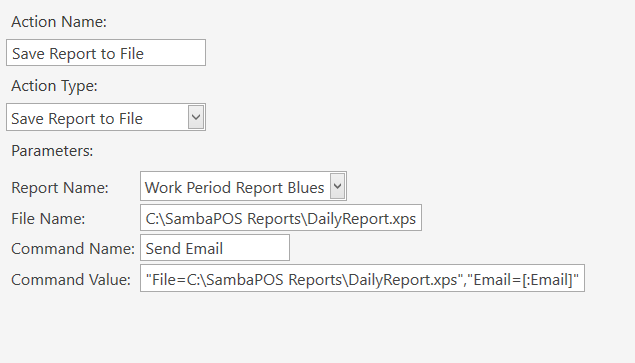
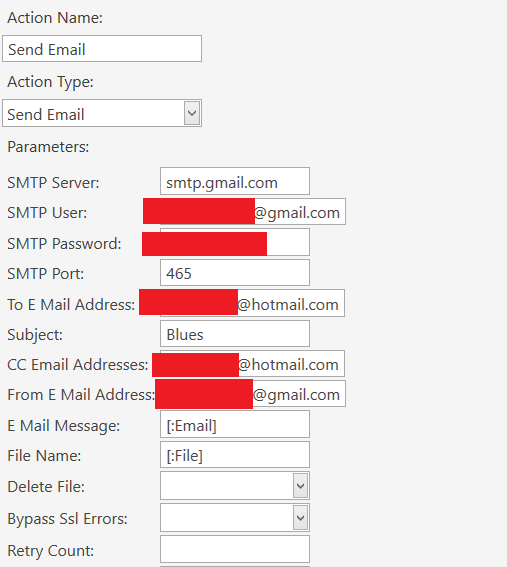
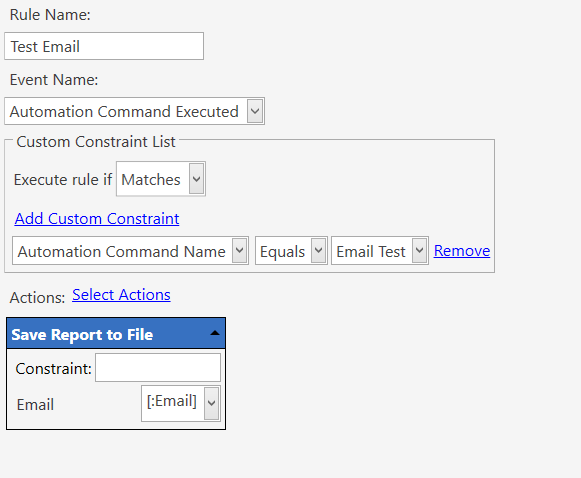
To be able to test I am using a command button instead of workperiod end event.
Where is your send email command rule.
I’d test with just send email without file etc if having issue sending to make sure settings right before extending to more complex setup.
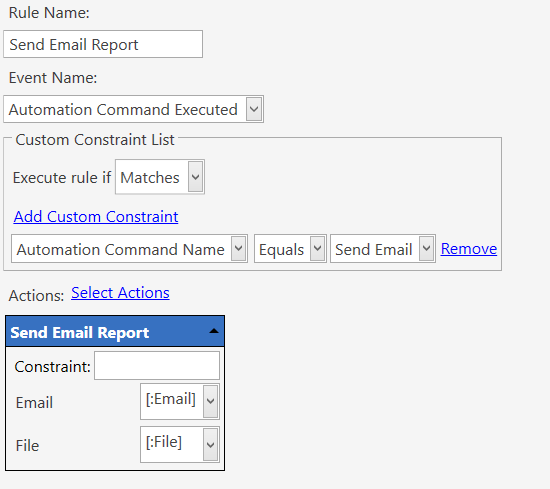
Sorry right here…