Timeclock Implementation Requirements - Discussion

The way TimeTrex is handeling it is it uses Punch… it has Auto Punch, and manual punching… manual punching means you tell it an ID to record… auto punch it checks status if its blank or 20 it will record Status=10 if its 10 then it records status=20 10 =in 20=out. I know its way more complicated and its not the same thing… but like I said I am going to spit out any info I come across it might inspire us more.

So in a way if your using auto punching… that means TImeTrex is using states of punch… manual punching its just manually entering the ID. The Type ID is always 10 if its using Auto Punch…Manual punch status would be blank and you would see 10 or 20 for Type Id.

What I mean by Manual Punch or Auto Punch is… Auto Punch it just records a punch and then determines in or out based on the status of that punch… Manual means your sending separate commands each with their specific ID for in Out lunch etc.

So in reference to our States we are using… We could create 2 states of Clocked In and Clocked Out… or we could use just a Punch State and use Status that can change as In and Out. Using Punch with a InStatus and OutStatus would allow us to use 1 command for punch and let constraints look at the status to determine what the next punch should be… Or we can go with Clocked in and Clocked out States with TCStatus allowing us more control over the States.

1 Like

… and I think I’m gonna make some popcorn and watch a movie! :stuck_out_tongue_winking_eye:

Seriously, keep the ideas coming @Jesse … within a day or 2 we should be able to build a simple Timeclock (if @emre doesn’t sleep). :smile:

Maybe State Type 1 is Ticket State?

I am thinking of a Table like the following

Select

[Id]
,[EntityId]
,[StateId]
,[StatusId]
,[TimeStamp]
FROM [StateLog]
order by [EntityId], [TimeStamp]

Maybe order by can be better… and I may be missing a few things… but basically [StatusId] would be In or Out and dictated through the rules and constraints. We could even add [TerminalId] And possibly Lattitude and Longitude if we ever wanted to track location of this State Change… (probably not practical now but might be later)

Keeping the Begin/End/Updated Times and Status Begin/End in the same row greatly simplifies Querying and Reporting.

As @emre suggested, and I quickly agreed, I mentioned a few posts back, tracking which In goes with which Out would be a nightmare if they were in different rows (my initial proposal - I slap myself for that) - better to keep it all on 1 row - the same as Timetrex is doing it.

1 Like

I agree. Just throwing out all possibilities. I guess I didnt read enough I didnt realize you had proposed that already sorry.

Go back up and look again at that post - I keep editting it to make it better, IMO.

use [SambaPOS4]
SELECT
[Id]
,[EntityId]
,[StateBeginId]
,[StateEndId]
,[DateBegin]
,[DateEnd]
,[DateUpdated]
,[Name] -- arbitrary, set from a Template and/or a Rule?
FROM [StateLog]

There will be none of that necessary. No worries buddy. Ideas are good. That’s how we get where we’re going. Hash it out.

I see it now. That looks almost perfect. I was looking at Wages…It would not be too hard to configure Hourly Wages as an Entity Custom Field and it seems like it would not be that hard to tie it in with hours. Typing Wage in to an entity from a custom field seems actually very natural.It should probably be designated as Hidden.

2 Likes

I completely agree. I already have a field for Salary in my Employee Entity Type, and it is hidden. And an associated Account. Calculating pay will require custom reports/queries to begin with - later it could be built in. For now, if we could just clock Entity Time/Duration, it’s a huge deal that would work for many things…

“Hey, hardly anyone ever sits at that Table, and when they do, they don’t stay long - hmm… why is that?”

Now the issue of Overtime, Holiday Pay, etc…I think can be done we just need to figure it out.

I agree lets keep it simple for now. I am just thinking ahead so we start it right like you mentioned earlier :stuck_out_tongue: But I think we are on track with the right idea

Yes all of what i mentioned above can be done with custom reports… I agree

I officially endorse a Method like what @QMcKay and @emre suggested… I think this would be a great starting block.

1 Like

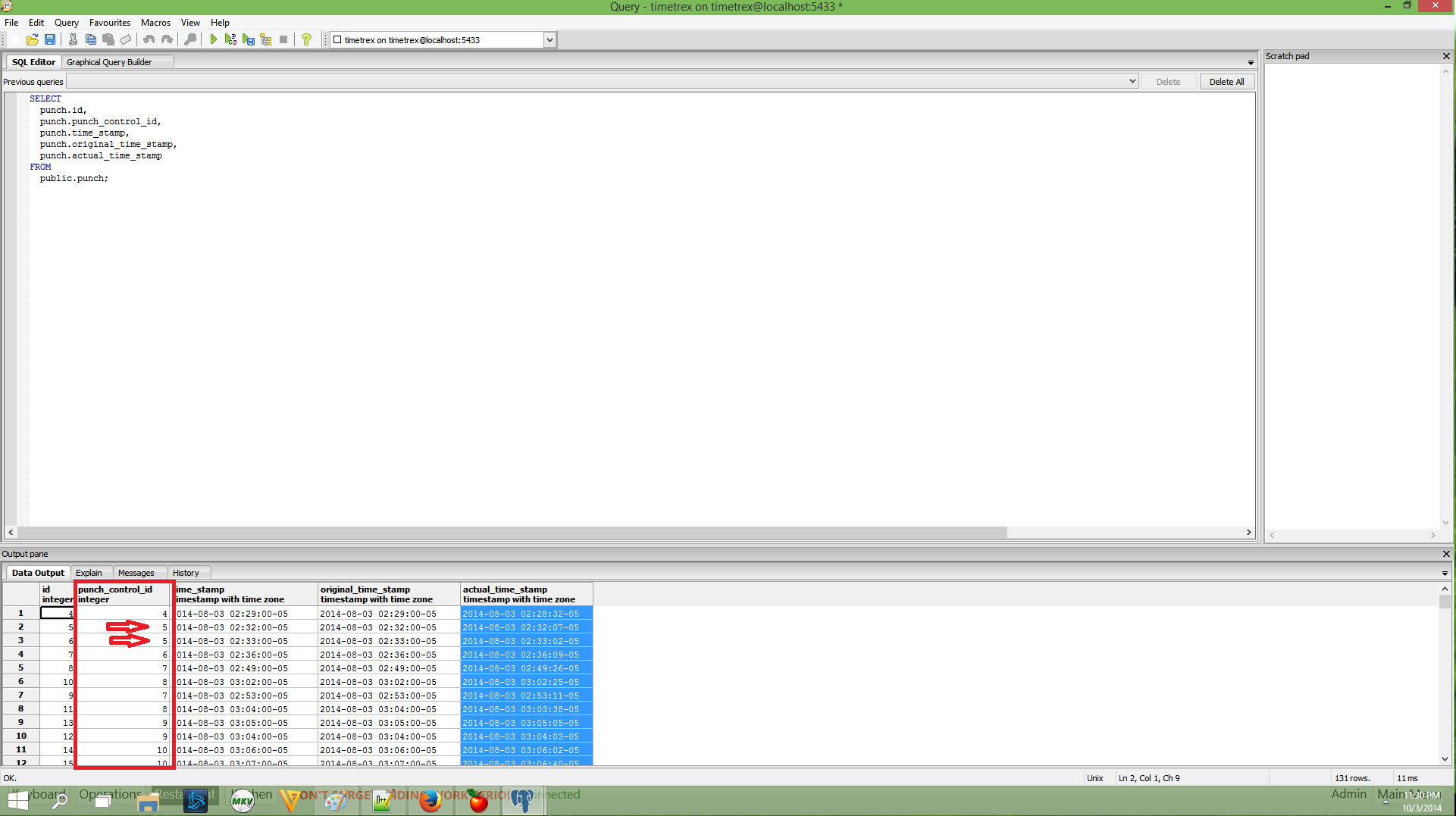
TimeTrex is not actually storing it in the Same Table… its using a Punch_Control table and PUnch Control Id to link the In and Out…

The 3 timestamps you see are for Original (Cannot be changed), TimeStamp (Whatever the current TimeStamp is), Actual (records seconds for tracking hours)

If you look close you see Punch_Control_Id which is what is linking the In and Out punches.

I will post a screenshot for clarity…

The Punch_Control is what is used for calculating accumulated hours etc.

I’ve uploaded a preview setup to ensure we are on the same track. This is not a official release so don’t install it to live systems, create your backups. You’ll need it if we decide to change how we store data.

:bulb: You’ll need custom reports module for this feature.

I’ve created Log Entity State action. That can be called on Entity State Updated rule and that rule will publish all required values.

I’ve also added a simple custom report tag for testing. We assume to track table state changes in minutes here.

[!Table Logs:1,1, 1]
>Table Number|State|[L]Minutes
{REPORT ENTITY STATE DETAILS:L.Entity.Name,L.StartState,LN.Minutes:EntityStateLog.StateName == "Status"}

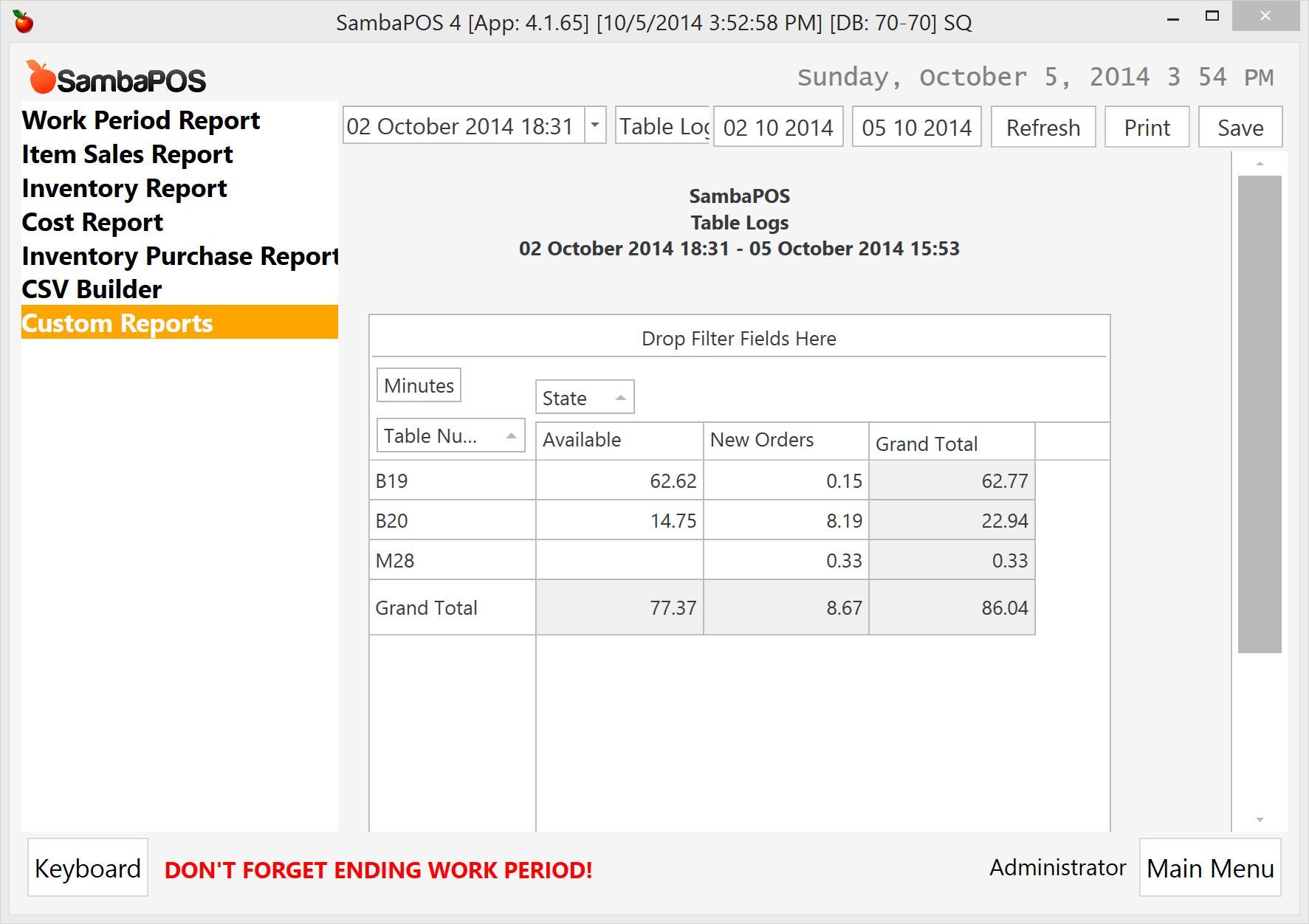
This is the result.

3 Likes

Sorry if this is a dumb question but…

lol, watcha doin @Jesse? I just crashed with this…

-----------------------------
[General Info]

Application: SambaPOS
Version:     4.1.65
Region:      en
DB:          SQ
Machine:     ACERROCKET
User:        Quentin
Date:        2014-10-05
Time:        16:25:03

User Explanation:

Quentin said ""
-----------------------------

[Exception Info 1]

Top-level Exception
Type:        System.InvalidCastException
Message:     Unable to cast object of type 'System.Object' to type 'System.Collections.Generic.IDictionary`2[System.String,System.Object]'.
Source:      Samba.Domain
Stack Trace: at Samba.Domain.Models.Automation.AppAction.Format(String s, Object dataObject, String parameterValues)
   at System.Dynamic.UpdateDelegates.UpdateAndExecute4[T0,T1,T2,T3,TRet](CallSite site, T0 arg0, T1 arg1, T2 arg2, T3 arg3)
   at CallSite.Target(Closure , CallSite , AppAction , String , Object , String )
   at Samba.Domain.Models.Automation.AppAction.GetFormattedParameter(String parameterName, Object dataObject, String parameterValues)
   at System.Dynamic.UpdateDelegates.UpdateAndExecute4[T0,T1,T2,T3,TRet](CallSite site, T0 arg0, T1 arg1, T2 arg2, T3 arg3)
   at CallSite.Target(Closure , CallSite , AppAction , String , Object , String )
   at Samba.Services.Common.ActionData.GetAsString(String parameterName)
   at Samba.Addon.CustomReports.ActionProcessors.LogEntityState.Log(ActionData actionData)
   at Samba.Addon.CustomReports.ActionProcessors.LogEntityState.<>c__DisplayClass1.<Process>b__0()
   at System.Windows.Threading.ExceptionWrapper.InternalRealCall(Delegate callback, Object args, Int32 numArgs)
   at MS.Internal.Threading.ExceptionFilterHelper.TryCatchWhen(Object source, Delegate method, Object args, Int32 numArgs, Delegate catchHandler)
   at System.Windows.Threading.DispatcherOperation.InvokeImpl()
   at System.Windows.Threading.DispatcherOperation.InvokeInSecurityContext(Object state)
   at System.Threading.ExecutionContext.RunInternal(ExecutionContext executionContext, ContextCallback callback, Object state, Boolean preserveSyncCtx)
   at System.Threading.ExecutionContext.Run(ExecutionContext executionContext, ContextCallback callback, Object state, Boolean preserveSyncCtx)
   at System.Threading.ExecutionContext.Run(ExecutionContext executionContext, ContextCallback callback, Object state)
   at System.Windows.Threading.DispatcherOperation.Invoke()
   at System.Windows.Threading.Dispatcher.ProcessQueue()
   at System.Windows.Threading.Dispatcher.WndProcHook(IntPtr hwnd, Int32 msg, IntPtr wParam, IntPtr lParam, Boolean& handled)
   at MS.Win32.HwndWrapper.WndProc(IntPtr hwnd, Int32 msg, IntPtr wParam, IntPtr lParam, Boolean& handled)
   at MS.Win32.HwndSubclass.DispatcherCallbackOperation(Object o)
   at System.Windows.Threading.ExceptionWrapper.InternalRealCall(Delegate callback, Object args, Int32 numArgs)
   at MS.Internal.Threading.ExceptionFilterHelper.TryCatchWhen(Object source, Delegate method, Object args, Int32 numArgs, Delegate catchHandler)
   at System.Windows.Threading.Dispatcher.LegacyInvokeImpl(DispatcherPriority priority, TimeSpan timeout, Delegate method, Object args, Int32 numArgs)
   at MS.Win32.HwndSubclass.SubclassWndProc(IntPtr hwnd, Int32 msg, IntPtr wParam, IntPtr lParam)
   at MS.Win32.UnsafeNativeMethods.DispatchMessage(MSG& msg)
   at System.Windows.Threading.Dispatcher.PushFrameImpl(DispatcherFrame frame)
   at System.Windows.Threading.Dispatcher.PushFrame(DispatcherFrame frame)
   at System.Windows.Threading.Dispatcher.Run()
   at System.Windows.Application.RunDispatcher(Object ignore)
   at System.Windows.Application.RunInternal(Window window)
   at System.Windows.Application.Run(Window window)
   at Samba.Presentation.App.Main()

-----------------------------

[Assembly Info]

Samba.Services, Version=1.0.0.0
mscorlib, Version=4.0.0.0
System, Version=4.0.0.0
Microsoft.Practices.Prism, Version=4.0.0.0
WindowsBase, Version=4.0.0.0
Samba.Infrastructure, Version=1.0.0.0
Samba.Infrastructure.Data, Version=1.0.0.0
PresentationFramework, Version=4.0.0.0
System.Xaml, Version=4.0.0.0
Samba.Presentation.Services, Version=1.0.0.0
FluentValidation, Version=3.4.0.0
Samba.Domain, Version=1.0.0.0
DevExpress.Xpf.Grid.v14.1, Version=14.1.6.0
DevExpress.Xpf.Grid.v14.1.Core, Version=14.1.6.0
PresentationCore, Version=4.0.0.0
Stateless, Version=1.0.0.0
System.Core, Version=4.0.0.0
System.Drawing, Version=4.0.0.0
System.Windows.Forms, Version=4.0.0.0
System.ComponentModel.Composition, Version=4.0.0.0
Samba.Localization, Version=1.0.0.0
Microsoft.CSharp, Version=4.0.0.0
Microsoft.Practices.ServiceLocation, Version=1.0.0.0
Samba.Persistance, Version=1.0.0.0
Microsoft.Practices.Prism.MefExtensions, Version=4.0.0.0
DevExpress.Xpf.Core.v14.1, Version=14.1.6.0
PropertyTools, Version=2012.4.14.1

-----------------------------

[System Info]

Operating System
-Microsoft Windows 7 Home Premium
--CodeSet = 1252
--CSDVersion = Service Pack 1
--CurrentTimeZone = -360
--FreePhysicalMemory = 13305976
--OSArchitecture = 64-bit
--OSLanguage = 1033
--ServicePackMajorVersion = 1
--ServicePackMinorVersion = 0
--Version = 6.1.7601

Machine
-ACERROCKET
--Manufacturer = Acer
--Model = Aspire E1-531
--TotalPhysicalMemory = 17008279552
--UserName = AcerRocket\Quentin

-----------------------------

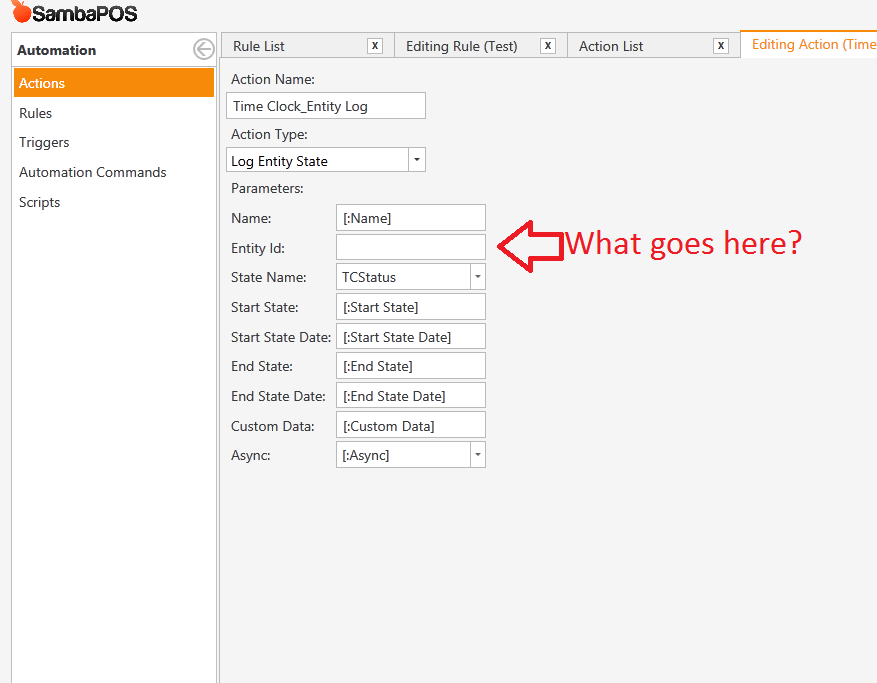
I am just deciphering the method and trying to get it to work. So far I have not gotten it to work. EntityId is the ID of each entity… i just dont know what to put there… if I put a variable it does not show up in the rule…Maybe i Made a mistake…

EDIT: Ok it was a mistake its showing up now… So i know what Entity ID is… im just trying to decipher the method …

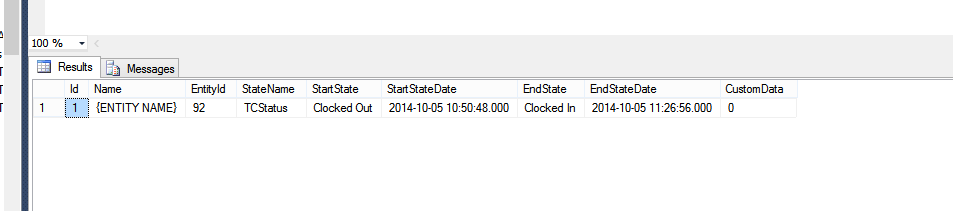
EDIT IT WORKED but like this lol. So I take it {ENTITY NAME} is not right haha

It was reversed because my state was clocked out when i invoked this rule lol. Guess I should clear transactions first.

EDIT: ok so [:EntityName] crashes it too. So thats not right… trying again.

Same here, trying to figure out how to get it all to work. Maybe I’ll just wait to see your implementation… you are the State Master afterall :wink:

You know what… EntityId is what stores what entity it is… so maybe I am thinking wrong for Name… maybe Name should be Time Clock… And in reports we can get name through matching Entity Id

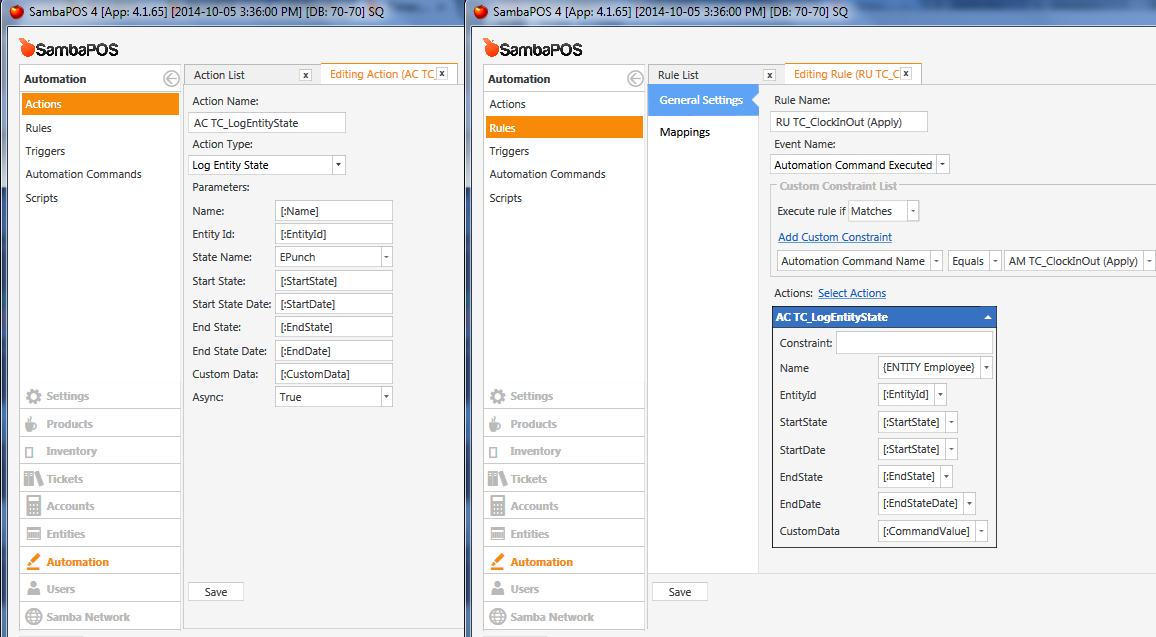
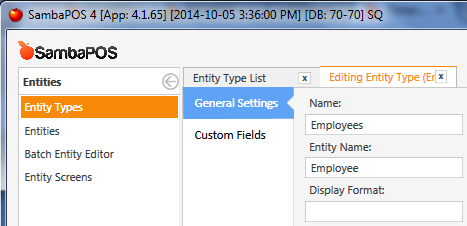
I think the fields for Name and Custom Data are both arbitrary. But if you want to put the Entity Name there, it would be {ENTITY NAME:Employee} (or similar), as defined here:

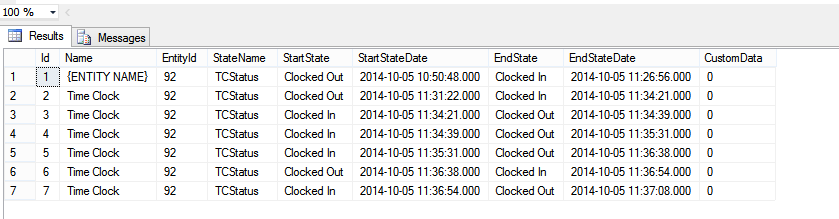
Hmm it is working… but take look at this… Does this look right?

Looks good to me! What are you questioning?