Hi,
With having so many issues (and being told we probably needed a new computer system for Samba) we purchased a new computer. Luckily we kept the old one which still has Samba running fine for now, but we cannot get Samba working on the new computer.
We followed the tutorial posted on the Samba website however never seen this error before - whether this is because it’s a fresh install or what we’re not sure.
I’ve also emailed Samba support, not sure which was was quickest we’d get a response on.
[General Info]
Application: SambaPOS
Version: 5.7.26
Region:
DB: SQ
Machine: SERVER1
User: user
Date: 18/06/2026
Time: 12:21
User Explanation:
user said “”
[Exception Info 1]
Top-level Exception
Type: System.Data.SqlClient.SqlException
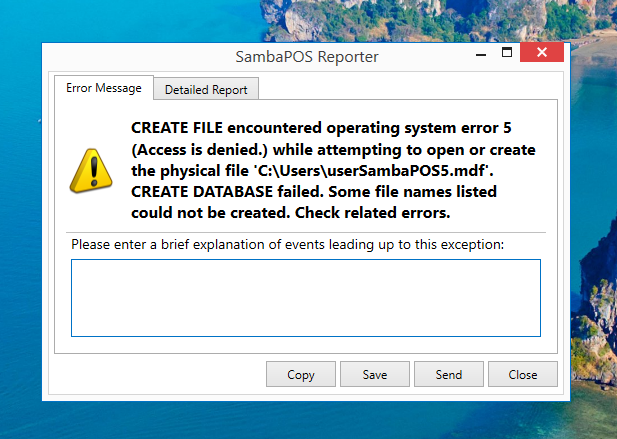
Message: CREATE FILE encountered operating system error 5(Access is denied.) while attempting to open or create the physical file ‘C:\Users\userSambaPOS5.mdf’.
CREATE DATABASE failed. Some file names listed could not be created. Check related errors.
Source: .Net SqlClient Data Provider
Stack Trace: at System.Data.SqlClient.SqlConnection.OnError(SqlException exception, Boolean breakConnection, Action1 wrapCloseInAction) at System.Data.SqlClient.SqlInternalConnection.OnError(SqlException exception, Boolean breakConnection, Action1 wrapCloseInAction)
at System.Data.SqlClient.TdsParser.ThrowExceptionAndWarning(TdsParserStateObject stateObj, Boolean callerHasConnectionLock, Boolean asyncClose)
at System.Data.SqlClient.TdsParser.TryRun(RunBehavior runBehavior, SqlCommand cmdHandler, SqlDataReader dataStream, BulkCopySimpleResultSet bulkCopyHandler, TdsParserStateObject stateObj, Boolean& dataReady)
at System.Data.SqlClient.SqlCommand.RunExecuteNonQueryTds(String methodName, Boolean async, Int32 timeout, Boolean asyncWrite)
at System.Data.SqlClient.SqlCommand.InternalExecuteNonQuery(TaskCompletionSource1 completion, String methodName, Boolean sendToPipe, Int32 timeout, Boolean& usedCache, Boolean asyncWrite, Boolean inRetry) at System.Data.SqlClient.SqlCommand.ExecuteNonQuery() at System.Data.Entity.Infrastructure.Interception.DbCommandDispatcher.<>c.<NonQuery>b__4_0(DbCommand t, DbCommandInterceptionContext1 c)
at System.Data.Entity.Infrastructure.Interception.InternalDispatcher1.Dispatch[TTarget,TInterceptionContext,TResult](TTarget target, Func3 operation, TInterceptionContext interceptionContext, Action3 executing, Action3 executed)
at System.Data.Entity.Infrastructure.Interception.DbCommandDispatcher.NonQuery(DbCommand command, DbCommandInterceptionContext interceptionContext)
at System.Data.Entity.SqlServer.SqlProviderServices.<>c__DisplayClass52_0.b__0(DbConnection conn)
at System.Data.Entity.SqlServer.SqlProviderServices.<>c__DisplayClass60_0.b__0()
at System.Data.Entity.Infrastructure.DbExecutionStrategy.<>c__DisplayClass17_0.b__0()
at System.Data.Entity.Infrastructure.DbExecutionStrategy.Execute[TResult](Func1 operation) at System.Data.Entity.Infrastructure.DbExecutionStrategy.Execute(Action operation) at System.Data.Entity.SqlServer.SqlProviderServices.UsingConnection(DbConnection sqlConnection, Action1 act)
at System.Data.Entity.SqlServer.SqlProviderServices.UsingMasterConnection(DbConnection sqlConnection, Action1 act) at System.Data.Entity.SqlServer.SqlProviderServices.CreateDatabaseFromScript(Nullable1 commandTimeout, DbConnection sqlConnection, String createDatabaseScript)
at System.Data.Entity.SqlServer.SqlProviderServices.DbCreateDatabase(DbConnection connection, Nullable1 commandTimeout, StoreItemCollection storeItemCollection) at System.Data.Entity.Core.Common.DbProviderServices.CreateDatabase(DbConnection connection, Nullable1 commandTimeout, StoreItemCollection storeItemCollection)
at System.Data.Entity.Core.Objects.ObjectContext.CreateDatabase()
at System.Data.Entity.Migrations.Utilities.DatabaseCreator.Create(DbConnection connection)
at System.Data.Entity.Migrations.DbMigrator.EnsureDatabaseExists(Action mustSucceedToKeepDatabase)
at System.Data.Entity.Migrations.DbMigrator.Update(String targetMigration)
at System.Data.Entity.Internal.DatabaseCreator.CreateDatabase(InternalContext internalContext, Func3 createMigrator, ObjectContext objectContext) at System.Data.Entity.Internal.InternalContext.CreateDatabase(ObjectContext objectContext, DatabaseExistenceState existenceState) at System.Data.Entity.Database.Create(DatabaseExistenceState existenceState) at Samba.Persistance.Data.Initializer.Create(CommonDbContext context) at Samba.Persistance.Data.Initializer.InitializeDatabase(DataContext context) at System.Data.Entity.Internal.InternalContext.<>c__DisplayClass66_01.b__0()
at System.Data.Entity.Internal.InternalContext.PerformInitializationAction(Action action)
at System.Data.Entity.Internal.InternalContext.PerformDatabaseInitialization()
at System.Data.Entity.Internal.LazyInternalContext.<>c.b__58_0(InternalContext c)
at System.Data.Entity.Internal.RetryAction1.PerformAction(TInput input) at System.Data.Entity.Internal.LazyInternalContext.InitializeDatabaseAction(Action1 action)
at System.Data.Entity.Internal.LazyInternalContext.InitializeDatabase()
at System.Data.Entity.Internal.InternalContext.Initialize()
at System.Data.Entity.Internal.InternalContext.ForceOSpaceLoadingForKnownEntityTypes()
at System.Data.Entity.DbContext.System.Data.Entity.Infrastructure.IObjectContextAdapter.get_ObjectContext()
at Samba.Persistance.Data.WorkspaceFactory.CreateReadOnly()
at Samba.Persistance.Data.Dao.Single[T](Expression1 predictate, Expression1 includes)
at Samba.Presentation.Bootstrapper.ConfigureAggregateCatalog()
at Microsoft.Practices.Prism.MefExtensions.MefBootstrapper.Run(Boolean runWithDefaultConfiguration)
at Samba.Presentation.App.RunInReleaseMode()
[Assembly Info]
mscorlib, Version=4.0.0.0
System, Version=4.0.0.0
Samba.Services, Version=5.7.26.421
Samba.Domain, Version=5.7.26.421
Samba.Infrastructure.Data, Version=5.7.26.421
System.ComponentModel.Composition, Version=4.0.0.0
Samba.Presentation.Services, Version=5.7.26.421
System.Core, Version=4.0.0.0
PresentationCore, Version=4.0.0.0
WindowsBase, Version=4.0.0.0
PresentationFramework, Version=4.0.0.0
DevExpress.Xpf.LayoutControl.v17.2, Version=17.2.13.0
System.Xml, Version=4.0.0.0
DevExpress.Xpf.Grid.v17.2, Version=17.2.13.0
DevExpress.Xpf.Grid.v17.2.Core, Version=17.2.13.0
System.Xaml, Version=4.0.0.0
Samba.Infrastructure, Version=5.7.26.421
Microsoft.Practices.Prism, Version=4.0.0.0
System.Runtime.Serialization, Version=4.0.0.0
Microsoft.Practices.Prism.MefExtensions, Version=4.0.0.0
DevExpress.Xpf.Core.v17.2, Version=17.2.13.0
System.Windows.Forms, Version=4.0.0.0
System.Drawing, Version=4.0.0.0
Samba.Persistance, Version=5.7.26.421
Stateless, Version=1.0.0.0
PropertyTools, Version=2012.4.14.1
Samba.Localization, Version=5.7.26.421
ReachFramework, Version=4.0.0.0
EntityFramework, Version=6.0.0.0
FluentValidation, Version=3.4.0.0
NCalc, Version=1.3.8.0
Microsoft.CSharp, Version=4.0.0.0
Omu.ValueInjecter, Version=2.3.0.0
Microsoft.Practices.ServiceLocation, Version=1.0.0.0
DevExpress.Data.v17.2, Version=17.2.13.0
WindowsInput, Version=1.0.4.0