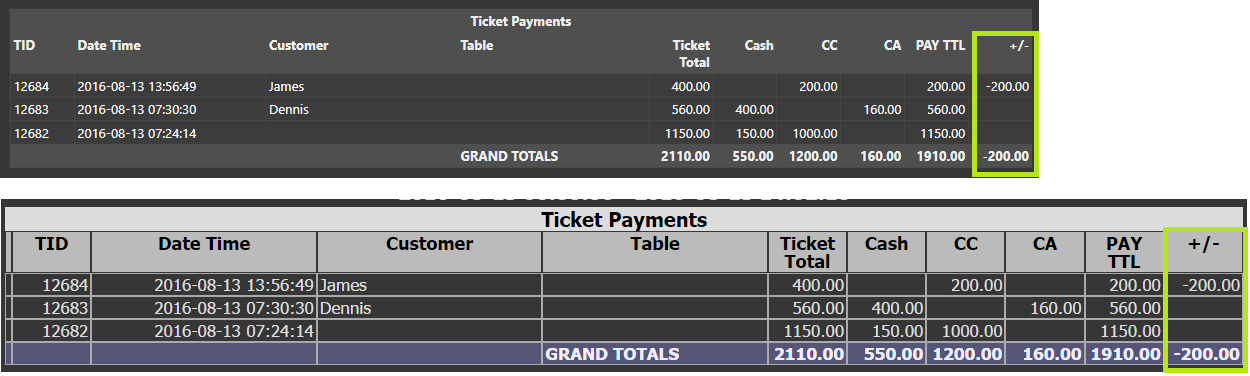
I am trying to add some extra Totals columns to the ticket screen that show whether a bill has been paid on account cash or credit card. This will help the manager at the end of the day when looking for Erroros and cashing up. i have tried using the column editor but there is no option to add the extra accounts as columns. is this possible? if not is there another way to show a list of all of the tickets for one work period in one list with the price in each account type shown?
Hi Currently the system show the total of all bills with each bill value in each row. The idea is to add an extra couple columns which shows the total of the bill paid on the Card account, and then on the customer account, maybe with a total figure at the bottom. this will allow the end of shift staff to see quickly at a glance and incorrect entries and tally the takings.
Ticket Type
Ticket Number
Date
Time
Total
Ticket Note
Username
Workperiod Start/End/Status
Entities (Customer, Table, etc)
Entity Custom Data Fields
You can add, remove, re-arrange, sort, and filter by those columns only.
The Ticket Explorer is not meant to do “tallies”. It is meant for searching for Tickets.
Account Screens can be used to see funds moving between Accounts, and Account Details can be used to open associated Tickets, if any.
You can also design a Custom Entity Screen for your Cashout/Cashup/Start/End of day operations using Custom Reports and calculations. This is best done using features available in V5.
If the Ticket Explorer gets any feature additions, they will not be propagated to V4. Only V5 receives feature updates.
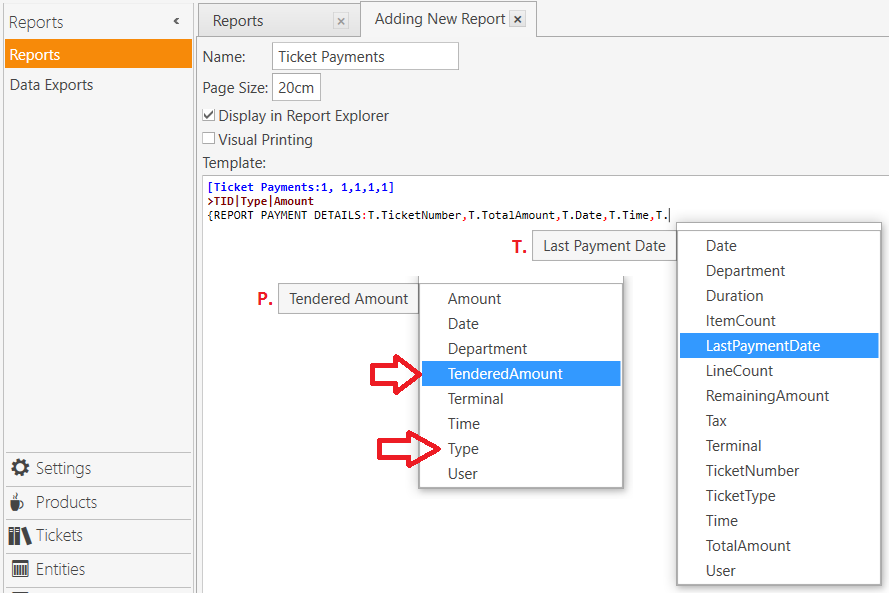
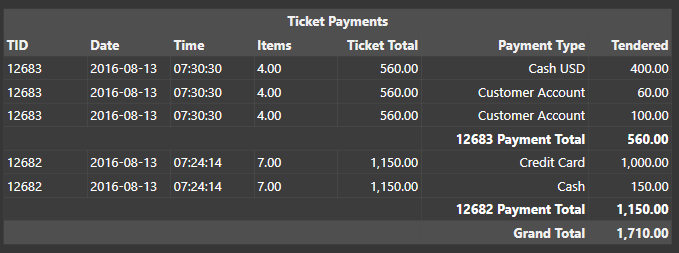
@Jesse, I think it would be interesting to develop some type of Custom Report that could show this information.
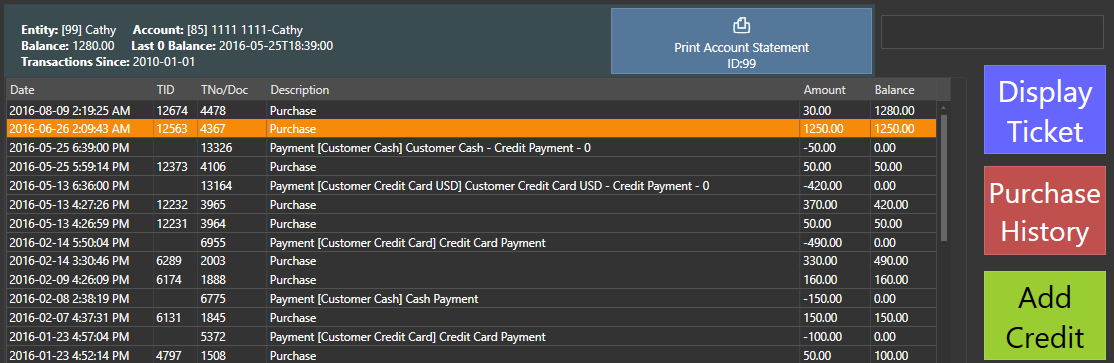
It could be configured as a [#Grid] to allow for highlighting a row to display the related Ticket… similar to the Customer Account Statement setup that I designed, but having more columns to show multiple Payment Types per-Ticket.
I did the Account Statement using SQL, but was wondering if it could be done with pure Report Tags?
Thanks for the replies, using the tickets screen is just an easy way to get a full recap on the nights tables at a glance. So maybe I’ll explain what we need and people may suggest a better or more efficient way to achieve it.
At the end of the night the floor manager cashes up and checks credit card slips, customer accounts and the like. If there is a mistake then 9/10 it is because a server has incorrectly chosen the wronge payment type on the settlement screen. A list of all bill totals separated by payment type let’s us quickly find the offending ticket and rectify it.
Any other ways we could go about this?
We are on version 4 and fully plan to implement V5 as soon as we have everything down in this one.
Custom Reports is the only in-built method you could use. It allows for using {REPORT TAGS} or @@SQL scripts to provision any type of data kept in SambaPOS. This is a paid addon-module in V4, or it comes as a “free” module with V5.
Your only other option is to design and run your own SQL scripts in SSMS to provide the data you want.
I see a lot of people say that and it really makes no sense to me. I mean v5 is different and it makes sense to set it up once and take advantage of the new features from the start. There is a unrestricted trial of 500 tickets and even after the trial it will still work it just displays reminders to upgrade to licensed.
To be frank one of the few reasons to why ppl still choose v4 is because before the website was updated to advertise v5, it showed only the download of v4. So only v4 was advertised on the website prior to website update. There was no information regarding v5 at all . a person only knew of It after registering in the forums and finding out that way…and.some ppl by that time may have already set up the system .
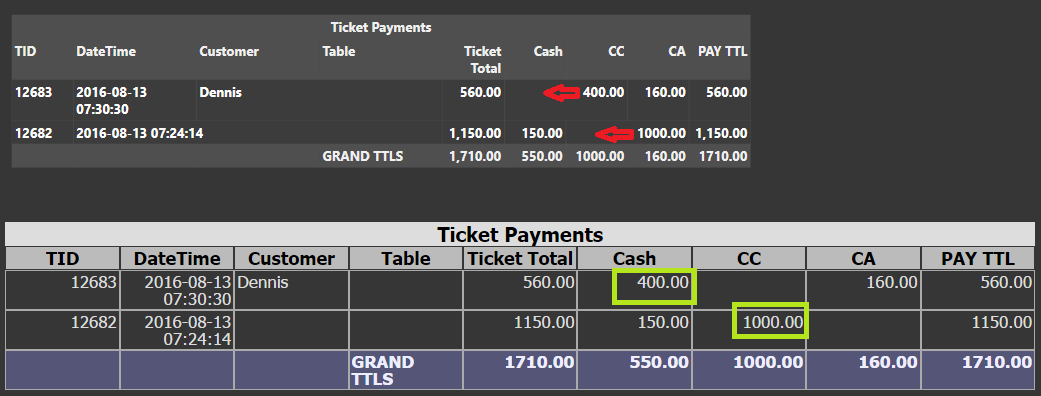
P.S. Maybe someone can help with proper value alignment. I can’t seem to get it right with the formatting to ensure zero-value cells are blank or contain a placeholder as a substitute.
The top table is generated in SambaPOS (incorrect), while the bottom table is generated via GraphQL (correct). The Cash value 400 and CC value 1000 should be shifted 1 cell to the left, and the cells that they are currently in should be blank, as shown in the GQL report.