Continuing the discussion from Print order list:
Continuing the discussion from Printing by department:
Continuing the discussion from Print order list:
Continuing the discussion from Printing by department:
Please post your actual question, don’t just post links to old topics.
Describe what exactly you are trying to do and what you have tried.
Thanks. 
Solve –
-create Print job Print Oder Checklist
-create Printer template Print Oder Checklist
-create automation command Print Oder Checklist
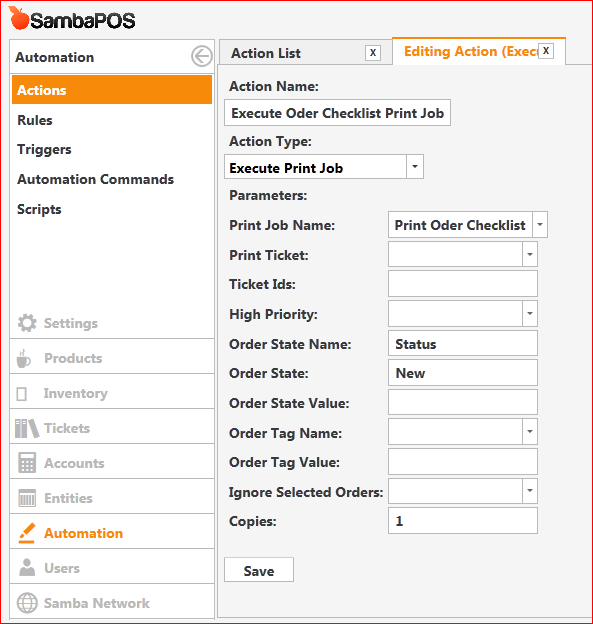
-create action execute job Print Oder Checklist
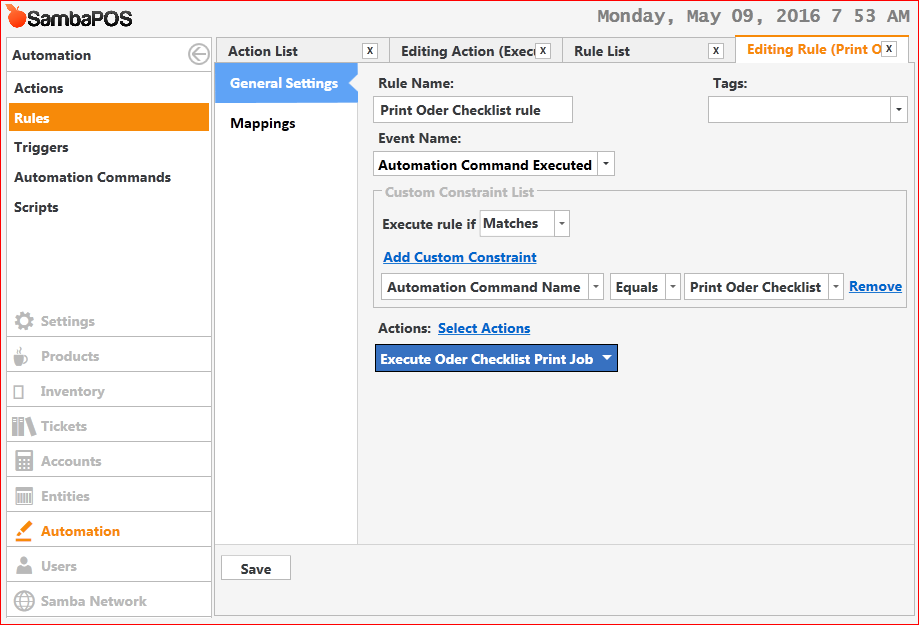
-create rule Automation Command Name equal Print Oder Checklist
░░░░░ O r d e r   C h e c k   l i s t ░░░░
##########################################
Date:5/9/2016   Time:1:08 AM Ticket No:429
Table: 16
Serve By:Administrator   Note:
##########################################
               -BEVERAGES-
**    2 X ICE TEA
                 -FOOD-
**    5 X FISH N PASTA MARINARA SAUCE
==========================================
I add more order and only last added order are printed
Thanks
Show that ^ Action. Chances are you are filtering the Order State so only certain orders are printed.
Right, so you are filtering the Print by a Status of New.
If you want to print all Orders on the Ticket, remove “New” from the Order State field.
Then remove the Action from the Rule, Save it, add the Action back in, and save it.
Noted …I’m still learn how its work …
Thanks … Q…