I think it always needs some user interaction, so it’s likely someone initiated it. However if you don’t want to upgrade, you can revert back to previous OS within 30 days.
Is the DB on the same system? If not, maybe firewall issue? What is the error message you get? Can you connect using MSSQL Management Studio?
SQL Agent is not available in SQL Express edition. It is included there (no idea why!) but it will not start. This is expected behaviour and can just be ignored, you don’t need SQL Agent for running SambaPOS.
yerp, fine and dandy! I Closed the shop, came in and opened and it had upgraded without interaction. Guaranteed ill not be the only person this happens to. All very annoying, just a good job I have some sort of knowledge of samba
Matt
Ive found woth windows 10 sql server doesnt always automatically start and to sort it do:
Ctrl alt del
Task manager
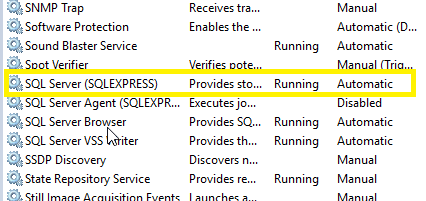
Services
Select the sql you want to start, right click and click start
Then all works, i dont know why it sometimes starts and sometimes doesnt, the last few weeks hasnt been a problem its started automatically when pc starts up, it seems more every now and then i have to manually start it
it should but to be sure just check the service and make sure its set to automatic. In the search bar by your start icon type services open that up and check your SQL Server make sure its set to automatic.
Small update, i updated the machines and they all worked fine apart from the network adaptor settings was crashing on them all. So I bit the bullet and reinstalled from scratch, the POS’s work ok now and I can connect to the internet. I have done the server now and I’m just installing SQL Express.
I did google the network problems and it seems I’m not the only one. Should have done this from the start but hey ho!
Hi RickH
I had exactly the same problem with a clean install of Windows 10, plus later on Windows 7 when I added a second instance of SqlServerExpress
Quite often Sql Server would not start automatically although it was set to automatic. I have installed Sql Server on many desktops and servers, in all forms, and this was a new one for me.
Eventually I found out that Sql Server was starting but it was timing out and shutting down. Setting the service to delayed starting was no help.
I found out on Stackoverflow that others were having the same problems and you could extend the services timeout setting in the registry. I made that change several months ago and the problem has not returned.
The registry setting is
Subkey: HKEY_LOCAL_MACHINE\SYSTEM\CurrentControlSet\Control
Name: ServicesPipeTimeout
By default it is set to 30000, try increasing it to 60000 and see if that helps
Regards
Tony