We will be starting some promotions and this is the scenario:
Coffee (regular size) and croissant for £3
We have many different types (around 10) of coffees at different prices and different order tags and different types of croissants. 2 examples of coffee listed below with 2 croissants:
Americano £1.80 (small), £2.10 (regular), £2.35 (large) - Order tags are free e.g. hot milk, cold milk, soya milk etcetc…
Chai Latte £2.50 (small), £2.70 (regular), £2.90 (large) - Order tags include cinnamon and different types of milk
Almond Croissant £2.00
Pain au chocolat £1.80
If customer chooses regular beverage e.g. Americano (£2.35) + Pain au chocolat ( £1.80 ) - the promotional offer should come to £3.00
If customer chooses regular beverage e.g. Chai Latte (£2.50) + Pain au chocolat ( £1.80 ) - the promotional offer should come to £3.00
If customer chooses regular beverage e.g. Chai Latte (£2.50) + Amond croissant ( £2.00 ) - the promotional offer should come to £3.00
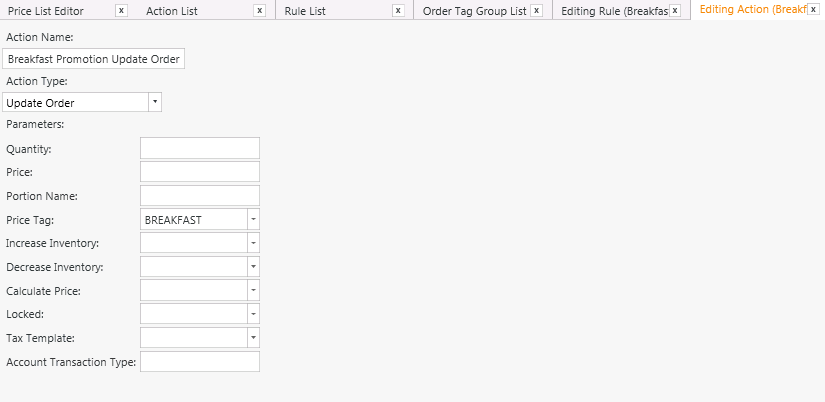
Yes this is possible. You are using version 4 correct? The rule Order Added to Ticket can use constraints to look for those specific items and you can make it look for that specific order tag. You can then use Update Order action to use a specific promotional price list. Hopefully I will have more time to show you an example later but I am currently sitting in a hospital bed using my tablet with no access to SambaPOS. I should be home later tonight and if you have not figured it out by then I will try and post a quick example.
I will try and see what i can figure out in the meantime… otherwise i will wait for your example.
i can sort of understand how it could be possible to use Order Added rule to look for specific items, however the Update Order action remains a bit vague…
I did not mean set a specific price I meant have it load a specific price tag for that item. The tag can be called Promotion or whatever you want. Set the price tag by going to Manage > Products > Price Definitions. You should also get in the habit of using Variables in your actions for example [:Price] or [:Price Tag] then set the actual value you want from inside the rule when you add the action. It should also have Matches all if you want it to only switch if that specific combo of items is added. If you want more than 1 you can separate them with | example:
Menu Item Group Code `Equals` Beverages|Viennoiserie
This would make it look for Beverages or Viennoiserie
If you want it to treat them like a combo maybe we should do something different I will think about it and get back with you. It seems easiest if you simply change price of the two to equal $3
Example:
The difference of these two would be 1.15 so take 1.15 off of the coffee leave the Pain au chocolat at full price. Or do it the other way around… take 1.15 off of the Pain au chocolat So the order becomes Americano 1.20 + Pain au chocolat 1.80 = 3.00
There are several ways to do this. You can also configure a discount that works when those specific items are added together.
I am at home I will try and prepare some samples now.
Problem with that is Group Beverages prices are each priced differently (Americano £2.35, Chai Latte £2.50, Tea £1.80)
Also Group Viennoiserie has items priced differently (Pain au chocolat £1.80, Almond Croissant £2.00, Plain butter £1.60)
So the total of the two should add to £3
It should not matter if the item from Viennoiserie is added first and the Beverage is discounted, or the Beverage is added first and the item from Viennoiserie is discounted.
Is it possible to discounted based on the items already added in the order? Then it could work… Or another thought that came to mind is to change the price of each to £1.50 so both items add to £3 ?
Yes. When these products added you can also popup a dialog to let operator quickly add these tags. They’ll also remember to ask customer if they want + croissant for $3.
If he needs to adjust tag prices according to product yes that event will be more appropriate. If specific tags are configured “order added” event can also be used to popup tag ( for additional products) selection dialog.
Other than changing product price we can configure tag prices and enable “add price to order price setting”
I see what your saying. This is a good topic to discuss. Gives me some ideas to try. Would be great to figure out a way for dynamic automation of this stuff. So we dont have to hardcode it into the menu. Something we can toggle on or off with promotions.
I may play around with the idea with the v5 beta I know that doesnt help @loveaffogato but I am definitely curious with some of the new features. I think he might be interested in what could be possible in future.
OK… There are a couple of issues with using Order Tags for items… mainly that products themselves could have order tags (cream, cinnamon etcetc…) and it is easier to see what items have sold if its the main product and not an order tag.
So I have changed tack and thought about this alternative:
Update Program Setting - Keep track of:
Beverage Count
Beverage Total
Viennoiserie Total
e.g. For order with:
1 Americano (£2.35)
1 Chai Latte (£2.50)
2 Pain au chocolat (£3.60)
So far so good… i can track the above information.
Question is I want to apply the discount at settle time… the formula for the discount will be something like:
TotalDiscount = (BeverageCount*£3)-(BeverageTotal+ViennoiserieTotal)
TotalDiscount = £6 - ( £4.85 + £3.60 ) = £2.45
How / when should i apply the discount? Ideally i want it applied automatically when the staff click on Settle button


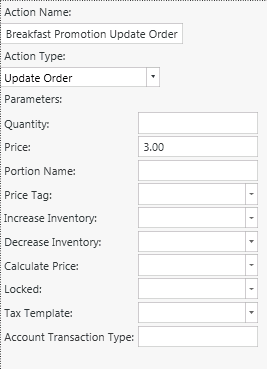 the following: