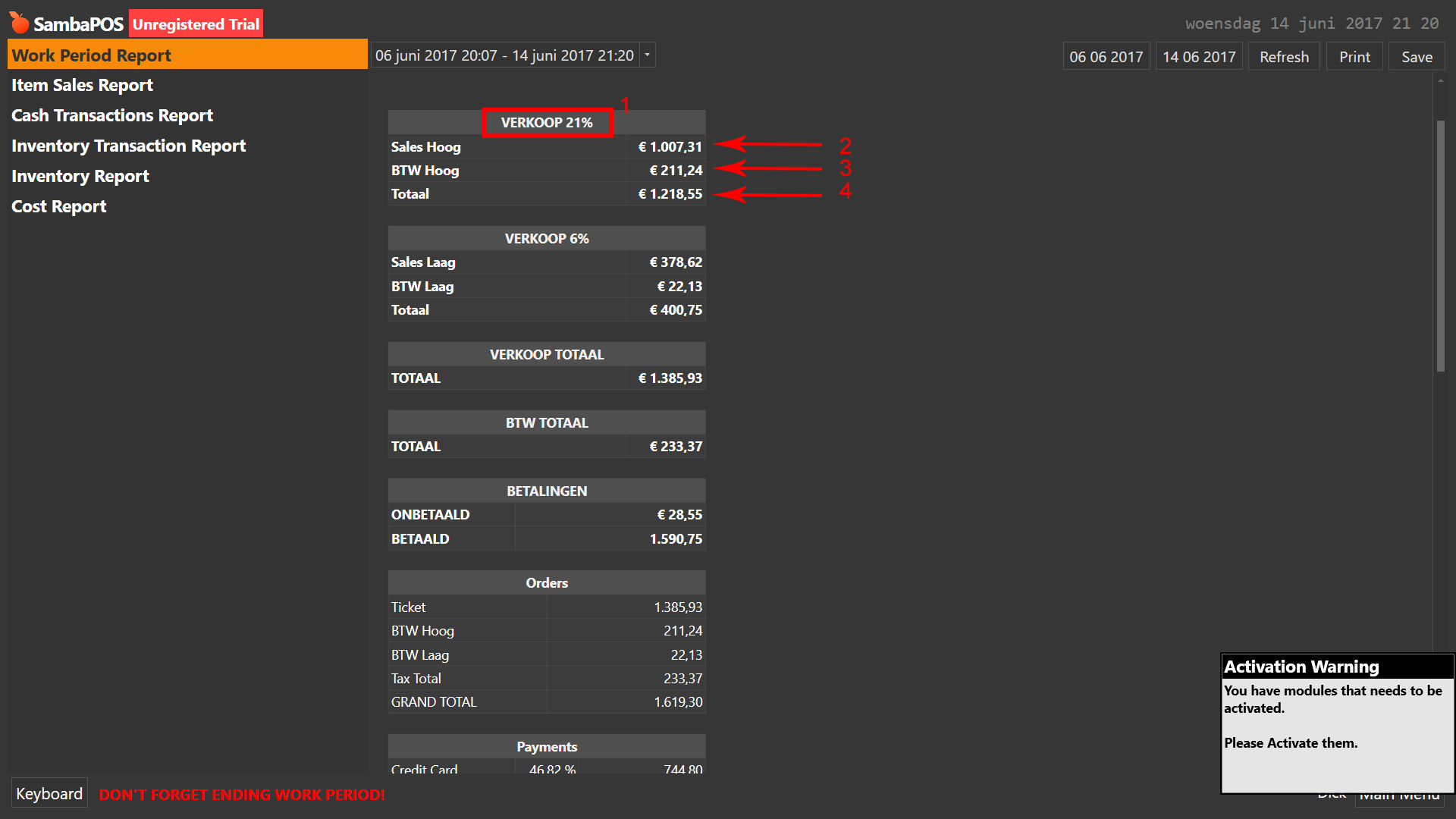
Bug in "tax included"?

Oke, still have tax problems in my tax calculation.

My ticket type is set to “Tax included”.
Prices are set to nice round prices.

Now 1 is the tax percentage. 21%.

2= sales without tax.
3= tax, calculated by the system.
4= total sales +tax

So calculation should be: 1007.31*0.21= tax: 211,47.

Maybe missing something? Still also see the 2 cent diffence in my ticket transactions…

Tax was calculated for each item at qty of 1 not from total. So, it will not be the same as calculate from total sale.

For Ex:
Price after tax = 10
Price before tax = 8.26 (2 digit round)
Tax = 1.74

Sell 100 of this:
Total after tax= 1000
Tax = 174
Total before tax = 826

See the different: 1000/1.21 = 826.44 not 826.

Tax rounding is done at ticket level so over many tickets it is not exact like calculating on total of all tickets.
Our post epos account accommodates this, usually see a tax variance of between 0.10 and 0.80 on daily sales between 2000-6000.
More smaller tickets would cause larger difference than small qty of larger tickets as more rounding on many tickets.
This is a natural occurrence and is to be expected

I think order level not ticket. As you can see when it go to settle screen each line has tax included. No matter how many lines total always match.

I took references to your databases out of public forum. If we ask for them via pm you can provide it but you should not put your database backups in public.

Increase your DB decimal places for greater accuracy.

That said, you can’t simply take round values of individual items and add them together, they won’t equal the same as the total because of the rounding (2 decimals by default).

You would need to take item values at 6+ decimal places and add them up and calculate tax, then do the same when you look at the total, take 6 decimals there and calculate tax. Your numbers will be closer to matching, but probably always a variance, until you round down to 2 decimals again ;).

Ok, tnx.

Now is it possible to alter the tax in the report? or make an visual more accurate tax calculation on the receipt?

Something like:
>Tax||€ [=F(TN(‘{ACCOUNT CREDIT TOTAL:Sales Hoog}’)+TN(‘{ACCOUNT CREDIT TOTAL:BTW Hoog}’),‘#,#0.00’)/121*21]

(This isn’t working :stuck_out_tongue: )
Werk periode: {WORKPERIOD ID}

[VERKOOP 21%:2,1, 1]
{ACCOUNT TRANSACTION DETAILS:Sales Hoog}

Sales Hoog||€ [=F(TN(‘{ACCOUNT CREDIT TOTAL:Sales Hoog}’),‘#,#0.00’)]
BTW Hoog||€ [=F(TN(‘{ACCOUNT CREDIT TOTAL:BTW Hoog}’),‘#,#0.00’)]
Totaal||€ [=F(TN(‘{ACCOUNT CREDIT TOTAL:Sales Hoog}’)+TN(‘{ACCOUNT CREDIT TOTAL:BTW Hoog}’),‘#,#0.00’)]

You have the /121*21 outside the F() function; it should be inside …

Tax||€ [=F((TN('{ACCOUNT CREDIT TOTAL:Sales Hoog}')+TN('{ACCOUNT CREDIT TOTAL:BTW Hoog}'))/121*21,'#,#0.00')]

For Receipt, you can get a lot of detail in the [TAXES] section…

...

<F>=
<EB>
<W00:27, 2, 9, 3, 7>Subtotal:|L|[=F((TN('{TICKET TOTAL}')-TN('{TAX TOTAL}')-TN('{CALCULATION TOTAL:Round HNL +}'))/TN('{EXCHANGE RATE:HNL}'))]|$|[=(F(TN('{TICKET TOTAL}')-TN('{TAX TOTAL}')-TN('{CALCULATION TOTAL:Round HNL +}')))]
<DB>
{TAXES}
<EB>
<W00:27, 2, 9, 3, 7>Tax Total:|L|[=F(TN('{TAX TOTAL}')/TN('{EXCHANGE RATE:HNL}'))]|$|[=F('{TAX TOTAL}')]
<DB>
{SERVICES}
<EB>
<W10:27, 2, 9, 3, 7>GRAND TOTAL:|L|[=F(Math.round(TN('{TICKET TOTAL}')/TN('{EXCHANGE RATE:HNL}')))]|$|[=F(TN('{TICKET TOTAL}'))]
<DB>

....

[TAXES]
<W00:27, 2, 9, 3, 7>Tax {TAX NAME} ({TAX RATE}%):|L|[=F(TN('{TAX AMOUNT}')/TN('{EXCHANGE RATE:HNL}'))]|$|[=F('{TAX AMOUNT}')]

Tnx! That worked! Now same for the 6% tax and done!

I don’t know why you want to do that. You will end up with report that not match with other reports.
I think tax agency understand this rounding thing. It always and impossible that tax will be exact percentage. Imagine a coffee shop selling a few dollars per receipt, it will have a lot of rounding.
Unless you have 6 digits as Q suggested but only round it on the receipt but then if you add the paper receipt then total will not be exact match.