database crashed and did a repair of the mdf file and it was successful how ever when i put the connection string to link the pos to the database it throws an error and i confirmed both users exist and ,are public and db owner and the db has both windows and sql server authentication enabled..
the only thing that works is using this as the connection string
Data Source=MATHIAS-PC\RMSPOS;Initial Catalog=RmsPos1;Integrated Security=True;
it accepts windows authentication and not sql server authentication .
Data Source=MATHIAS-PC\RMSPOS; User Id=sa; Password=icui4cu9669; Database=RmsPos1;
What error was logged? Post it here.
Juts the norma connection string error.
Top-level Exception
Type: System.Data.ProviderIncompatibleException
Message: An error occurred while getting provider information from the database. This can be caused by Entity Framework using an incorrect connection string. Check the inner exceptions for details and ensure that the connection string is correct.
Source: EntityFramework
Stack Trace: at System.Data.Entity.ModelConfiguration.Utilities.DbProviderServicesExtensions.GetProviderManifestTokenChecked(DbProviderServices providerServices, DbConnection connection)
at System.Data.Entity.ModelConfiguration.Utilities.DbConnectionExtensions.GetProviderInfo(DbConnection connection, DbProviderManifest& providerManifest)
at System.Data.Entity.DbModelBuilder.Build(DbConnection providerConnection)
at System.Data.Entity.Internal.LazyInternalContext.CreateModel(LazyInternalContext internalContext)
at System.Data.Entity.Internal.RetryLazy2.GetValue(TInput input) at System.Data.Entity.Internal.LazyInternalContext.InitializeContext() at System.Data.Entity.Internal.InternalContext.GetEntitySetAndBaseTypeForType(Type entityType) at System.Data.Entity.Internal.Linq.InternalSet1.Initialize()
at System.Data.Entity.Internal.Linq.InternalSet1.get_InternalContext() at System.Data.Entity.Infrastructure.DbQuery1.System.Linq.IQueryable.get_Provider()
at System.Linq.Queryable.Count[TSource](IQueryable`1 source)
at Rms.Infrastructure.Data.SQL.EFWorkspace.CountT
at Rms.Presentation.Services.Common.DataGeneration.DataCreationService.ShouldCreateData()
at Rms.Presentation.Services.Common.DataGeneration.DataCreationService.CreateData()
at Rms.Presentation.Bootstrapper.InitializeShell()
Inner Exception 1
Type: System.Data.ProviderIncompatibleException
Message: The provider did not return a ProviderManifestToken string.
Source: System.Data.Entity
Stack Trace: at System.Data.Common.DbProviderServices.GetProviderManifestToken(DbConnection connection)
at System.Data.Entity.ModelConfiguration.Utilities.DbProviderServicesExtensions.GetProviderManifestTokenChecked(DbProviderServices providerServices, DbConnection connection)
Inner Exception 2
Type: System.Data.SqlClient.SqlException
Message: Login failed for user ‘sa’.
Source: .Net SqlClient Data Provider
Stack Trace: at System.Data.SqlClient.SqlInternalConnectionTds..ctor(DbConnectionPoolIdentity identity, SqlConnectionString connectionOptions, SqlCredential credential, Object providerInfo, String newPassword, SecureString newSecurePassword, Boolean redirectedUserInstance, SqlConnectionString userConnectionOptions, SessionData reconnectSessionData, DbConnectionPool pool, String accessToken, Boolean applyTransientFaultHandling, SqlAuthenticationProviderManager sqlAuthProviderManager)
at System.Data.SqlClient.SqlConnectionFactory.CreateConnection(DbConnectionOptions options, DbConnectionPoolKey poolKey, Object poolGroupProviderInfo, DbConnectionPool pool, DbConnection owningConnection, DbConnectionOptions userOptions)
at System.Data.ProviderBase.DbConnectionFactory.CreatePooledConnection(DbConnectionPool pool, DbConnection owningObject, DbConnectionOptions options, DbConnectionPoolKey poolKey, DbConnectionOptions userOptions)
at System.Data.ProviderBase.DbConnectionPool.CreateObject(DbConnection owningObject, DbConnectionOptions userOptions, DbConnectionInternal oldConnection)
at System.Data.ProviderBase.DbConnectionPool.UserCreateRequest(DbConnection owningObject, DbConnectionOptions userOptions, DbConnectionInternal oldConnection)
at System.Data.ProviderBase.DbConnectionPool.TryGetConnection(DbConnection owningObject, UInt32 waitForMultipleObjectsTimeout, Boolean allowCreate, Boolean onlyOneCheckConnection, DbConnectionOptions userOptions, DbConnectionInternal& connection)
at System.Data.ProviderBase.DbConnectionPool.TryGetConnection(DbConnection owningObject, TaskCompletionSource1 retry, DbConnectionOptions userOptions, DbConnectionInternal& connection) at System.Data.ProviderBase.DbConnectionFactory.TryGetConnection(DbConnection owningConnection, TaskCompletionSource1 retry, DbConnectionOptions userOptions, DbConnectionInternal oldConnection, DbConnectionInternal& connection)
at System.Data.ProviderBase.DbConnectionInternal.TryOpenConnectionInternal(DbConnection outerConnection, DbConnectionFactory connectionFactory, TaskCompletionSource1 retry, DbConnectionOptions userOptions) at System.Data.ProviderBase.DbConnectionClosed.TryOpenConnection(DbConnection outerConnection, DbConnectionFactory connectionFactory, TaskCompletionSource1 retry, DbConnectionOptions userOptions)
at System.Data.SqlClient.SqlConnection.TryOpenInner(TaskCompletionSource1 retry) at System.Data.SqlClient.SqlConnection.TryOpen(TaskCompletionSource1 retry)
at System.Data.SqlClient.SqlConnection.Open()
at System.Data.SqlClient.SqlProviderServices.UsingConnection(SqlConnection sqlConnection, Action1 act) at System.Data.SqlClient.SqlProviderServices.UsingMasterConnection(SqlConnection sqlConnection, Action1 act)
at System.Data.SqlClient.SqlProviderServices.GetDbProviderManifestToken(DbConnection connection)
at System.Data.Common.DbProviderServices.GetProviderManifestToken(DbConnection connection)
Either mixed-mode is not enabled for SQL Server or you have the wrong password.
From a command prompt on the computer running SQL Server, run the following command:
sqlcmd -U sa -P sa-password-here -N o
replace “sa-password-here” with the password of the sa account
You should see 1> if login is successful.
If not then follow B here:
Ensure the proper password is set:
ALTER LOGIN sa WITH PASSWORD = 'sa-password-here';
Funny thing sa password is correct since i can log in with it to the sql sever managment studio and do queries,confirmed its mixed mode.
Hmm. You may have multiple instances installed.
Run this in a terminal (not command prompt) and see if more than RMSPOS is returned:
(Get-ItemProperty 'HKLM:\SOFTWARE\Microsoft\Microsoft SQL Server').InstalledInstances
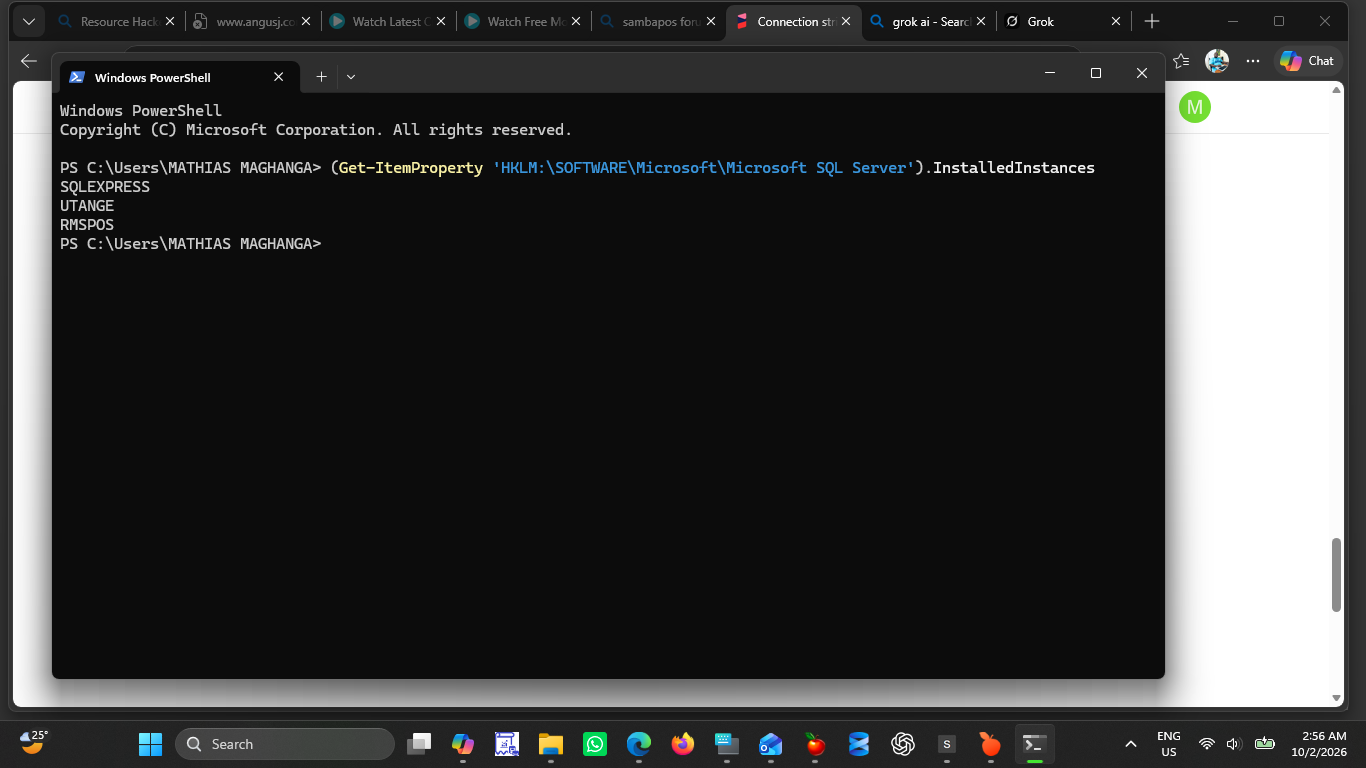
You have three instances of SQL Server running. So whilst you are able to login using SSMS to AN instance of SQL Server using the sa account, the instance used for SambaPOS does not have mixed mode enabled.
So you have a some options:
- uninstall all intsances and all SQL dependencies (OLE, ODBC, etc.) and do a fresh install for once instance
- remove the instances not related to SambaPOS (SQLEXPRESS, UTANGE)
- using SSMS, connect to the RMPOS instance and enable mixed mode auth
- have SambaPOS use one of the other instances instead that has mixed mode enabled
Were I in your position and nothing else was using SQL Server, I would uninstall everything SQL, including SSMS, and then perform fresh instalsl everything being sure to remove the C:\Program Files\Microsoft SQL Server folder, too.