I just wanted to check if this is the “correct” way of doing this?
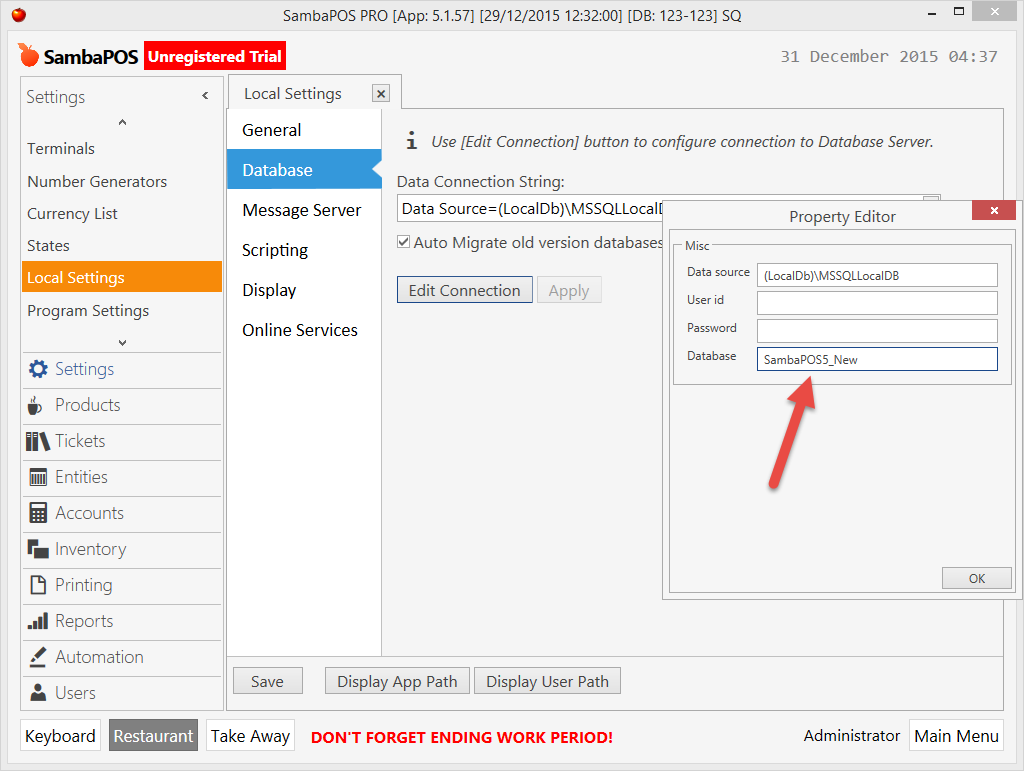
If I want to create a new database with LocalDB from within SambaPOS (i.e. keeping my old default SambaPOS5 one as is), first step is just to change the connection string, in the Database field, enter the name you want to give the new database.
When you click Apply, it will create the .mdf and .ldf files automatically, then take you to the login screen with your new database. The new database will have the sample data installed.
I am just posting this as I tried another way first which didn’t work. I tried duplicating the .mdf and .ldf files when SambaPOS was closed, renaming to the name of my new database, then updating the connection string in SambaPOS to the new database name. This resulted in a “Cannot create database as file already exists” error, which lead me to the current way I described above.
That should work yes. Sambapos auto creates database if one not found. If you define a name but it does not exist then it creates one with that name.
It does the same thing with full SQL express. It’s essentially the same thing. After all localdb is SQL express its just not running as a service and only supports local connection for single machine.
I just attempted this, as I would like to start the new year, with a new data file. Now I cannot get into the application. I receive the following error:
"can’t connect to database with current setting. You can check and modify the connection string shown below.
Error Message:
An error occurred while getting provider information from the database. This can be caused by Entity Framework using an incorrect connection string. Check the inter exceptions for details and ensure that the connection string is correct.
When I click OK or Cancel I receive the following message:
Please restart application there was a problem saving log file.
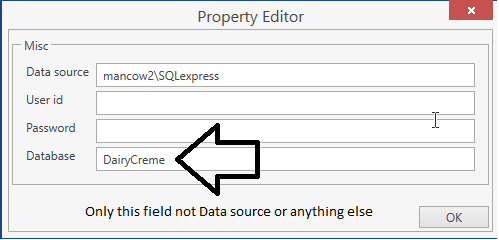
What did you change? If you changed connection string then yes that will happen. What I was talking about was just the name of database thats all nothing more.
OK, I restarted my computer and it worked. However, I am still on version 4. What I want to do is create a new data file for 2016, is here a way that I can bring over all of my configurations, but not the translations?