Thanks for the awesome guide. 
I have managed to set this up with 2 columns (1 Showing Slideshow/Another side transactions as above).
However, I’m stuck in getting it to display the Tendered and Change Due to work.
The number $0 is generated, however it doesnt reflect the true amount.
I use the same {commands} on my Ticket Printer and it works fine.
Also feel free to use the code below and tweak it for your needs.
For all intents and purposes it works fine except for the Change/Tendered.
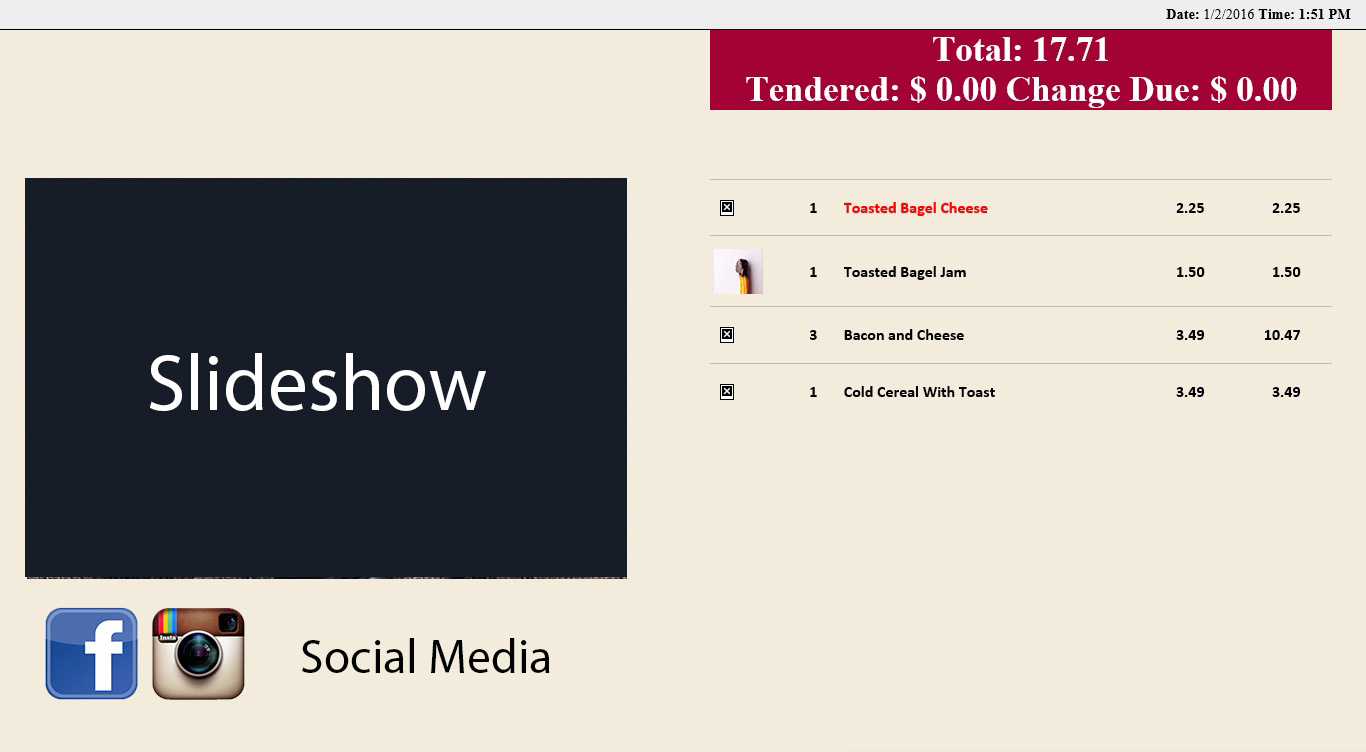
I would appreciate any help you guys can provide in getting them to work.
Total: {TICKET TOTAL}
{PAYMENTS} Tendered: $ {TENDERED TOTAL}
Change Due: $ {CHANGE TOTAL}
My Printer Template is as below.
> <!DOCTYPE html PUBLIC "-//W3C//DTD XHTML 1.0 Strict//EN" "http://www.w3.org/TR/xhtml1/DTD/xhtml1-strict.dtd">
> <html xmlns="http://www.w3.org/1999/xhtml" xml:lang="en-GB">
> <head>
> <title>2 Column Customer Display</title>
> <meta http-equiv="Content-Type" content="application/xhtml+xml; charset=utf-8" />
> <meta name="description" content="2 Column Customer Display" />
> <meta name="keywords" content="2 Column Customer Display" />
> <meta name="robots" content="index, follow" />
> <link rel="shortcut icon" href="/favicon.ico" type="image/x-icon" />
> <style media="screen" type="text/css">
> /* <!-- */
> /* General styles */
> body {
> margin:0;
> padding:0;
> border:0; /* This removes the border around the viewport in old versions of IE */
> width:100%;
> background:#f3ecdd;
> min-width:600px; /* Minimum width of layout - remove line if not required */
> /* The min-width property does not work in old versions of Internet Explorer */
> font-size:90%;
> }
> a {
> color:#369;
> }
> a:hover {
> color:#fff;
> background:#369;
> text-decoration:none;
> }
> h1, h2, h3 {
> margin:.8em 0 .2em 0;
> padding:0;
> }
> p {
> margin:.4em 0 .8em 0;
> padding:0;
> }
> img {
> margin:10px 0 5px;
> }
> /* Header styles */
> #header {
> clear:both;
> float:left;
> width:100%;
> }
> #header {
> border-bottom:1px solid #000;
> }
> #header p,
> #header h1,
> #header h2 {
> padding:.4em 15px 0 15px;
> margin:0;
> }
> #header ul {
> clear:left;
> float:left;
> width:100%;
> list-style:none;
> margin:10px 0 0 0;
> padding:0;
> }
> #header ul li {
> display:inline;
> list-style:none;
> margin:0;
> padding:0;
> }
> #header ul li a {
> display:block;
> float:left;
> margin:0 0 0 1px;
> padding:3px 10px;
> text-align:center;
> background:#eee;
> color:#000;
> text-decoration:none;
> position:relative;
> left:15px;
> line-height:1.3em;
> }
> #header ul li a:hover {
> background:#369;
> color:#fff;
> }
> #header ul li a.active,
> #header ul li a.active:hover {
> color:#fff;
> background:#000;
> font-weight:bold;
> }
> #header ul li a span {
> display:block;
> }
> /* 'widths' sub menu */
> #layoutdims {
> clear:both;
> background:#eee;
> border-top:4px solid #000;
> margin:0;
> padding:6px 15px !important;
> text-align:right;
> }
> /* column container */
> .colmask {
> clear:both;
> float:left;
> width:100%; /* width of whole page */
> overflow:hidden; /* This chops off any overhanging divs */
> }
> /* common column settings */
> .colright,
> .colmid,
> .colleft {
> float:left;
> width:100%;
> position:relative;
> }
> .col1,
> .col2,
> .col3 {
> float:left;
> position:relative;
> padding:0 0 1em 0;
> overflow:hidden;
> }
> /* 2 Column (double page) settings */
>
> .doublepage .colleft {
> right:50%; /* right column width */
> background:#f3ecdd; /* left column background colour */
> }
> .doublepage .col1 {
> width:46%; /* left column content width (column width minus left and right padding) */
> left:52%; /* right column width plus left column left padding */
> }
> .doublepage .col2 {
> width:46%; /* right column content width (column width minus left and right padding) */
> left:56%; /* (right column width) plus (left column left and right padding) plus (right column left padding) */
> }
> /* Footer styles */
> #footer {
> clear:both;
> float:left;
> width:100%;
> border-top:1px solid #000;
> }
> #footer p {
> padding:10px;
> margin:0;
> }
> /* --> */
> </style>
> </head>
> <body>
> <body bgcolor="#e7e1ce">
> <div id="header">
> <p id="layoutdims"><strong>Date:</strong> {DATE} <strong> Time: {TIME} </p>
> </div>
> <div class="colmask doublepage">
> <div class="colleft">
> <div class="col1">
> <!-- Column 1 start -->
>
> <html>
> <body bgcolor="#f3ecdd">
> <head> <br><br><br><br><br><br><br><br><br>
> <link href="js-image-slider.css" rel="stylesheet" type="text/css" />
> <script src="js-image-slider.js" type="text/javascript"></script>
> </head>
> <body>
> <div id="sliderFrame">
> <div id="slider">
> <img src="slide-1.jpg" />
> <img src="slide-2.jpg" />
> <img src="slide-3.jpg" />
> <img src="slide-4.jpg" />
> <img src="slide-5.jpg" />
> <img src="slide-6.jpg" />
> <img src="slide-7.jpg" />
> <img src="slide-8.jpg" />
> </div>
> <img src="social.png" />
>
> </div>
> </body>
> </html>
>
> <!-- Column 1 end -->
> </div>
> <div class="col2">
> <!-- Column 2 start -->
> [LAYOUT]
> <html>
> <head>
> <title>Chulop</title>
> </head>
> <body style="margin:0px; padding:0px; display:block">
> <center>
> <div style="width:99%; font-size:35px; position:absolute; top:0px; left:0px; background:#a20334; color:#FFFFFF; margin:0px;">
> Total: {TICKET TOTAL} <br> {PAYMENTS} Tendered: $ {TENDERED TOTAL}
> Change Due: $ {CHANGE TOTAL}
> </div>
> </center>
> <div style="width:99%; margin:0px; margin-top:35px;"> </div>
> <div id="orders" style="background:#f3ecdd; width:99%; margin:0px; font-size:16px; font-family:calibri">{ORDERS}</div>
> </body>
> </html>
> [ORDERS:INDEX:1]
> <br><br><br><br><br>
> <div id="orderline" style="width:99%; font-size:16px; border-top:solid 1px #BBB; padding:3px;">
> <div id="prodimg" style="width:15%; display:inline-block; vertical-align:middle"><img src="[='{ITEM TAG:ProdImage}' !='' ? '{ITEM TAG:ProdImage}' : 'D:/Programs/POS/images/znoimage-th.jpg']"> </div>
> <div id="prodqty" style="width:5%; display:inline-block; vertical-align:middle">{QUANTITY}</div>
> <div id="prodname" style="width:45%; display:inline-block; overflow:hidden; vertical-align:middle;color:#FF0000"><b>{NAME}</b></div>
> <div id="prodprice" style="width:13%; display:inline-block; text-align:right; vertical-align:middle">{PRICE}</div>
> <div id="prodamount" style="width:15%; display:inline-block; text-align:right; vertical-align:middle">{TOTAL AMOUNT}</div>
> </div>
> <div style="width:99%; text-align:left; font-size:10px;">{SORTED ORDER TAGS}</div>
> [ORDERS]
> <EB>
> <div id="orderline" style="width:99%; font-size:16px; border-top:solid 1px #BBB; padding:3px;">
> <div id="prodimg" style="width:15%; display:inline-block; vertical-align:middle"><img src="[='{ITEM TAG:ProdImage}' !='' ? '{ITEM TAG:ProdImage}' : 'D:/Programs/POS/images/znoimage-th.jpg']"> </div>
> <div id="prodqty" style="width:5%; display:inline-block; vertical-align:middle">{QUANTITY}</div>
> <div id="prodname" style="width:45%; display:inline-block; overflow:hidden; vertical-align:middle">{NAME}</div>
> <div id="prodprice" style="width:13%; display:inline-block; text-align:right; vertical-align:middle">{PRICE}</div>
> <div id="prodamount" style="width:15%; display:inline-block; text-align:right; vertical-align:middle">{TOTAL AMOUNT}</div>
> </div>
> <DB>
> <div style="width:99%; text-align:left; font-size:10px;">{SORTED ORDER TAGS}</div>
> [SORTED ORDER TAGS]
> <div id="ordertags" style="width:99%; color:#0000FF">
> <div style="width:15%; display:inline-block; vertical-align:middle"> </div>
> <div style="width:1%; display:inline-block; padding-left:35px; padding-right:3px; vertical-align:middle">{ORDER TAG QUANTITY}</div>
> <div style="width:35%; display:inline-block; overflow:hidden; vertical-align:middle">{ORDER TAG NAME}</div>
> <div style="width:1%; display:inline-block; vertical-align:middle">{ORDER TAG PRICE}</div>
> <div style="width:15%; display:inline-block; text-align:right; vertical-align:middle">[=F(TN('{ORDER TAG QUANTITY}')*TN('{ORDER TAG PRICE}'))]</div>
> </div>
> [SORTED ORDER TAGS GROUP|OTS]
> [SORTED ORDER TAGS GROUP:OTS]
> <div id="ordertags" style="width:99%; color:#0000FF">
> <div style="width:15%; display:inline-block; vertical-align:middle"> </div>
> <div style="width:60%; display:inline-block; padding-left:35px; padding-right:3px; vertical-align:middle">~~~ ON-THE SIDE ~~~</div>
> </div>
> <!-- Column 2 end -->
> </div>
> </div>
> </div>
> <script type="text/javascript">
> _uacct = "UA-1848067-8";
> urchinTracker();
> </script>
> </body>
> </html>
Transaction template from this thread and slider Code from here : Demo 2 - Image Slider with Thumbnails