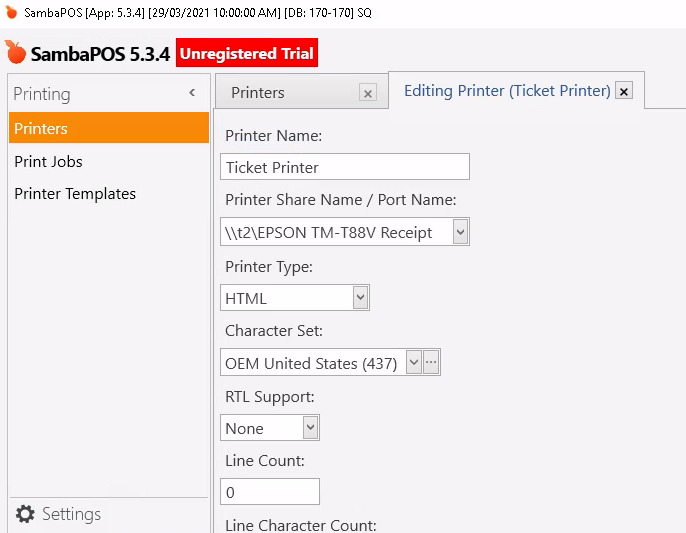
Instantly got a random issue when i wanted to kick off, so here’s my issue
Server PC
I login with User 1
Setup with 2 Epson Printer
I use Local Epson : Connected to cash register, Kitchen and Bar
I shared the spare printer as T2\P1
Tablet PC
I login with User 1
I connect and install the T2\P1 printer
I set up as T2\P1 as the Kitchen, Bar Printer
I login with User 1 on the Server PC, i hit print and it spits it out from the spare printer.
I check the settings, it seems its not individual profiles per workstation and its the same printer across the database.
Strugling to follow, what do you mean by spare printer?
Printer list is global, but printer name refferes to the name locally on that terminal.
You can either choose a printer accross all terminals and configure in windows differently on each terminal but with same name or when using shared printer you can use the share name \sharepcname\printername
Or configure multiple printers with different names setup on each terminal with same names and work print job with mapping to specify each terminals to printers that way.
Sorry i re-read your post JTR, so how do i setup Terminals… assuming
Terminals means each PC…
so how do i assign a PC to terminal profile?
Wait i think i found the terminal setting thing… ok I’ll give it a shot and play with it a little and see if i can just iron it out… thanks JTR for the instant repsonse
If you want different printers for different terminals you either need to use global name and set endpoint within windows but easier to manage is to make each printer a different name and set mapping by terminal to corresponding printer.
I’ve found it easier to just have every terminal’s printer named something like “Receipt Printer” no matter what the printer is and how it’s connected.