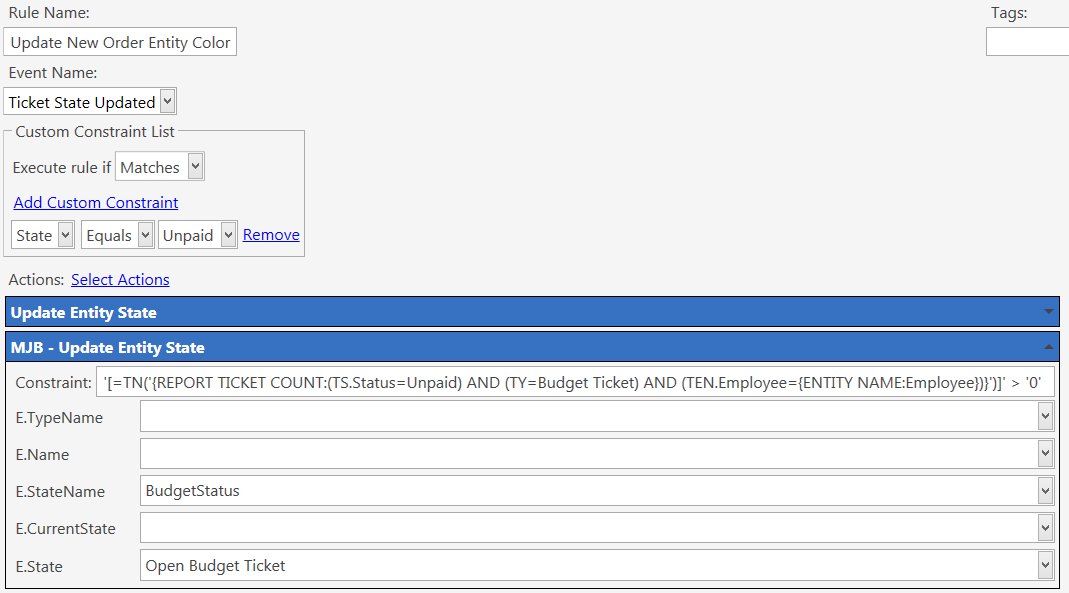
I would like to set an entity state based on if the entity has any open tickets of a particular ticket type.
Some of my entity types can have mutliple types of tickets open at any stage, so using the standard functionality of an entity state “New Orders” is not enough. I need a specific entity state for a specific ticket type.
I have tried adding to the existing rule which sets “New Orders” but it doesn’t work…
The report used above is:
'[=TN('{REPORT TICKET COUNT:(TS.Status=Unpaid) AND (TY=Expense Ticket) AND (TEN.Employee={ENTITY NAME:Employee})}')]' > '0'
This report returns “-” in the moment that the ticket state is set to “unpaid”. But, if moments later I go to Reports and run the report manially, it does return “1”. So it seems like updated ticket state needs a couple more moments to ‘sink-in’ before the report pulls the correct information.
How is that action updating the entity state when you haven’t set the entity type/name?
Good point! But, this is an old screenshot.
I have used the same constraint on a Show Message action and nothing appears. The issue is that the report does not return the correct number of tickets, even though the Tick State has just that moment been set to “Unpaid”
You mean updated in that first action?
Constraints in a rule are determined at rule start not in order.
Ie if that first action is setting a state the second action constraint will not see that update as the actions are ‘filtered’ before any actions are run.
No, the report is listing “Unpaid” ticket states and this entire rule is being fired when the ticket state is set to “Unpaid” - So you would think that the report would find this recently updated ticket, no?
Not sure then, but as a side not you shouldn’t use ‘quotes’ when using numbers. Quoting forces string and > and < need numbers hence the TN() but the quotes will in essence counter the TN()
Good pooint. I’ll change that.