Probably best to set it as HTML as a printer settings in samba. Then from there you’ll have to edit the HTML template to make it fit properly and look like the ESC/POS
I see… Yes, the HTML setting allows multiple print, but then looks wrong. Not sure how to make the HTML look correct, but I suppose “Google is my friend” :). With the HTML setting though, will I lose the ability to get the drawer to pop?
Let me see if I can find my HTML template for you, as a skeleton. Nope, google your printer and there is a manual which has the code to pop the cash drawer 
Thank you all SOOOO much for the help. I have it working well now. The only problem I have left is getting the drawer to pop. I followed instructions to get it to do so, I even built a “drawer open” button just to test. My drawer open code is “27,112,0,25” and I know it is correct as I had it working in the past (when the printer was printing wrong, I still got the drawer open button to work) but now that I am HTML, the “drawer open” button actually prints the code on the receipt rather than pop the drawer.
I use the < XCT >27,112,0,25 code. (Without the spaces)
Is that incorrect for HTML. Or should I add another printer in the printers section, use the ESC/POS option and only use it to call up the “drawer open” command?
XCT code will only work with ESC/POS option as its a command code where HTML just sees it as a bunch of numbers.
Yea, I got the button working now. I just added another printer (same physical printer) as ESC/POS and reference it for the drawer pop. It works… For some reason I have to press the button twice though! Now I will try to link it to a “cash out” and see if it will pop. I am guessing I may have to have it send the command twice though.
Ha ha… Nice… I have the drawer opening now after a cash transaction, but it only opens every OTHER time. You have to love computers! I’ll probably figure it out.
Try turning that back on in Windows and leaving it as HTML mode in Samba
That will kick drawer for any print.
Will not work for no sale/open drawer unless you print something.
Will open drawer when you print a pre bill.
Correct, but at this stage it probably better than it not opening or printing half the time.
If you have a key, just turn that for No Sale 
I have it set for the drawer to open ONLY when completing a cash transaction. I also have the “open drawer” button. As I have to press the button twice, I can still get the drawer to pop. One time, it will pop on it’s own. The next time you have to press the “open drawer” button.
I tried repeating the code twice in the printer template. That worked (one push open) but it also errored out the printer. But I am not sure if just typing the code twice is even correct. Example:
< ECT>27,112,0,25
< ECT>27,112,0,25
Or if I need an end after the first code?
You could try firing the action twice in the rule.
Right click on the left list when adding actions to the rull and you get an option to show all allowing you to add the open drawer print job action a second time.
YES!!! That did it! Thank you so much! I did think to add the rule twice, but it was not there. Man, I would have NEVER thought to right click.
2 Likes
It doesn’t solve the the issue, I would still look to try and get to the bottom of it further down the road when you have time.
Love that feeling when whatever you’re doing, however small or big, actually works 
2 Likes
Hi guys I have a problem with windows 10, I cant install epos thermal printer for samba POS. Is there anyone who have problems with windows 10, The driver cant install, yes it uses USB, will appreciate your help
Try with generic text printer driver which is usually Stockton windows
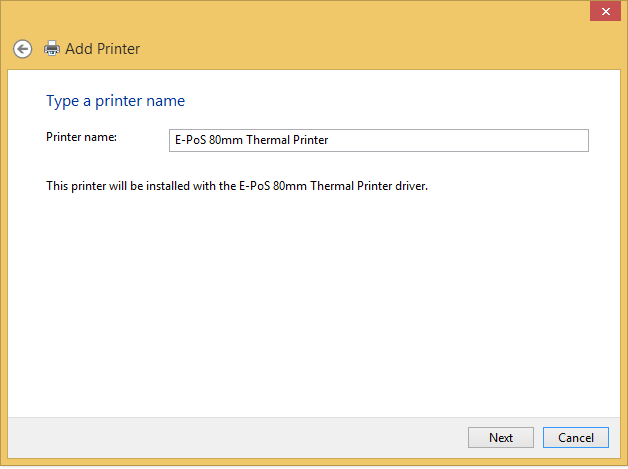 Hi have tried generic text printer driver printer but cant get to install, in the the screenshot when I click next I get to the same screen