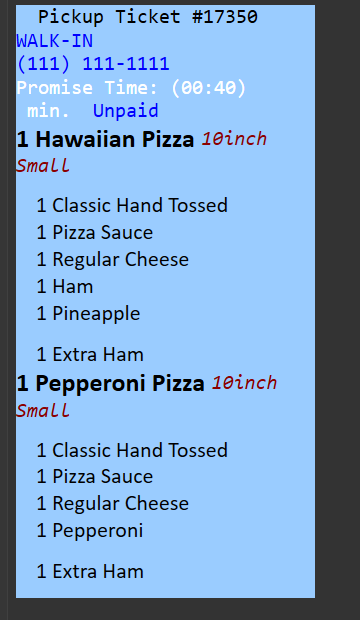
If I’m using just a plain template the text seems to be aligned to the left of the card as seen below. Is there any way to adjust the padding from the left of the card to where the text starts?
TIA
<bold>
<extrabold>
<thin>                  : thinner style
<italic>
<underline>
<b>, <u>, <i>           : short for bold, underline, italic
<img>                   : displays an image (URLs supported)
<linebreak/>            : forces a NewLine (NL)
<br/>                   : stops auto-NL in Ticket Lister, fine-tune with <br/>
<sym>                   : displays symbol from Segoe UI Symbol font
<size x>                : font size
<font x>                : font name
<color x>               : font color
<block margin color alignment width>
                            : margin=Left,Top,Right,Bottom
                            : alignment=left,right,center,justified
<panel color alignment>
                            : alignment=left,right,center
You could wrap all the contents in a block and setup margins
<L><block 5,5,5,5 #5ffffff left 200>
<J>Text
<J>Some more text
{ORDERS}
<L></block>