Has anyone ever had this problem before?
Somehow the users at one of our sites has done something and now you cannot enter purchasing without getting this error:
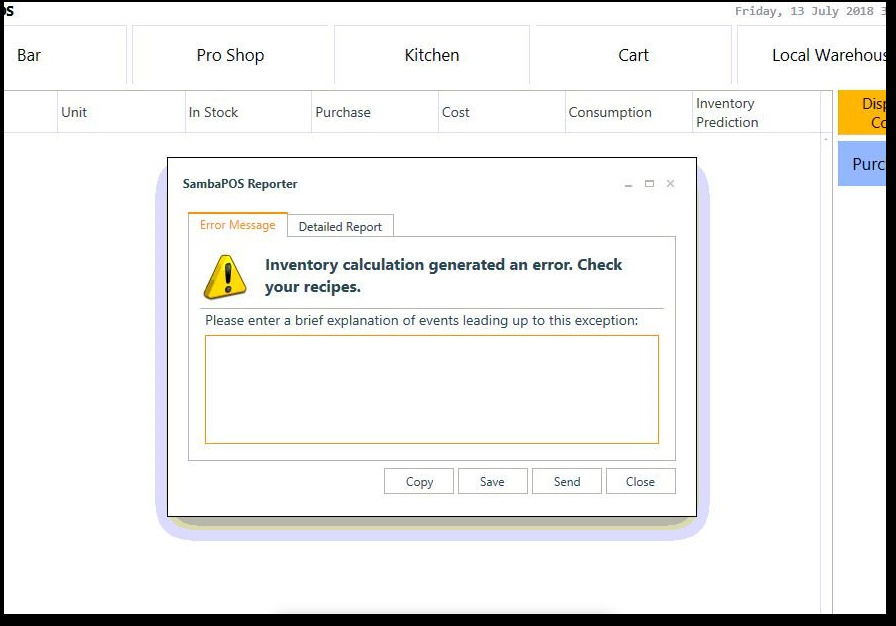
My team suggests stock looks ok 
Any assistance would be welcomed
Thanks Paul.
Can you show the detailed report.
@Jesse sorry for the delay (travelling at the moment but duty calls).
I seen a “no recipe” error before that effected COD but not one that crashes the Purchasing screen on load? Could it be a bad layout…
-----------------------------
[General Info]

Application: SambaPOS
Version:     5.1.60
Region:      en
DB:          SQ
Machine:     RGC-SERVER
User:        it.support
Date:        13/07/2018
Time:        7:25 AM

User Explanation:

it.support said ""
-----------------------------

[Exception Info 1]

Top-level Exception
Type:        System.Exception
Message:     Inventory calculation generated an error. Check your recipes.
Source:

-----------------------------

[Exception Info 2]

Top-level Exception
Type:        System.InvalidOperationException
Message:     Sequence contains no matching element
Source:      System.Core
Stack Trace: at System.Linq.Enumerable.Single[TSource](IEnumerable`1 source, Func`2 predicate)
   at Samba.Modules.InventoryModule.WarehouseInventoryViewModel.UpdateSelectedWarehouse(Int32 warehouseId)
   at Samba.Modules.InventoryModule.WarehouseInventoryViewModel.Refresh(Int32 warehouseId)
   at Samba.Modules.InventoryModule.InventoryModule.OnNavigate(String parameterName)

-----------------------------

[Assembly Info]

mscorlib, Version=4.0.0.0
Samba.Services, Version=1.0.0.0
Samba.Domain, Version=1.0.0.0
Samba.Infrastructure.Data, Version=1.0.0.0
System.ComponentModel.Composition, Version=4.0.0.0
System.Core, Version=4.0.0.0
PresentationCore, Version=4.0.0.0
DevExpress.Xpf.LayoutControl.v14.1, Version=14.1.13.0
System.Xml, Version=4.0.0.0
DevExpress.Xpf.Grid.v14.1, Version=14.1.13.0
System, Version=4.0.0.0
DevExpress.Xpf.Grid.v14.1.Core, Version=14.1.13.0
WindowsBase, Version=4.0.0.0
System.Xaml, Version=4.0.0.0
PresentationFramework, Version=4.0.0.0
Samba.Infrastructure, Version=1.0.0.0
Microsoft.Practices.Prism, Version=4.0.0.0
System.Runtime.Serialization, Version=4.0.0.0
Microsoft.Practices.Prism.MefExtensions, Version=4.0.0.0
DevExpress.Xpf.Core.v14.1, Version=14.1.13.0
Samba.Presentation.Services, Version=1.0.0.0
System.Windows.Forms, Version=4.0.0.0
System.Drawing, Version=4.0.0.0
Stateless, Version=1.0.0.0
Samba.Persistance, Version=1.0.0.0
PropertyTools, Version=2012.4.14.1
Samba.Localization, Version=1.0.0.0
ReachFramework, Version=4.0.0.0
EntityFramework, Version=6.0.0.0
FluentValidation, Version=3.4.0.0
Omu.ValueInjecter, Version=2.3.0.0
Microsoft.Practices.ServiceLocation, Version=1.0.0.0
Microsoft.CSharp, Version=4.0.0.0

-----------------------------

[System Info]

Operating System
-Microsoft Windows Server 2012 R2 Essentials
--CodeSet = 1252
--CSDVersion =
--CurrentTimeZone = 480
--FreePhysicalMemory = 11224876
--OSArchitecture = 64-bit
--OSLanguage = 1033
--ServicePackMajorVersion = 0
--ServicePackMinorVersion = 0
--Version = 6.3.9600

Machine
-RGC-SERVER
--Manufacturer = HP
--Model = ProLiant ML110 Gen9
--TotalPhysicalMemory = 25499389952
--UserName = RGC\it.support

-----------------------------It kinda looks like it can’t find the Warehouse.
Is it reproducible? Did you changed a warehouse type to hidden?
I will check for warehouse type - is that on product or system?
Yes it happens every time we open warehouse tile.
Can you send me your backup?
Legend Emre!
User has added a new Warehouse and it was hidden.
So important to have your tips and pointers in the right direction 
Thank you.
PS: I might add Emre
Without searching SQL Studio (not knowing what to look for) it pretty hard to see what a user may have entered for the Purchase Order from this:
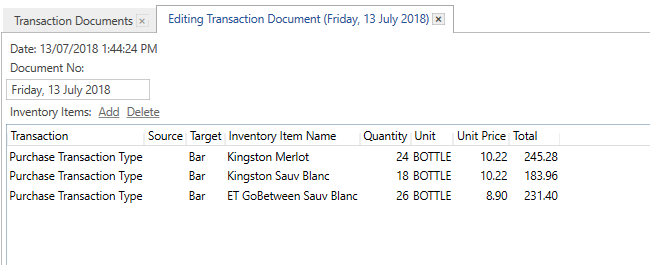
Trying to find where they used this warehouse as I think it was just a typo which brought the system down…
Hi @emre
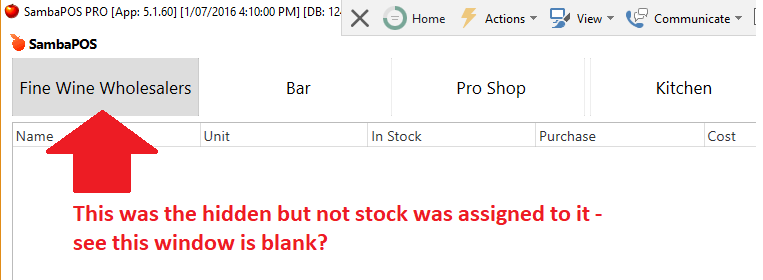
Just for completeness this was the hidden warehouse BUT not stock was assigned to it?
I also think I found the offending Workstation and here is the log with something new:
Till1 said "Adding Supplier"
I think that Supplier was always hidden and they accidentally used it by typo and then crashed the system. All other LOGS after that do not give this message just blank…
-----------------------------
[General Info]

Application: SambaPOS
Version:     5.1.60
Region:      en
DB:          SQ
Machine:     DESKTOP-J72LTAR
User:        Till1
Date:        13/07/2018
Time:        5:44 AM

User Explanation:

Till1 said "Adding Supplier"
-----------------------------

[Exception Info 1]

Top-level Exception
Type:        System.Exception
Message:     Inventory calculation generated an error. Check your recipes.
Source:

-----------------------------

[Exception Info 2]

Top-level Exception
Type:        System.InvalidOperationException
Message:     Sequence contains no matching element
Source:      System.Core
Stack Trace: at System.Linq.Enumerable.Single[TSource](IEnumerable`1 source, Func`2 predicate)
   at Samba.Modules.InventoryModule.WarehouseInventoryViewModel.UpdateSelectedWarehouse(Int32 warehouseId)
   at Samba.Modules.InventoryModule.WarehouseInventoryViewModel.Refresh(Int32 warehouseId)
   at Samba.Modules.InventoryModule.InventoryModule.OnNavigate(String parameterName)

-----------------------------
Hope that helps.
SambaPOS autoselects first warehouse when we click on warehouses button. It looks like hiding first warehouse or hiding all warehouses cases didn’t handled. I’ll commit a fix for that.
Let me know if you notice something related on next update.