I have been trying to solve this issue for over a week now and I cannot get to the bottom of it.
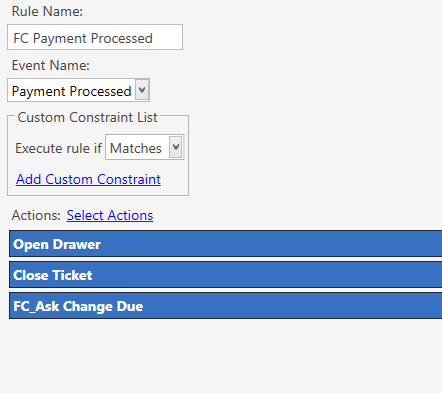
When the Open Drawer print job is executed when I process a payment it works fine.
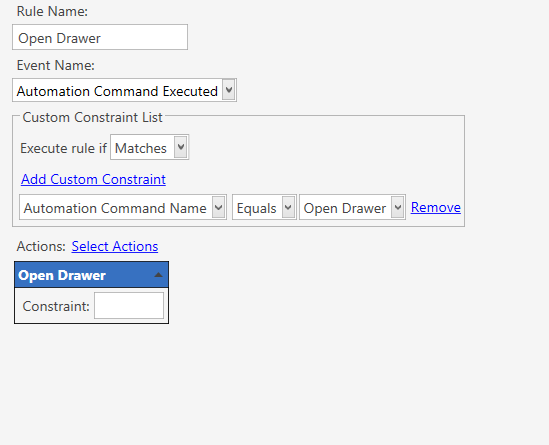
The problem is my Open Drawer button and when this is executed it does not do anything.
I have created 3 different versions of the open drawer automation and all behave the same.
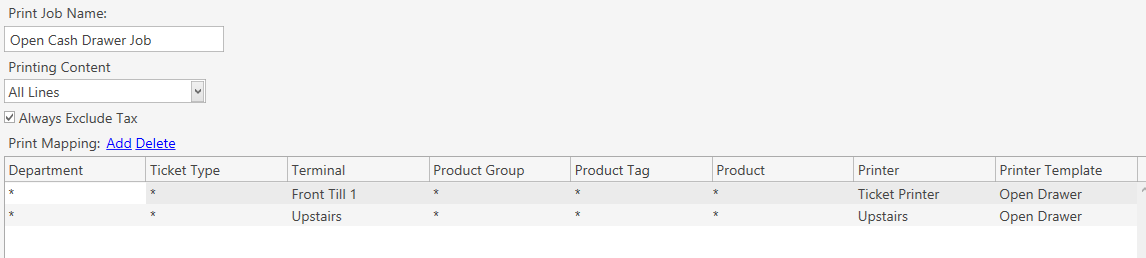
If i remove the terminal mapping in the print job both drawers open.
I have a Print Bill print job which has identical mappings only different template and it prints fine via Automation Command so I don’t think it is the way I have my mappings set up.
To overcome this I had to create separate Print Jobs and Rules for each terminal and applied terminal mappings at rule level vs inside the print job.
I can’t get my head around why the Open Drawer print job works on Payment Processed event and not on Automation Command Executed.
Has anyone come across this before?