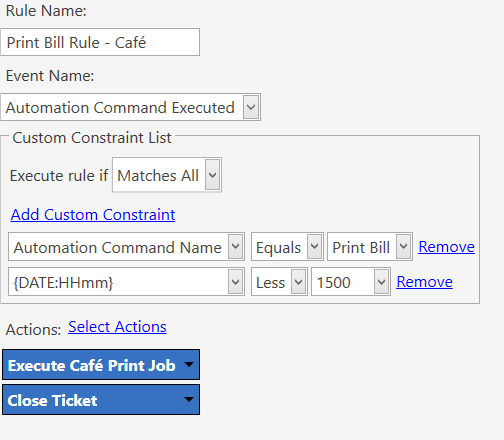
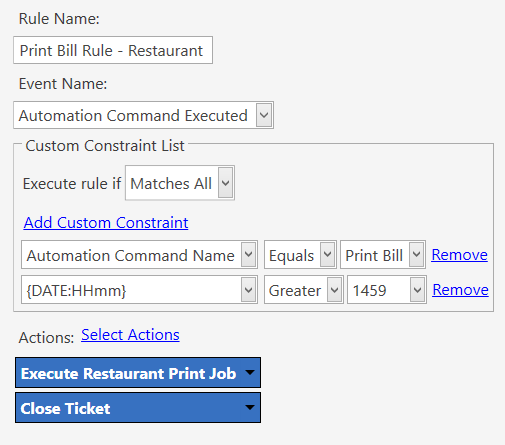
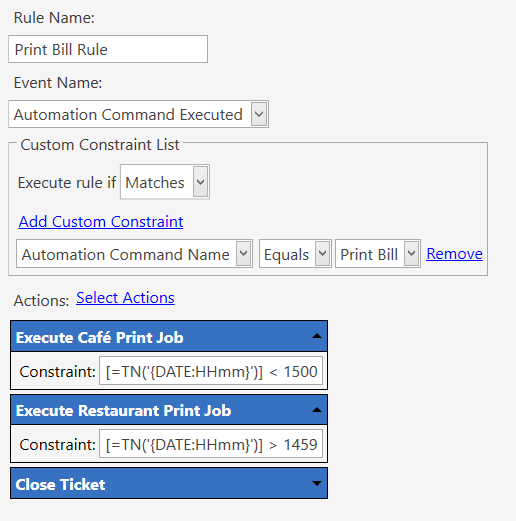
Wondering if it’s possible to have two separate printer templates for the same print job that trigger based on the time of day.
Use case:
We have a business that outwardly operates as two separate restaurants depending on the time of day. In the morning and lunch it runs as a relaxed café, and in the evening it becomes a higher-end restaurant with a different menu and vibe.
Internally, however, it is still a single cost centre with the same staff and stock. We operate two menus (with a small amount of overlap where needed) and track reporting using different work periods and staff logins. All of that is working well.
The only outstanding area is the customer bill. At the moment it only prints one version of the bill.
Does anyone have ideas on how to have two separate bill formats available? One thought was to use a second button, but I also wondered if it’s possible to automatically change the printer template at a set time of day.
I assume there are probably a few creative ways to solve this in SambaPOS, so any suggestions would be appreciated.