I have a date selection on orders using three different tags (one for day, one for month, one for year).
Nearly always the date is within 1 month of “today” so I have written some logic in a script to automatically tag the current order with a month and year when the user tags the date.
The problem I have is that although the order tags are applied (you can see the tags it in the order list) the order tag buttons themselves don’t get highlighted with the usual red colour, so at first it looks as if this automatic tagging has not occurred. If I deselect and re-select the order the tags do appear with the correct highlighting.
Any idea how I could have the tags be highlighted automatically when the tags are set?
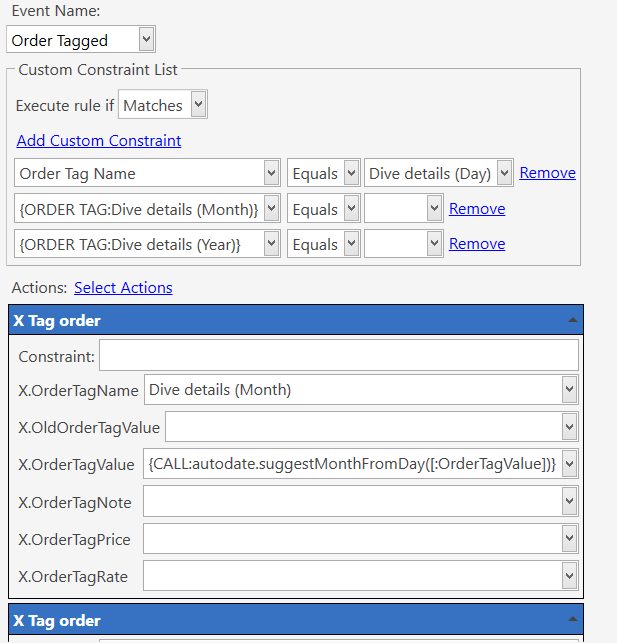
Script:
function suggestMonthFromDay(day) {
  var d = new Date();
  var months = ["JAN", "FEB", "MAR", "APR", "MAY", "JUN", "JUL", "AUG", "SEP", "OCT", "NOV", "DEC", "JAN"];
  var month = "";
  if (day >= d.getDate()) {
  //dlg.ShowMessage('This month');
  month = months[d.getMonth()];
    } else  {
  //dlg.ShowMessage('Next month');
  month = months[d.getMonth() +1];
  }
  return month;
}

function suggestYearFromDay(day) {
  var d = new Date();
  var year = d.getYear();
  if (day < d.getDate() && d.getMonth() == 11) {
  // dlg.ShowMessage('Next year');
  year ++
  }
  return year;
}

