Ok this is a bit embarrassing - but how do you change any of these settings? Mine are stuck and it surely I have missed something silly…

No matter what I type it always returns to the Work Period Data 19th June to Today?
Defiantly have multiple work periods in there? 
Nope checked just have not closed it for a few days or so …
Since June 19th?
Yes, arrest me! No seriously it only test data so are you saying the filter will fail as it cannot cope with 1 very long Work Period?
I believe the reports are based on work periods. so selecting a date within that will extend to include whole period.
To only do part of a period you would have to hardcode some dates into the report for the start and end I think or use SQL.
Its not the length of the period, presumably its still working just showing that whole date range within the single workl period?
I came across this issue previously and found it its simply because of the work period log date… Example… If your first work period start 19/3/2016 and you have like 50 work periods. You wanna go back to an earlier date then the 19. It will always show from 19/3/2016-- whatever period you set and have available… Not sure if I answered your question though lol
OK let say in a perfect word I have WP every day.
If I then use “This Week” - what do I expect to get? All Work periods from Sun/Mon (do not know what is Samba Day 1).
If I then use “Past Week” - I get the full week of WP for last week?
Ive never used week ones but always presumed it was last 7 days and the 7 days before that…
Our stock takes are never exact week/month so always set dates personally.
Umm something seems broken? So if I use a date bigger than current WP if defaults back to Start WP -> Today. In fact there is nothing I can type to make any difference in either side…
Maybe @emre need to set me straight…
Show the list of work periods?
No sure if this helps - make me feel old but 
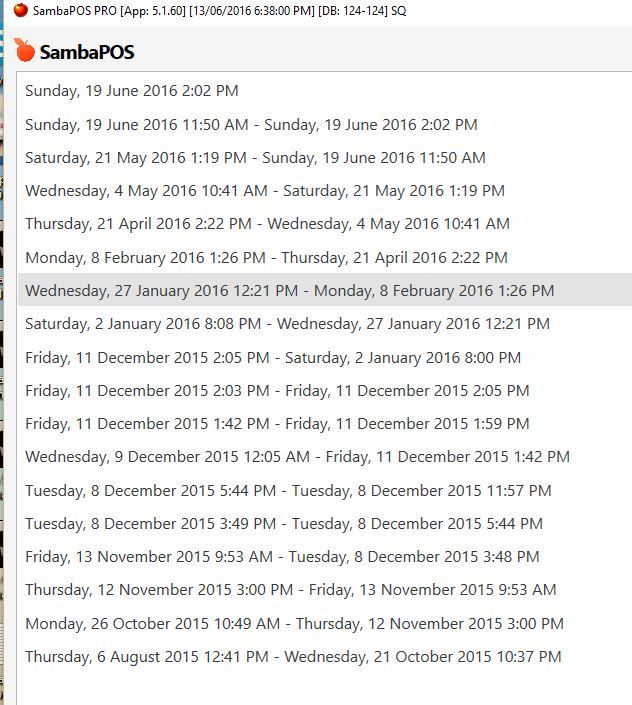
OK, so what date you putting in?
Mate,anything! I can use the drop down it returns to 1st Image above. If I manually enter dates on the RHS - it returns to the 1st image above…
04/05/16 to 21/05/16?
Oh OK - let me try that I see the wood from the trees…
So you can only use a Beginning Date and End Date EXACT for filters? So that’s what I was missing…
It should adjust outward to cover the periods for the dates.
I was just about to call it a night BUT thought @JTRTech - how do you run these Reports over say 1 month? A month might include half a WP at each end?
You say hard code the Dates? Q will probably say SQL?
You mean if wp is closed am of 1st of following month?
You can use custom report widget and actions to update report widget to create your own date picker. I demonstrated that for gerlandog a while back.