Hi ,
I am using samba pos v5 and from today when i am trying to settle the tickets, samba pos is not responding. ~Please help me out.
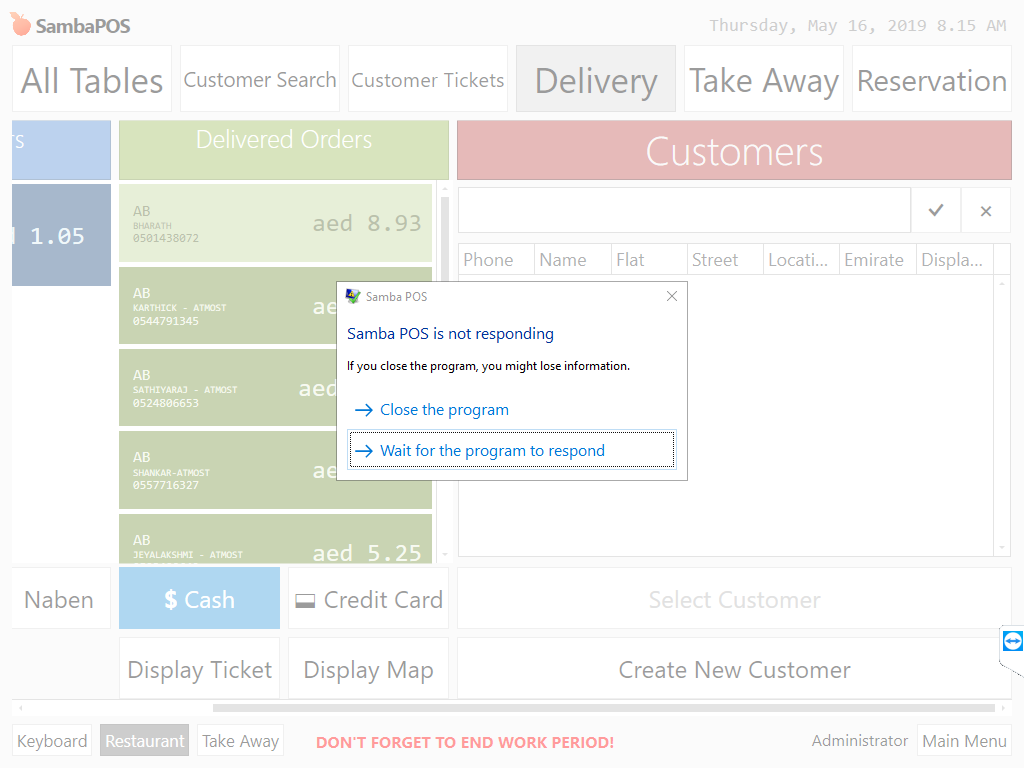
How are you trying to settle them? Through settle screen ?
I tried both way. Both doesnt work
Did you change a payment type or ticket type? Can you show logs?
You need the log file?
Paste it here so we can see what went wrong.
[General Info]
Application: SambaPOS
Version: 5.2.14
Region: en
DB: SQ
Machine: DESKTOP-0E07FRU
User: USER
Date: 14/05/2019
Time: 2:33 PM
User Explanation:
USER said “”
[Exception Info 1]
Top-level Exception
Type: System.OutOfMemoryException
Message: Exception of type ‘System.OutOfMemoryException’ was thrown.
Source: System
Stack Trace: at System.IO.Compression.DeflateStream…ctor(Stream stream, CompressionMode mode, Boolean leaveOpen)
at MS.Internal.IO.Packaging.CompressStream.ChangeMode(Mode newMode)
at MS.Internal.IO.Packaging.CompressStream.Write(Byte[] buffer, Int32 offset, Int32 count)
at MS.Internal.IO.Zip.ProgressiveCrcCalculatingStream.Write(Byte[] buffer, Int32 offset, Int32 count)
at MS.Internal.IO.Zip.ZipIOModeEnforcingStream.Write(Byte[] buffer, Int32 offset, Int32 count)
at MS.Internal.IO.Packaging.IgnoreFlushAndCloseStream.Write(Byte[] buf, Int32 offset, Int32 count)
at System.IO.StreamWriter.Flush(Boolean flushStream, Boolean flushEncoder)
at System.IO.StreamWriter.Dispose(Boolean disposing)
at System.IO.StreamWriter.Close()
at System.Xml.XmlTextWriter.Close()
at System.Xml.XmlWriter.Dispose(Boolean disposing)
at System.Xml.XmlWriter.Dispose()
at MS.Internal.IO.Packaging.InternalRelationshipCollection.WriteRelationshipPart(PackagePart part)
at MS.Internal.IO.Packaging.InternalRelationshipCollection.Flush()
at System.IO.Packaging.PackagePart.FlushRelationships()
at System.IO.Packaging.PackagePart.CloseRelationships()
at System.IO.Packaging.Package.DoCloseRelationshipsXml(PackagePart p)
at System.IO.Packaging.Package.DoOperationOnEachPart(PartOperation operation)
at System.IO.Packaging.Package.System.IDisposable.Dispose()
at Samba.Services.Implementations.PrinterModule.PrinterService.SaveAsXps(String path, FlowDocument document) in C:\Users\vehbi\Source\Repos\sambapos-v5-pro\Samba.Services\Implementations\PrinterModule\PrinterService.cs:line 319
at Samba.Presentation.ClientLibrary.Modules.BasicReports.CustomReports.ReportSaver.SaveDocument(FlowDocument document, ILogService logService, IPrinterService printerService, String fileName) in C:\Users\vehbi\Source\Repos\sambapos-v5-pro\Samba.Presentation.ClientLibrary\Modules\BasicReports\CustomReports\ReportSaver.cs:line 19
[Assembly Info]
mscorlib, Version=4.0.0.0
PresentationFramework, Version=4.0.0.0
PresentationCore, Version=4.0.0.0
System, Version=4.0.0.0
WindowsBase, Version=4.0.0.0
Samba.Services, Version=1.0.0.0
System.ComponentModel.Composition, Version=4.0.0.0
System.Configuration, Version=4.0.0.0
DevExpress.Xpf.Core.v16.2, Version=16.2.13.0
System.Xaml, Version=4.0.0.0
Microsoft.Practices.Prism.MefExtensions, Version=4.0.0.0
Samba.Presentation.Services, Version=1.0.0.0
Samba.Presentation.Common, Version=1.0.0.0
Samba.Domain, Version=1.0.0.0
Microsoft.Practices.Prism, Version=4.0.0.0
System.Core, Version=4.0.0.0
Samba.Infrastructure, Version=1.0.0.0
DevExpress.Data.v16.2, Version=16.2.13.0
Microsoft.Practices.ServiceLocation, Version=1.0.0.0
Samba.Localization, Version=1.0.0.0
Samba.Persistance, Version=1.0.0.0
FastButton, Version=1.0.0.0
[System Info]
Operating System
-Microsoft Windows 10 Pro
–CodeSet = 1252
–CSDVersion =
–CurrentTimeZone = 240
–FreePhysicalMemory = 619352
–OSArchitecture = 64-bit
–OSLanguage = 1033
–ServicePackMajorVersion = 0
–ServicePackMinorVersion = 0
–Version = 10.0.17134
Machine
-DESKTOP-0E07FRU
–Manufacturer = To be filled by O.E.M.
–Model = To be filled by O.E.M.
–TotalPhysicalMemory = 4186468352
–UserName = DESKTOP-0E07FRU\USER
######################### E N D #########################
@Jesse
This is what i found in the log file.
But i have a ram of 4 gb
It’s not the ram. You have an accounting transaction type that’s messed up or configured wrong is what I’m guessing. What did you change when it started this?
I didnt change anything since this problem started
That doesn’t just happen. You must have done something. Maybe on accident.
Your hard drive isn’t full is it?
May be by accident. Any suggestion how to figure it out?
No the hard drive is not full
Try unmapping any print jobs see if it does it.
Le t me check that …
I unmapped ticket print job. Still no use
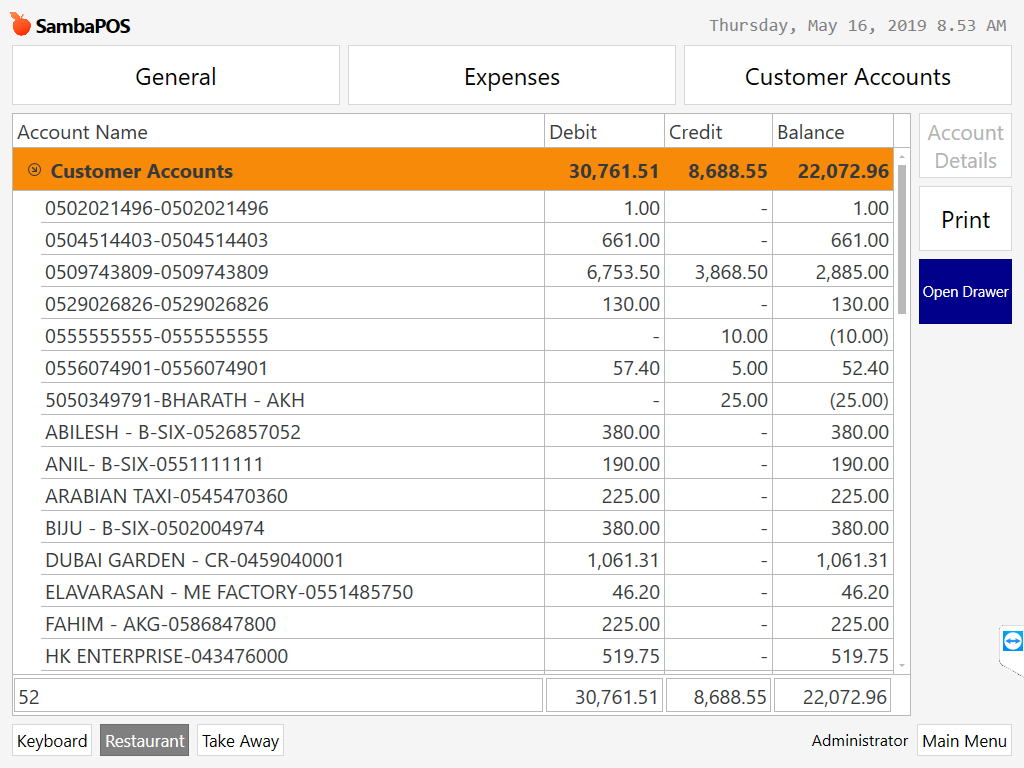
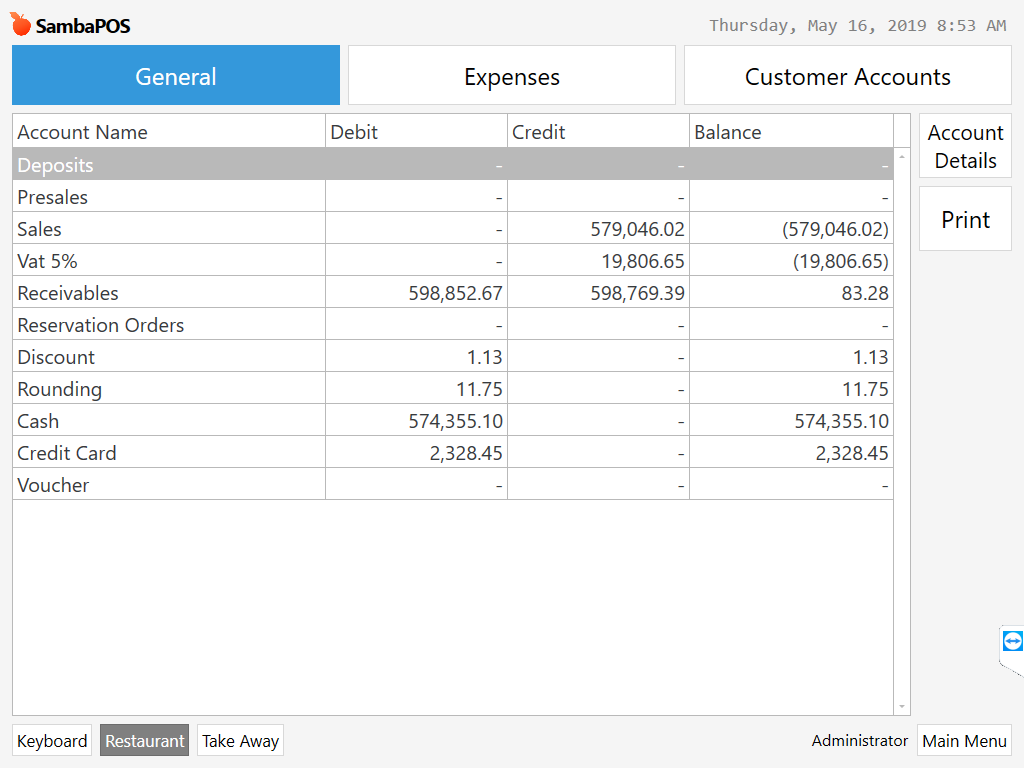
You have a transaction type setup wrong. Receivables should have a 0 balance.
What if , there are open tickets that is not settled yet