Hello Friends,
I have a setup that has 3 Departments (BAR, GARDEN and KITCHEN)
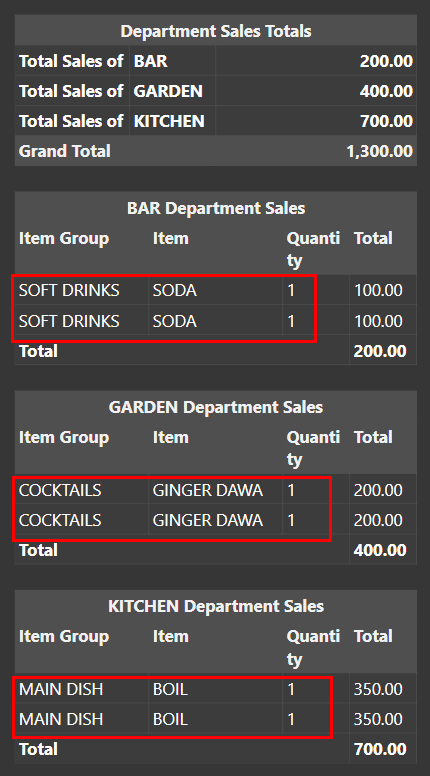
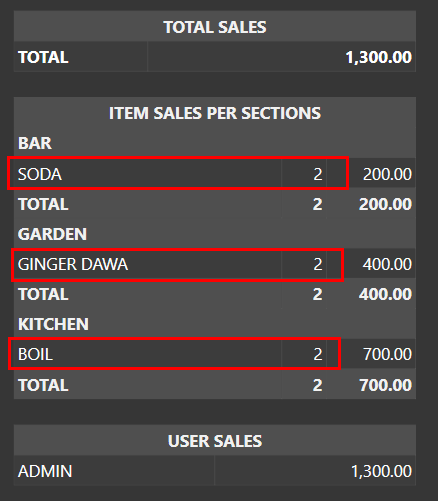
I have a Sales Report that has actually been giving me the correct report.
[TOTAL SALES:1, 1, 1]
@{REPORT ORDER DETAILS:O.MenuItemName,O.ExactTotal.Sum:(ODI=True):{0}:,}
{REPORT ORDER DETAILS:O.MenuItemName,O.Quantity.Sum,O.ExactTotal.Sum:(ODI=True) and (TY=$1) and O.MenuItemName=“$2”}
{REPORT ORDER DETAILS:’ '+[O.PortionName],O.Quantity.Sum,O.ExactTotal.Sum:(ODI=True) and (TY=$1) and O.MenuItemName=“$2”:2}
>TOTAL|{REPORT ORDER DETAILS:O.ExactTotal.sum}
[ITEM SALES PER SECTIONS:6, 1, 2]
@{REPORT ORDER DETAILS:O.Department.asc:(ODI=True):,}
@{REPORT ORDER DETAILS:O.MenuItemName,O.ExactTotal.Sum.desc:(ODI=True) and (DE=$1):{0}:,}
>>$1
{REPORT ORDER DETAILS:O.MenuItemName,O.Quantity.Sum.desc,O.ExactTotal.Sum:(ODI=True) and (DE=$1) and O.MenuItemName=“$2”}
{REPORT ORDER DETAILS:’ '+[O.PortionName],O.Quantity.Sum,O.ExactTotal.Sum:(ODI=True) and (DE=$1) and O.MenuItemName=“$2”:2}
>>TOTAL{REPORT ORDER DETAILS:MT.productType,O.Quantity.sum,O.ExactTotal.Sum:(ODI=True) and (DE=$1)}
[USER SALES:1, 1]
{REPORT ORDER DETAILS:O.User,O.ExactTotal.Sum.desc}
@{REPORT PAYMENT DETAILS:P.User,P.Amount.Sum::{0}:,}
My client (Business Owner) has asked that he wants 3 separate reports (1 for each of the Departments) as he has separate supervisors for each department that he wants to be analyzing their own departments.
I have tried adding the filter (OD.DepartmentName=BAR) as below but am getting a blank report instead.
Could someone assist me with it…
[TOTAL SALES:1, 1, 1]
@{REPORT ORDER DETAILS:O.MenuItemName,O.ExactTotal.Sum:(ODI=True) and (OD.DepartmentName=BAR):{0}:,}
{REPORT ORDER DETAILS:O.MenuItemName,O.Quantity.Sum,O.ExactTotal.Sum:(ODI=True) and (TY=$1) and (O.MenuItemName=“$2”) and (OD.DepartmentName=BAR)}
{REPORT ORDER DETAILS:’ '+[O.PortionName],O.Quantity.Sum,O.ExactTotal.Sum:(ODI=True) and (TY=$1) and (O.MenuItemName=“$2”) and (OD.DepartmentName=BAR):2}
>TOTAL|{REPORT ORDER DETAILS:O.ExactTotal.Sum:(ODI=True) and (OD.DepartmentName=BAR)}
[ITEM SALES PER SECTIONS:6, 1, 2]
@{REPORT ORDER DETAILS:O.Department.asc:(ODI=True) and (OD.DepartmentName=BAR):,}
@{REPORT ORDER DETAILS:O.MenuItemName,O.ExactTotal.Sum.desc:(ODI=True) and (DE=$1) and (OD.DepartmentName=BAR):{0}:,}
>>$1
{REPORT ORDER DETAILS:O.MenuItemName,O.Quantity.Sum.desc,O.ExactTotal.Sum:(ODI=True) and (DE=$1) and (O.MenuItemName=“$2”) and (OD.DepartmentName=BAR)}
{REPORT ORDER DETAILS:’ '+[O.PortionName],O.Quantity.Sum,O.ExactTotal.Sum:(ODI=True) and (DE=$1) and (O.MenuItemName=“$2”) and (OD.DepartmentName=BAR):2}
>>TOTAL{REPORT ORDER DETAILS:MT.productType,O.Quantity.sum,O.ExactTotal.Sum:(ODI=True) and (DE=$1) and (OD.DepartmentName=BAR)}
[USER SALES:1, 1]
{REPORT ORDER DETAILS:O.User,O.ExactTotal.Sum.desc:(ODI=True) and (OD.DepartmentName=BAR)}
@{REPORT PAYMENT DETAILS:P.User,P.Amount.Sum::{0}:,}