SQL Server 2022
SambaPOS 5.7.14
REPORT TICKET DETAILS
Report tag for getting an account transaction type amount from the ticket document doesn’t work, it also doesn’t work in all of its aggregate forms.
TTA.
`TTA.<account transaction type>`
`TTA.<account transaction type>.sum`
`TTA.<account transaction type>.count`
`TTA.<account transaction type>.percent`
REPORT ORDER DETAILS
There’s a discrepancy between the calculated tax values at the order level versus the ticket level. The tax totals don’t match between these two views.
- In the “Test” view (Image 1), the ticket tax column adds up to 14.60 (T.Tax) with a TX.VAT value of 14.61
- In the “Outlets Gross Net” report (Image 2), the tax value is shown as 57.02 (O.Tax.sum) with TX.VAT.sum as 56.89
- These inconsistencies suggest the tax is being calculated differently in different contexts
The likely cause is that the order model doesn’t store fixed tax amount values. Instead, the tax is recalculated dynamically in different contexts using potentially different calculation methods.
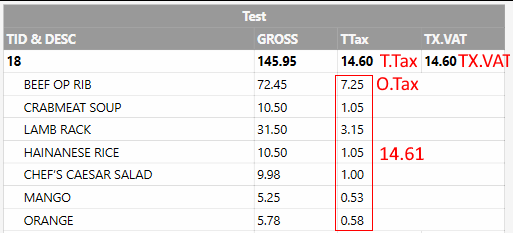

These values should be set once and directly match the tax transaction values from the ticket document rather than being recalculated by different parts of the engine.
- A fixed taxable amount field in order table (O.ExactTotal)
- A fixed tax amount field in order.taxes column