Hi Guys,
Ive got 2 tax groups on my systems 20% and 5%.
I need to pull a report that shows the total of all the orders that are subject to 20% and a total for 5%.
Is this possible.
Thanks
Hi Guys,
Ive got 2 tax groups on my systems 20% and 5%.
I need to pull a report that shows the total of all the orders that are subject to 20% and a total for 5%.
Is this possible.
Thanks
{REPORT ORDER DETAILS:O.MenuItemName,TX.VAT 20%,O.Tax:(DE=Pool)}
This is what ive got so far. But this lists every order in the department. I only want it to list the orders that are subject to VAT 20%.
Cheers
You want a list of sold orders or just a list of mapped products?
Something like this should do the job for list of sold orders and tax on them;
@{TAX TYPE LIST}
[Order $1:2,2,1]
>Product|Total|$1
{REPORT ORDER DETAILS:O.MenuItemName,O.ExactTotal.Sum,O.Tax:}
Hold on, not finished, needs tweaking… that will show all tax in 3rd column…
Thanks I was just replying lol
Hmmm, strugling to find a way to specify a single tax…
this is my struggle lol
Can you explain your need for this? Might help understand as not a usual request?
I currently have a report that displays the following (roughly)
Total Sales 500.00
20% VAT - 20.00
5% VAT - 12.00
I need to know the totals of the 500 that make up the separate VAT amounts. (The figures are only an illustration)
Does that make sense.
Cheers
But why on order level?
If vat is 20% and comes to 20 the total sales you know that was £100 exc, £120 inc aka £20 vat
Exc value is VAT5, Gross/inc value is VAT6
I don’t mind it on ticket or order level.
Basic but something like this?
[Tax Breakdown:2, 2, 2]
Sales|{REPORT TICKET DETAILS:T.TotalAmount.Sum}
VAT 20%|[={REPORT TICKET DETAILS:TX.$1.Sum}*5]|{REPORT TICKET DETAILS:TX.VAT 20%.Sum}
VAT 5%|[={REPORT TICKET DETAILS:TX.$1.Sum}*20]|{REPORT TICKET DETAILS:TX.VAT 5%.Sum}
I obviously dont know both your tax names…
It might not be to the penny as there may be tax rounding issues but your VAT value will be accurate
Works while tax s round number…
If not round numbers you then have to do divide by then multiply by.
So 17.5% would become TAX TOTAL / 17.5 * 100 to get the exc value.
Like such;
[Tax Breakdown:2, 2, 2]
Sales|{REPORT TICKET DETAILS:T.TotalAmount.Sum}
VAT 20%|[={REPORT TICKET DETAILS:TX.$1.Sum}/20*100]|{REPORT TICKET DETAILS:TX.VAT 20%.Sum}
VAT 5%|[={REPORT TICKET DETAILS:TX.$1.Sum}/5*100]|{REPORT TICKET DETAILS:TX.VAT 5%.Sum}I am having a problem calculating Zero rated tax in my country. So this is tax at Zero percent. eg, I have 2 categories that have Zero Rated products and the rest of the categories are calculated at 16%. In a situation where i am trying to archieve this in reports.
Total Taxable amount: xxxxx
Total amount taxed @ 16%: | total 16% tax
Total amount Taxed @ Zero rated (0%) | 0.00
The problem is that with the Zero rated i can not do what you did on top,
16% Sales|[={REPORT TICKET DETAILS:TX.16% Tax.Sum}/16*100]|[={REPORT TICKET DETAILS:TX.16% Tax.Sum}]
Because of the zero. The tax calculation is working fine in the pos even the 0 rate in the product tax template for the zero rated (which i am also not sure of if its the right way of doing it. How else could this be done?
I don’t understand why you would even bother to calculate anything if it’s 0.
I get you, my intention is to pull the total zero rated groups total, Which i could also get by group code but i am having a hard time this in the reports eg.
{REPORT TICKET DETAILS:MenuItem.GroupCode == "Bread"}
that is not pulling anything which make me think its wrong,
It is wrong. That is not valid Report Syntax for a Field Selection nor a Filter Expression.
Read how to make a proper Report: Custom Report Tags
Thanks i can see that i could use the MG tag for menu group code, but i have decide order tags would be easy in future if we wanted to expand fuctionality to other groups, so now i am stuck on how to use the OT.TagName to filter in the reports
Zero Rated |{REPORT ORDER DETAILS:(OT.ZR="zr"):O.ExactTotal.Sum}
How do we use these filters? ZR is the tag name and zr is the value of the Tag
So i have created an action Tag Order where i have name and value placeholders which i am updating in the rule, with the group constrain. I just need a way of filtering order total with this tag.
That will not work. It is not valid syntax. You cannot just make stuff up. Read the WiKi document to learn how to form proper Report Syntax.
Surely custom product tag would be better than order tags…
Thanks all forthe help, though i am still having a problem with the tax breakdown section in the below report. Seems to be calculating the correct tax total but when i add the
taxable amount + Vat total + zero rated = x
I expected x to be equal to the grandTotal but this is not the case.
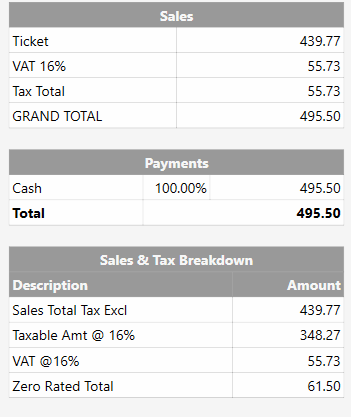
[Sales & Tax Breakdown:2, 1]
>Description|Amount
@{REPORT ORDER DETAILS:O.Total.sum:(MG=Bread)}
Sales Total Tax Excl|{REPORT TICKET DETAILS:=[T.TotalAmount.sum]-[T.Tax.sum]}
Taxable Amt @ 16%|{REPORT TICKET DETAILS:=[TXT.VAT 16%.sum]-[T.Tax.sum]}
VAT @16%|{REPORT TICKET DETAILS:T.Tax.sum}
Zero Rated Total|{REPORT ORDER DETAILS:O.Total.sum:(MG=Bread)}