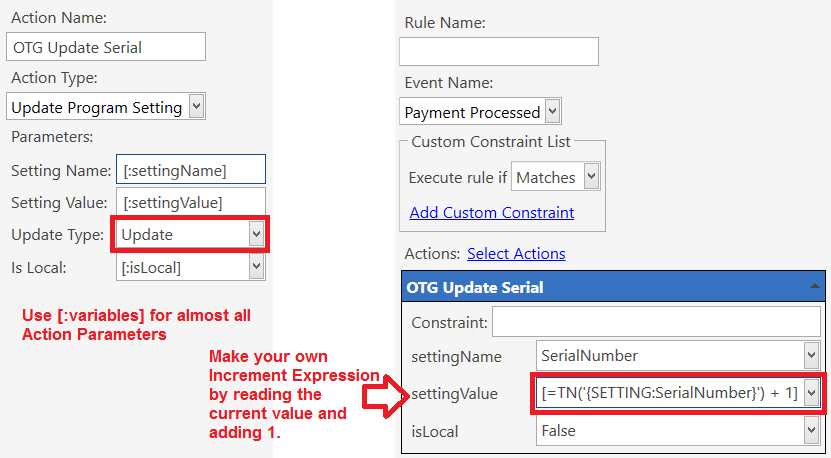
Don’t do that ^.
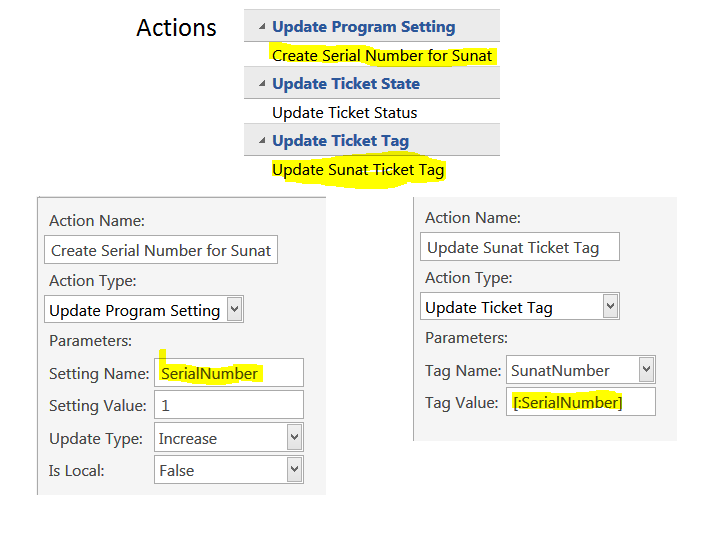
Don’t hard-code things like Program Settings into an Action.
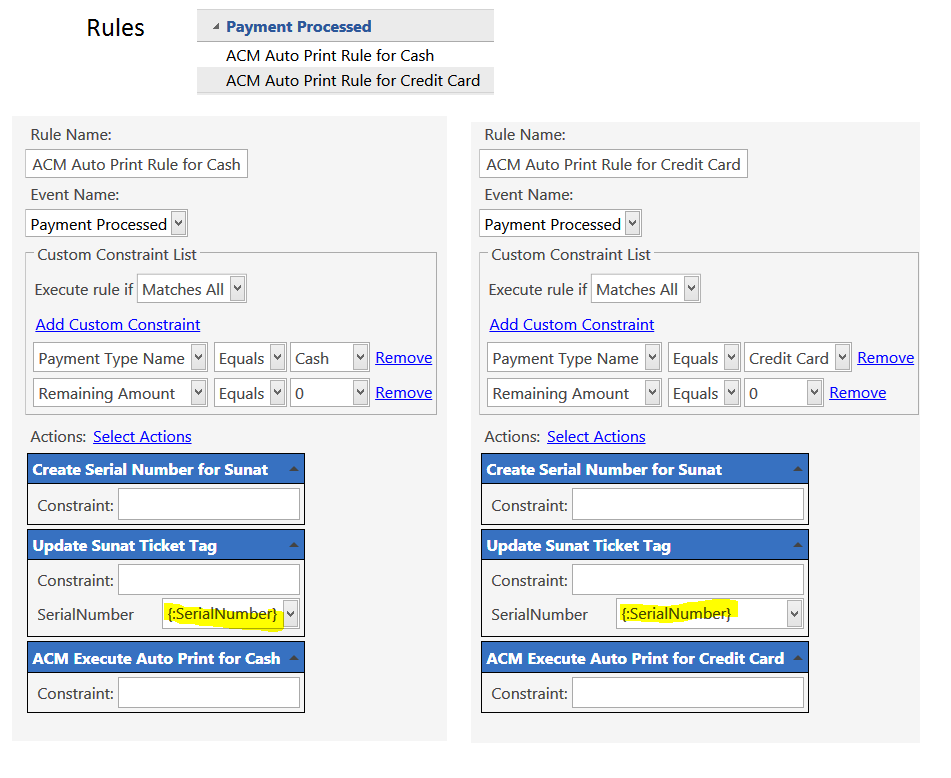
Instead, use a [:variable] for Action Parameters, and set the Parameter for the Action in the Rule.
Make your action like this:
Action Update TT - "Update Ticket Tag"
Tag Name: MyNumber
Tag Value: [:serialNumber]
Remove that ^ Action from your Rule, and Save the Rule.
Open the Rule and add the Action back in. You should now see a field for serialNumber in the Action.
Put {:SerialNumber} or {SETTING:SerialNumber} in that field.
Yes. The Program Setting is stored in the Database when IsLocal=False.
You are not changing that Action anyway (not that it would matter in this case); you are only changing the Ticket Tag Action (and the Rule to use the updated Ticket Tag Action).
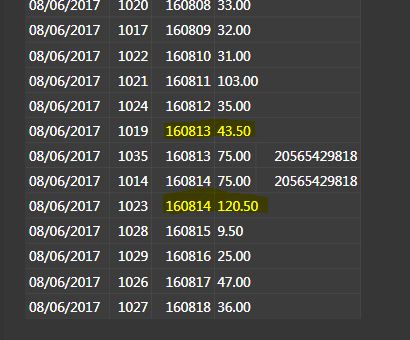
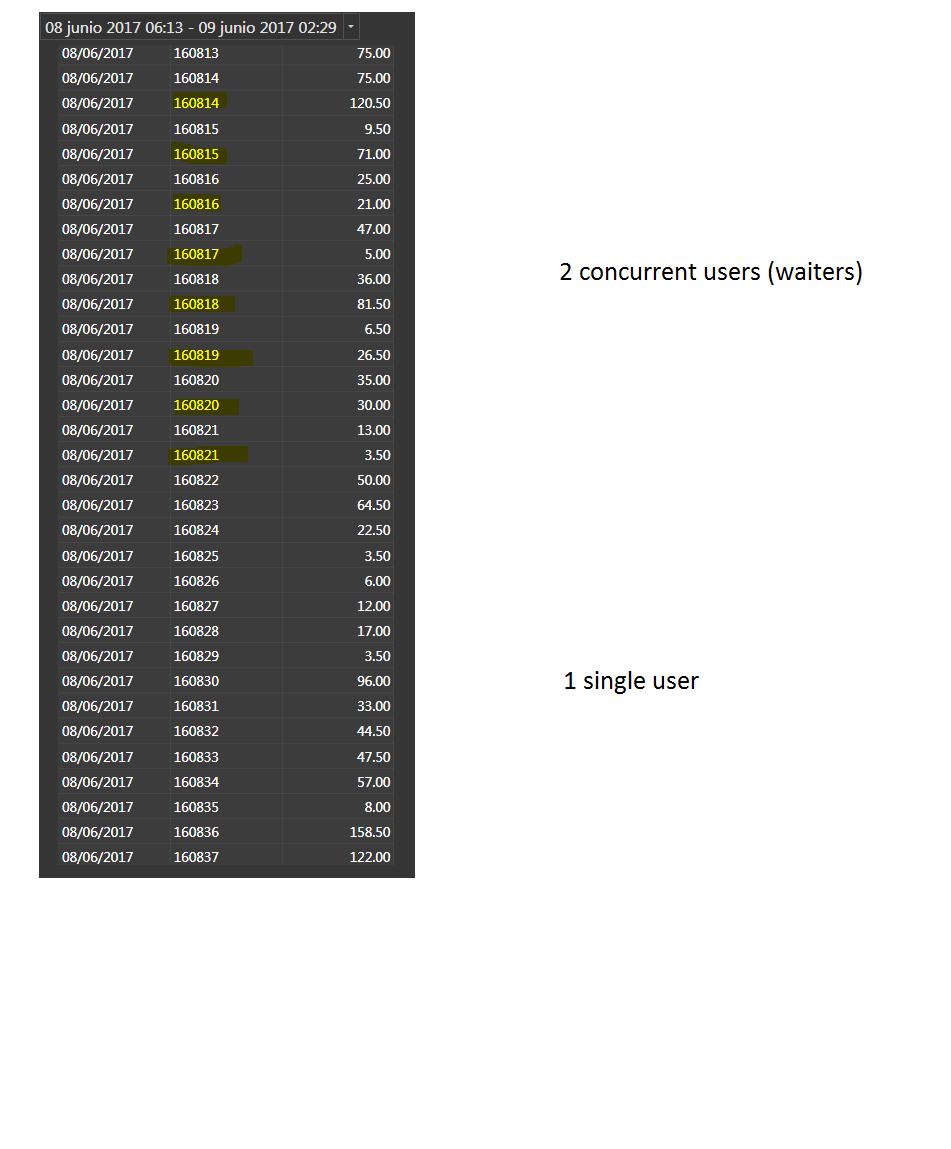
My own Ticket number (MyNumber), a Ticket Tag (IsLocal:false)
Ticket Total Amount
MyNumber is generated at payment time, when automatic printing. (Btw the 2 bills of 75.00 are really 2 different bills, it’s a coincidence if they are the same amount, it is not twice the same ticket.)
Now we can see that MyNumber (which should be unique) is repeating.
Waitresses work on 2 Tablets that RDP to different windows users on a single computer.
1019 - 160813 - was closed at 18:43 by Tablet 1 > User 1 (the first yellow)
1035 - 160813 - was closed at 19:20 by Tablet 1 > User 1
1014 - 160814 - was closed at 19:21 by Tablet 1 > User 1
1023 - 160814 - was closed at 19:01 by Tablet 2 > User 2
So:
{SerialNumber} = 160812
18:43
tkt 1019 closes with MyNumber at 160813 by tablet 1
Variable {serialNumber} = 160813 (OK, it has been incremented by 1)
19:01
tkt 1023 closes with MyNumber at 160814 by tablet 2
Variable {serialNumber} = 160814 (OK, it has been incremented by Tablet2)
19:20
tkt 1035 closes with MyNumber at 160813 by tablet 1
Variable {serialNumber} = 160813
It looks like that tablet 1 still think half an hour later that the global variable is 160812, increment by 1 and print.
I am lost …
I am digging, I will restart the whole système and watch the ticket closing … hope that by tomorrow the problem has solved because this ticket number is really important.
1 computer running windows 7
5 users (4 waitresses + the server)
Only 1 terminal defined (the default : Server)
Other user has no special terminals defined (Terminal Name : blank) after double check this is NOT TRUE (Terminal Name = Server)
I have this problem ONLY when 2 waitresses are working at the same time.
When only one waitress works, MyNumber are serial without double.
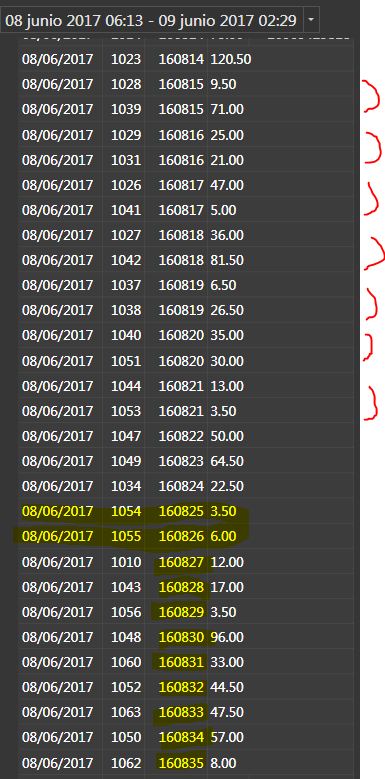
Here is an example, I also check for the 9 days, same behaviour.
one user ok (yelow)
two users double
Some questions:
It looks like they each have their “own” global variable, Does IsLocal:False work ? Where can I check that setting (SQL?)
The above is not exactly true because when a waitress clocks in, she’ll start with the “correct” number, then will come the issue.
Do I need to setup the message server/client?
Do I have to configure the local settings for each windows user (make different terminal)? I use same printers for everybody.
No they dont have their own value unless you set it to do so.
IsLocal: False works.
You can use SSMS to open Program Setting Table. Or GQL or Show Message to read the number.
Don’t think it has something to do with that.
So I think you tag the ticket and the rule not update serial number right away. Make sure right after you tag the serial number and you have action to update it right away.
Theoretically yes, though I rarely ever use the short-form, since I am used to that form being Local rather than Global (throwback to older versions). You can force selection of Local (read fro memory) or Global (read from DB) Program setting with:
I replace with {GLOBAL SETTING:SerialNumber}
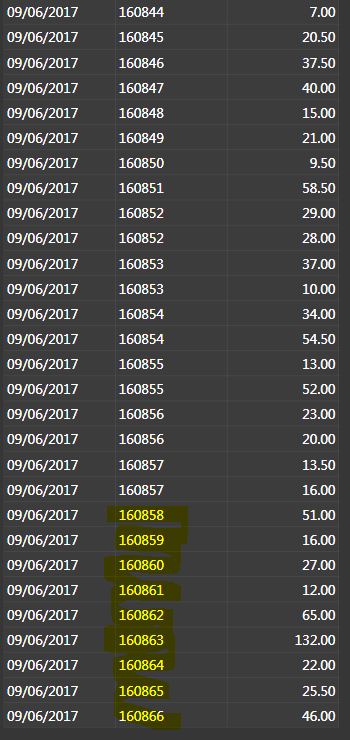
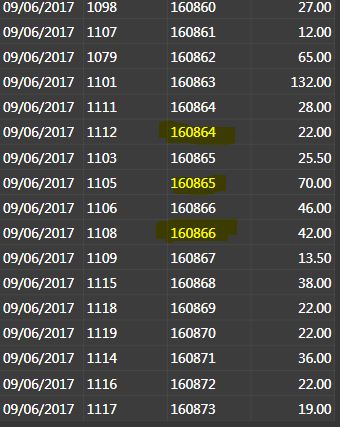
Up to now it works … no more double numbers: Numbers in yellow are generated since I have done that change.
I’ll confirm later tonight with more data.
That also means that IsLocal : False does not work or that I understand it bad.
Btw : I did so for a friend’s restaurant 3 years ago, but V4, and I had no issue.
@QMcKay I might need your db skills tomorrow as I’ll have to modify about 1200 ticket tag in the database
IsLocal=False does work. Never had any issues with it in 5 years. Possibly you have an old version of the Action cached in the Rules. Remove the Serial Update from the Rules, save the Rules, add the Actions back in, and Save the Rules.
V4 way a long time ago and much has changed. I suppose it is possible that some optimization is creating a race-condition and the update is not occurring fast enough before the Ticket is Tagged.
##Try this:
Another way to increment a value (and the way I always do it), is like this:
How does this ms sql server works?
Each windows user make some transactional table before updating the database?
It smells rare
Times are the same for the 4 windows users (Lima)
(I cannot test … I have to wait to have real tickets and check them … it takes time)
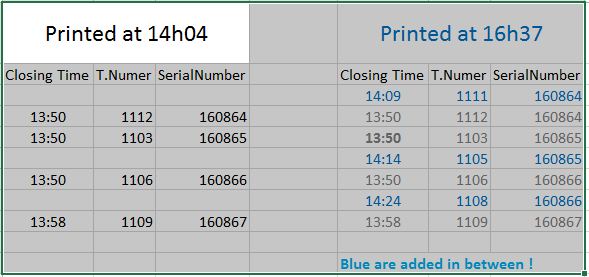
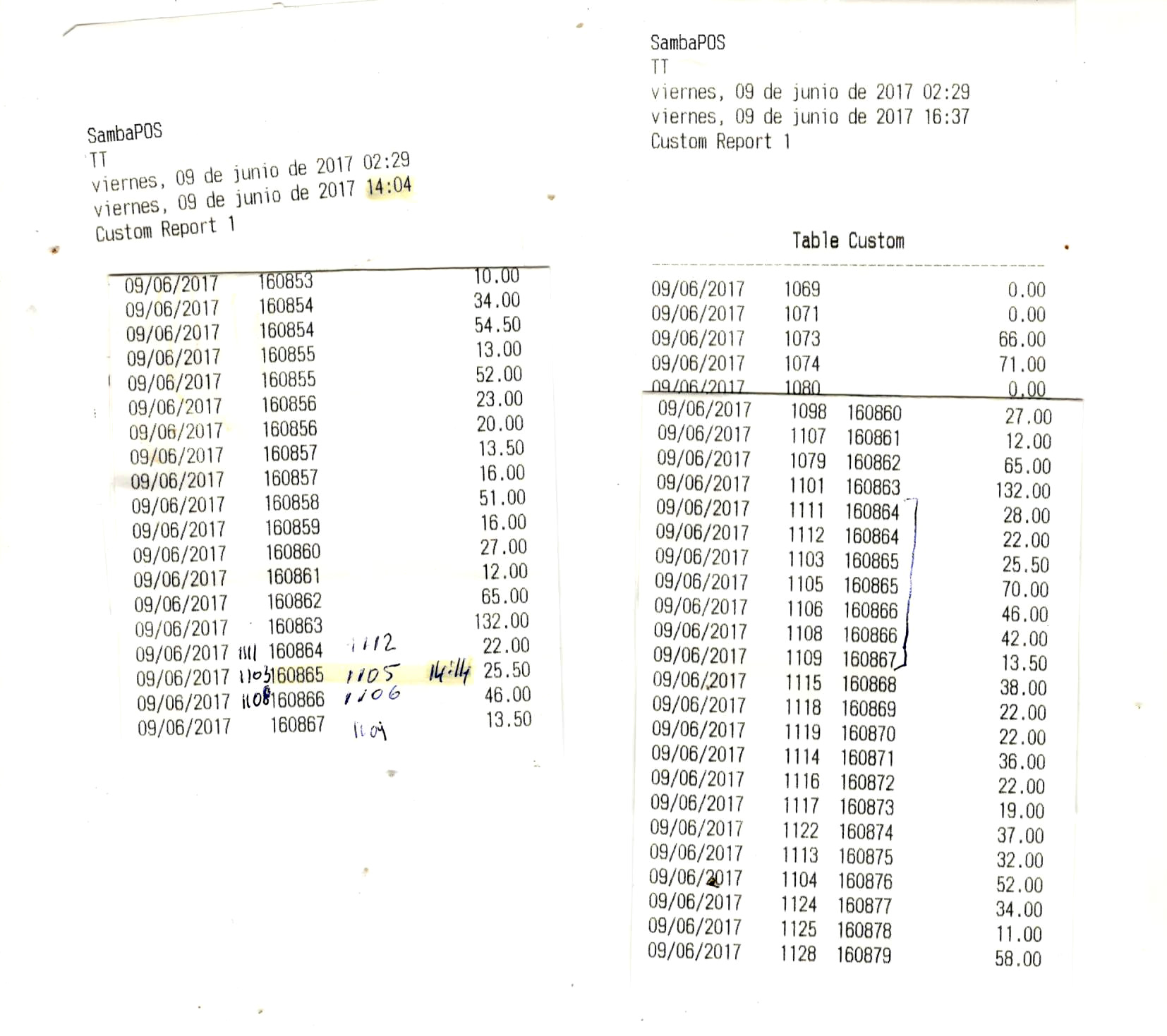
I print out a report at 14:04
I generate the Serialnumber in PaymentProcessed so at the closing-for-ever time of the ticket, which is the time I can see in the ticket list Op-Cls column
A merged Tickets will leave Tickets with 0.00 balance so you can see them pretty clearly in the Ticket Explorer.
I am wondering if your Rules are not in the correct order for what you are trying to do.
Maybe you need to move the Ticket Tag assignment into another Rule or something. Rule ordering can be important sometimes though.
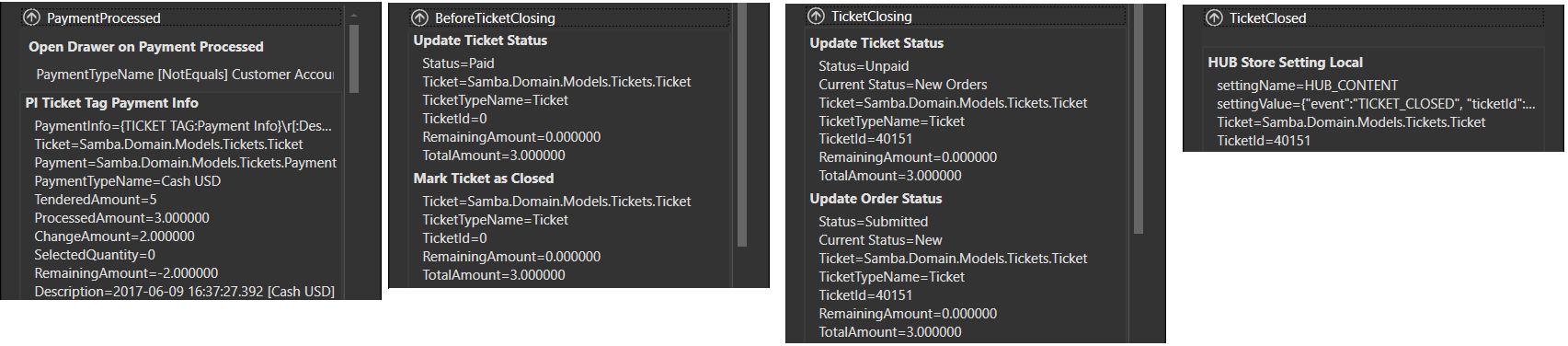
We have:
Payment Processed
Before Ticket Closing
Ticket Closing
Ticket Closed
We also have an Action for Mark Ticket Closed. This is probably only in a single Default Rule named Ticket Payment Check which is a Before Ticket Closing event.
Looking at Rule Debugger, we can see which event comes before which when a Ticket is fully Paid, and it is the same order as I listed above. You can ignore the Automation Command Executed Rules
Pick out important Rules and Actions … There is a lot more going on in my system during these Events; this is just an example… can you see anything strange in your Debugger?
Using a global program setting value as a serial number works very well. I use it in my setup daily without a hitch. The actions work just fine and its not something with MS SQL. It more than likely is something with your rule configuration or actions or combination of the both. It can be anything really. We just need to figure it out.
Using program setting to do what you are attempting to do can be tricky if you have a complex flow with multiple terminals. Remember it is fully dependant on your rule flow and what the event does and how it interacts with the built in hard coded system to prevent duplicate tickets if two different terminals taking orders at same time.
If you are merging tickets… you need to account for that with your system that you built. Same thing with any other automation you might be doing.
I may have missed this a long time ago but you are aware that we have {TICKET ID} which is a unique number not the same as {TICKET NO} right? Every ticket is assigned a unique TICKET ID even the voided or merged tickets.



 and much has changed. I suppose it is possible that some optimization is creating a race-condition and the update is not occurring fast enough before the Ticket is Tagged.