My void and cancel buttons are not working on my live system in the restaurant and bar, I think the database has been corrupted.
On my test computer they work OK.
So I have copied the live database from the live computer and attached it to to my test computer and the void and cancel buttons do not work and closes the software down.
That tells me it has to be the database at fault, everything else is OK except maybe “move” is not working either but that’s not really a problem.
Any ideas how I can correct the problem?
Rgds
Outback Bar Thailand
Its not a database fault. Its a configuration mistake. You changed a rule or action or automation command. Look at the rules for those buttons make sure they contain mappings. You changed something that broke them so you have to figure out how you broke them and change it back.
I have been looking for the problem for the last month but I can’t find the error.
I have compared like for like on both computers, test and live.
I am 95% certain that the rules and commands I have are the same on both computers, hence the question.
Thanks BTW for your rapid response, I have even tried restoring the default buttons, but now I have run out of ideas. Could there be a conflict somewhere?
Rgds
Outback Jack
There is a config issue so show your rules,actions,commands and show mappings for each in screenshots we can help you find the mistake.
Or pm me a backup of the db and I can take a look for you.
Hi Kendash
I still can’t see it, my config is the same on both computers and the gift button has the same problem and I have never reconfigured that
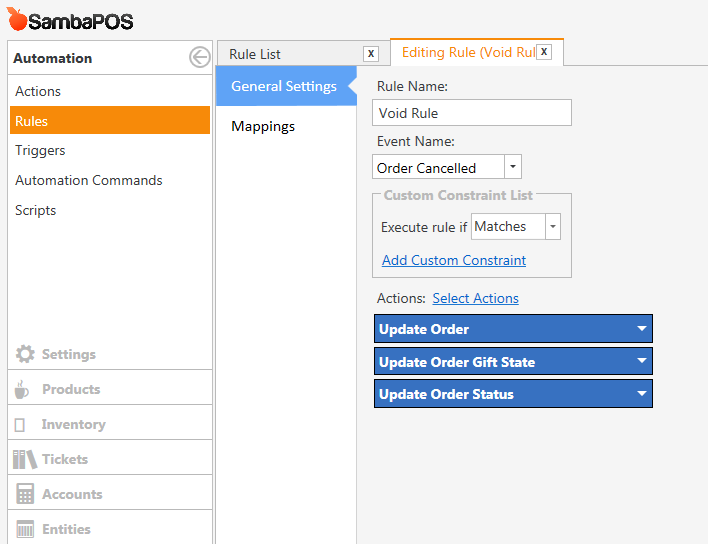

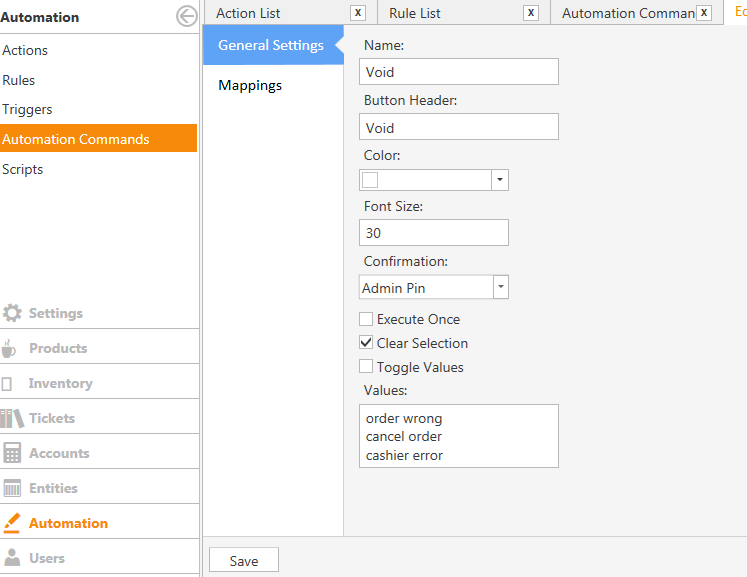
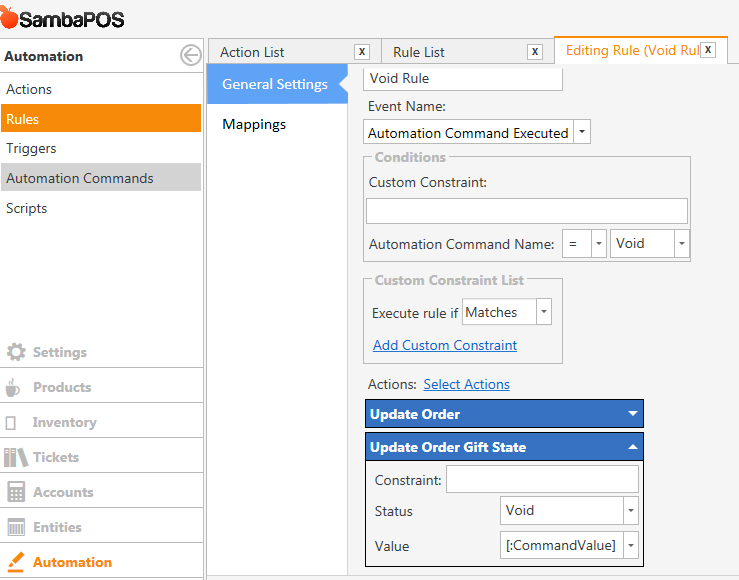
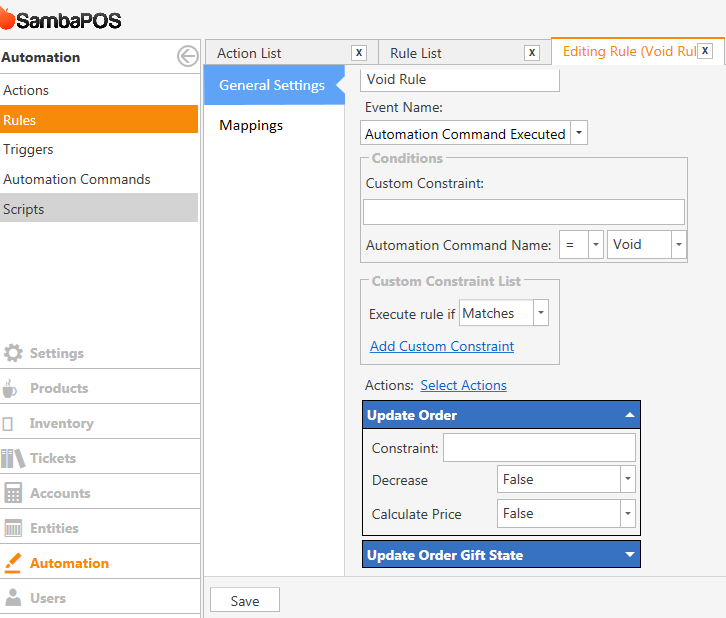
I have taken a copy of both databases sambaPOS3 is the one with the problem, sambaPOS4 works fine.
I will try to send them separately
Rgds
Outback Jack.
I have copy of both databases but I don’t know how to send them to you.
Rgds
Where you have the void reasons in your void automation command button there should be an action somewhere that uses [:Command Value] to add those reasons, without that i dont think it will work
Those reasons you have added and they arnt default setup so that could be the reason its not working if you havent got that configured correctly?
He has it configured correctly.
Why using v3? Anyway try remaking them from scratch.
You should update to v4 unless there is a specific reason your still using v3?
Now I’m really puzzled , I’m not using V3, I’m on latest V4 , maybe it didn’t update properly
I could transfer, everything from my test computer database to my live database, but that is a lot of work,
Any other ideas? I can send the two databases if somebody tells me how to do it.
Rgds
Outback Jack.
I said what I said because you said:
So you just named it SambaPOS3 but your actually running 4. You do have some old v2 rule constraints that could be part of issue. You may need to delete them and remake them all from scratch via the remake default buttons again. But be sure you delete the Rules, Actions, Automation commands for each button first before running the maintenance task.
Hi Kendash
Both computers are running SambaPOS4, sorry if the naming of the database is confusing.
I wondered if it was a problem with the computer, because if I try to double click the SambaPos icon in the top left hand corner, the window will not reduce to the windows format, which is strange.
I can load everything again from my test computer which will take some time, and then transfer the database.
I don’t think there will be any left overs from Sambapos2 or 3, since everything I have done was developed through the test computer. I never went live until everything was working, but at that stage I would not really have been looking at voids etc all that closely.
The screenshots you showed from your live system… those contain v2 constraints… so some of v2 was retained for whatever reason.
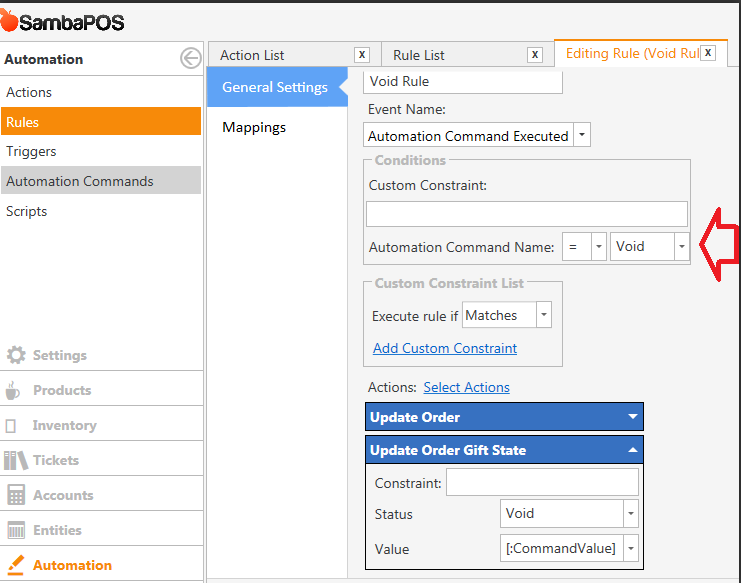
Should look like this.
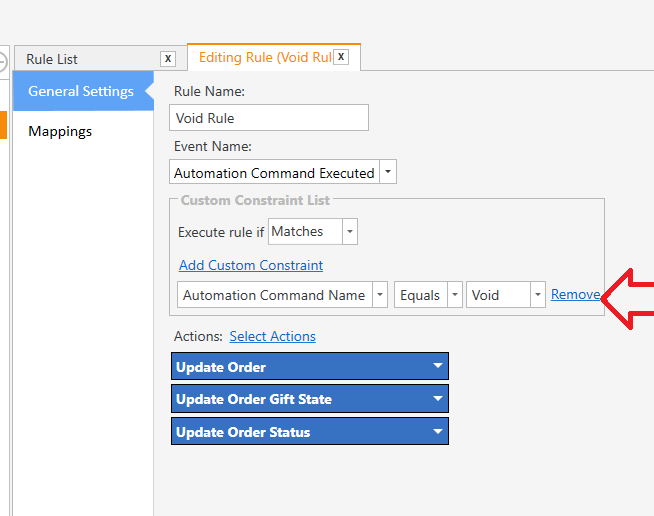
Order cancelled rule works when you remove a newly added order by clicking cancel button so updating that order’s state has no meaning. You can remove it.
Switching to windowed mode works when you are not on login screen because it tied to a permission and to be able to check permission we need a logged in user. So login with your pin code and try again.
What does it mean? Does it show an error message?
Hi Emre
The computer just goes into “not responding” mode and has to be shut down. I have now found a number of other issues relating to adding order tags, which also shuts the software down. I do now believe it is the database causing the problem.
I believe the fastest way for me to solve the problem is to bring the test computer up to date and replace the restaurant database with a new version which is problem free, it’s almost the same anyway.
However, I would like to know what caused the problem, if you want to have a look at the 2 databases just tell me how to send them to you.
Rgds
Outback Jack
Create a database backup, zip that and PM me that zip file.
PM means:
- Click on my picture.
- Click
Private Messagebutton. - Drag and drop zip file in message typing box.
I tried all the other ideas to no avail.
I am currently updating the software on my test computer.
It’s late here now, I will send the 2 db tomorrow
So just curious did you try to delete all the actions and rules and remake them from scratch?
BTW it could be something with your setups database because it looks like you migrated that db from v2 at some point. But we should be able to correct it. However a fresh install of latest version with a fresh database would more than likely resolve it. You just would have the inconvenience of rebuilding your system.
I am sure @emre will spot the issue quickly when he looks at it. I personally feel its something to do with old v2 rule constraints.
Can’t upload ZIP files, computer says too large
Backup your running database then clear all transactions and backup again and send the copy without the transactions. Restore the copy that has all your transactions.
2 Likes
Outback first of all click Rebuild Default Buttons and Upgrade old Rules buttons on Program Settings > Maintenance section.
Your V3 database backup does not have a Void button at all. It have Cancel button. You’ve added it as an automation command but defined no rule for it. So it does nothing when you click Cancel and select a Reason. There are other small configuration issues as well. For example you can set a single height value for all category buttons so that gap between buttons will disappear.
I’ll suggest you to create a new V4 setup on a separate computer and review your rules, actions and automation commands to check how they should be configured.