Have searched a few times and found people asking the question but never a suggested solution to achive.
While I understand the reason for having multiple tickets on one table that situation does not apply to the setup in question.
Has anyone got a suggested solution?
Only was I can think of is a program setting logging ticket ID to table names, and a rule which checks if there is already a ticket on a table and merges them. Would need a few constraints to set when to merge and when to log and another rule to clear setting.
Anyone got an easier solution (other than always selecting table first  that doesnt always work as customer wont always make it clear that they have a table tab).
Thanks in advance for any advice.
Can you remind us what setup we are talking about? I dont think I remember it?
I mean just that multiple tickets on a single table entity is not something that is needed and would prefer an automerge type setting.
I am not sure I am following you. Why would you get multiple tickets on a single table entity? Forgive my ignorance I run a Fast Food and have not setup a sit down table restaurant setup yet.
If you ring in the orders, then select entity you get two tickets,
If you select entity first it adds orders to ticket.
As customer doesnt always specify they have a table open before ordering selecting the table first doesn’t always apply.
Would like to make the open orders add to the current ticket on that entity when selected.
Hmm that sounds odd. I think I may be confused. On mine if I ring up orders and then select entity it keeps it the same ticket?
Do you mean if you ring up orders then select a table that already has a ticket started?
it doesnt change the ticket it adds a second ticket (the new one) to the entity.
Next time you select the entity it shows two tickets and gives option to merge, looking to automate that merging when the second ticket to set to an entity already in use.
Ok I understand you now… You were inferring that a ticket was already started on Table A for example. you ring up someone then they say oh I am with Table A. IF you select that table it adds it as another ticket instead of merging it into the already prepared ticket?
Hmm this should be possible I will load a default database and play around with it.
I have one question though… what if its a table with multiple parties and each party wants separate ticket? Just plan to use the split function at payment screen?
We have access to Merge Tickets action. We should be able to loop ticket Numbers into the action. We can easily get {TICKET ID} from the current ticket but we would need {TICKET ID} from the ticket currently assigned to that entity.
Not sure of the definition of loop but an working towards using the merge action. with program setting to remember the ticket number of the first ticket set to the entity.
I think changing entities (tables) might be an issue, as i understand entity selected and entity changed are completely separate events, ie entity selected does not include entity changed?? changing entity will be similar ‘loop’ issue, how to clear the ticket id from the ‘old’ entity when changing entities…
Does that make sense?
Yes so just to be clear this is specific to a setup that uses Tables but has POS set to Create Ticket by default. So flow is you can ring up items and then select table vs selecting table first.
What we have is access to Merge Tickets action so thats good. What our issue is… is figuring out how to define the tickets to be merged.
@emre is there a way to read Ticket Ids that are currently assigned to an Entity? Or am I thinking about this wrong? Maybe program setting is way to go…
EDIT: SO this does work. On Ticket Closed event you can store a program setting with Name of {ENTITY NAME:Tables} value of [:Ticket Id]
Logging with program settings was my thought.
THis is my first step rule;
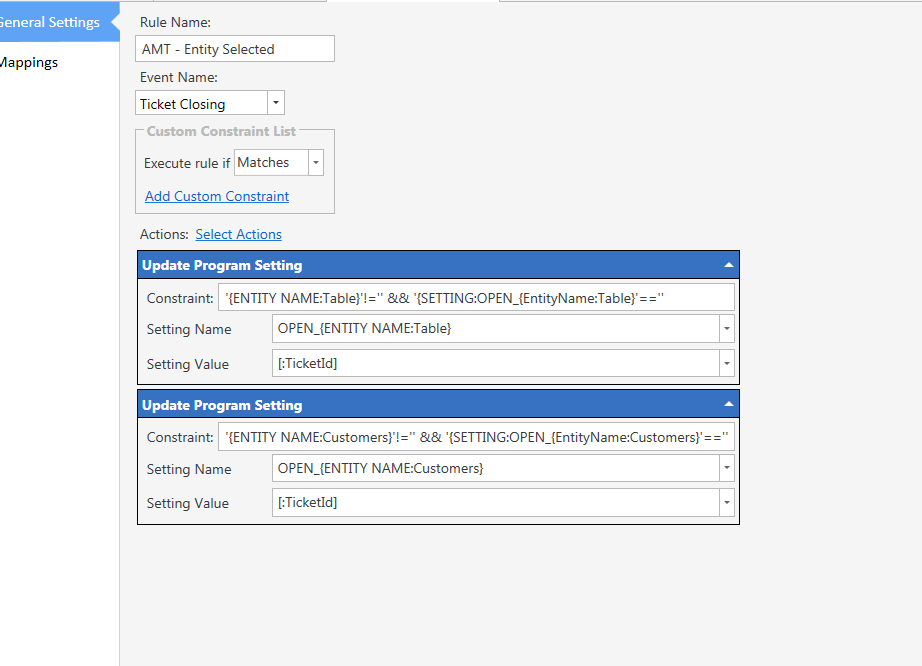
Havn’t tested yet, just finished constraints.
Ticket closing wont work because Ticket Id not generated yet… it would work if it was closed once already.
You sure?
Similar method used in my switch user setup im sure.
Just tried and seems to work!!!
The merging tickets will be the issue, not closing/loging the ticket ID on first ticket. There wont be a ticket ID on the second order :-/… unless both are on ticket closing;
if setting value for that entity is not blank merge program setting ticket and current ticket… maybe…
Ticket has to be closed to get a Ticket ID. That is the issue with the current ticket.
if all actions are on ticket close with some creative constrints… am testing now
What format is needed for merging tickets? comma separated?
Pretty sure you can get ticket id on ticket closing event!
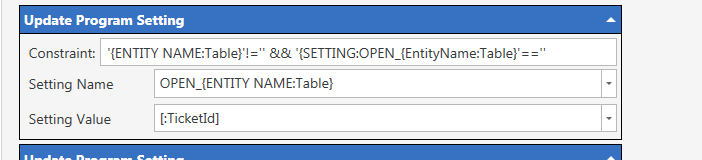
On ticket close event is putting ticket id against OPEN_T01 setting name…
Issue I cant work out is this action with that constraint is overwiting the setting value with second ticket (not got to merge yet)
'{SETTING:OPEN_{EntityName:Table}'==''
My understanding is this constraint should prevent overwriting of the program setting… It requires the value to be blank shouldnt it?
Have i missed something.
All that constraint is doing is telling it to only execute if Tables Entity is not empty and if that setting is empty.
However your syntax is wrong {SETTING:OPEN_{EntityName:Table} is not correct
- You have no closing } and 2 it should be {ENTITY NAME:Tables} not Table unless you changed the Entity Name from default. Its also Case Sensitive. EntityName:Table is not the same as ENTITY NAME:Table
Yes,
This is on the ‘log first ticket rule’
If table is not empty (table is selected) and the setting for that table is empty to write the ticket id to the setting value for OPEN_(table numeber)