Is there a Printer Tag for Product Timers?

I would like to print the details of a order with the details of the product timer.

I already noticed that i’ll have to use {LINE AMOUNT} instead of {TOTAL PRICE} as total price = quantity * price, without the product timer multiplier.
So i can calculate the multiplier of the product timer using {LINE AMOUNT} and {TOTAL PRICE} but i was wondering if there is an easier/better way and if it was possible only to show this for products with a product timer ?

It will be better if you can show an example to help us understand how you use product timers and what you specifically want to print.

Ok i was checking if i could use the product timer for Renting out something, like a bicycle.
I have products renting out for a day or per hour.
If you click on the product you get the timer details; Beginning, Ending, Duration. Those are actually details i would like to print this on my Bill for every product that has a product timer.

Now i use this for printing:

[ORDERS]
-- Default format for orders
<TableRowGroup><TableRow>
	<TableCell></TableCell>
	<TableCell><Paragraph TextAlignment="Left">{ORDER DATE}</Paragraph></TableCell>
	<TableCell><Paragraph TextAlignment="Left">{NAME}</Paragraph></TableCell>
	<TableCell><Paragraph TextAlignment="Right">[=F(TN('{LINE AMOUNT}')/TN('{TOTAL PRICE}'),'#,#0')] x         </Paragraph></TableCell>
	<TableCell><Paragraph TextAlignment="Left">{QUANTITY} x {PRICE}</Paragraph></TableCell>
    <TableCell><Paragraph TextAlignment="Right">{LINE AMOUNT}</Paragraph></TableCell>
</TableRow></TableRowGroup>

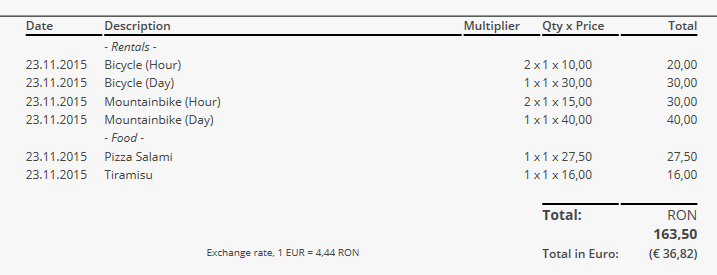
Which will give me something like this

:

The problem is that Multiplier (Which isn’t the best name, but…) also will be printed for my normal products. And i would like to print the start and end time as well.
To be honest I kind of expected that there would be printertags for product timers like {PRODUCT TIMER NAME}, {PRODUCT TIMER START:X} or something like that :slight_smile:
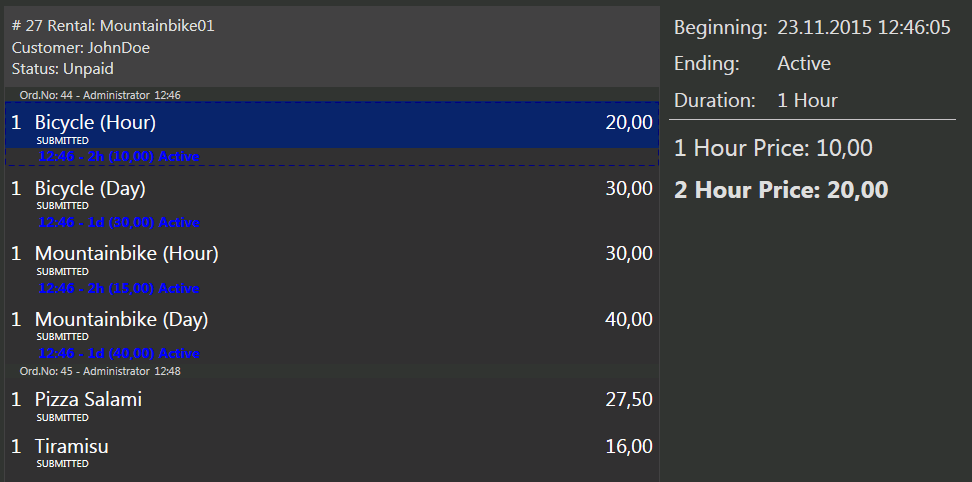
I’ll add these printer template tags for next update (.55). You can use them inside order line template.

{PRODUCT TIMER START TIME}
{PRODUCT TIMER END TIME}
{PRODUCT TIMER PRICE}
{PRODUCT TIMER VALUE}
{PRODUCT TIMER NAME}
{PRODUCT TIMER DURATION}

@Emre That’s Quick, Thanks a lot :smile:

Just an example
My example printer template:

[ORDERS]
-- Default format for orders
<TableRowGroup>
<TableRow>
	<TableCell></TableCell>
	<TableCell><Paragraph TextAlignment="Left">{ORDER DATE}</Paragraph></TableCell>
	<TableCell><Paragraph TextAlignment="Left">{NAME} [{PRODUCT TIMER START TIME} /{PRODUCT TIMER END TIME} /{PRODUCT TIMER PRICE} /{PRODUCT TIMER VALUE} /{PRODUCT TIMER NAME} /{PRODUCT TIMER DURATION}]</Paragraph></TableCell>
	<TableCell><Paragraph TextAlignment="Right"></Paragraph></TableCell>
	<TableCell><Paragraph TextAlignment="Left">{QUANTITY} x {PRICE}</Paragraph></TableCell>

{LINE AMOUNT}


{ORDER TAGS}

Will give this result

A better example also using Optional Template lines improvements:

The Printer Template:

[ORDERS]
-- Default format for orders
<TableRowGroup>
<TableRow>
	<TableCell></TableCell>
	<TableCell><Paragraph TextAlignment="Left">{ORDER DATE}</Paragraph></TableCell>
	<TableCell><Paragraph TextAlignment="Left">{NAME} [- {PRODUCT TIMER DURATION}]</Paragraph></TableCell>
	<TableCell><Paragraph TextAlignment="Right">[([{PRODUCT TIMER PRICE}]) [=F(TN('{LINE AMOUNT}')/TN('{TOTAL PRICE}'),'#,#0')] x ]</Paragraph></TableCell>
	<TableCell><Paragraph TextAlignment="Left">{QUANTITY} x {PRICE}</Paragraph></TableCell>

{LINE AMOUNT}


{ORDER TAGS}

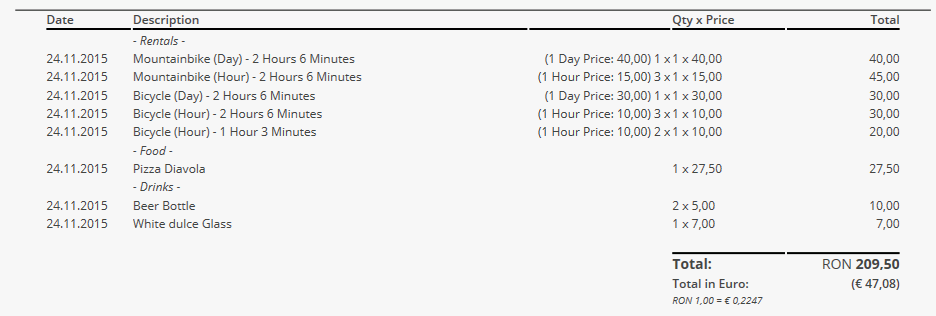
And the print result:

Thank you very much for sharing this. Great template.

When we use this templates, we always see …minutes, or per hour…
Is it possible to change this text?
Thanks
Tiago

@proeftuin I like the template is it possible to share complete template thank you in advance