RickH
March 30, 2019, 11:16pm
1
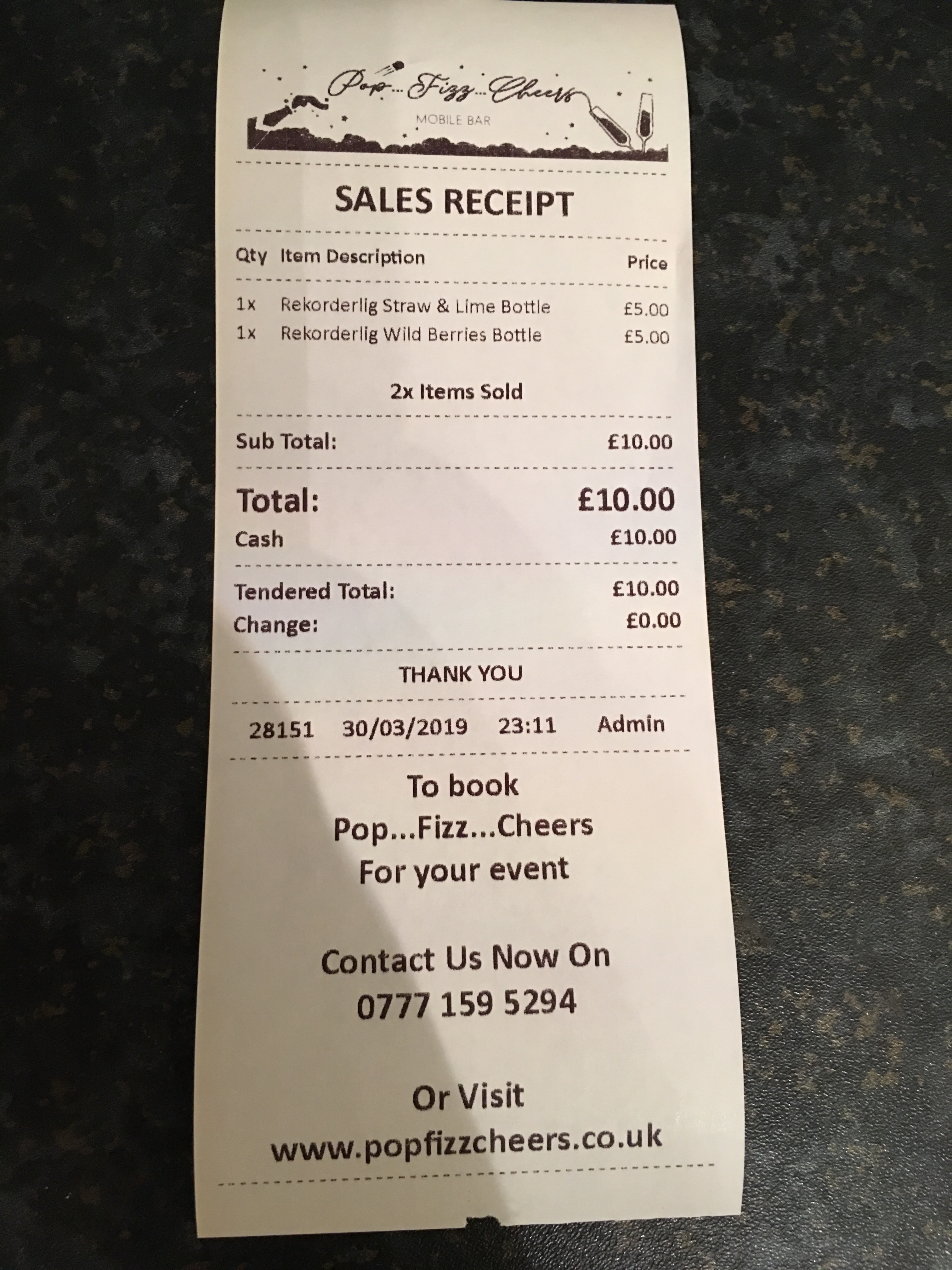
Im trying to create an X and Z Read but instead of using reports i want to use a ticket template instead so i can use HTML and have more control over how i want it to look printing from my receipt printer
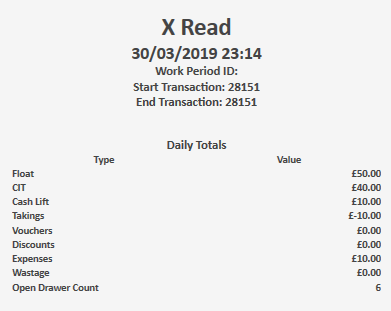
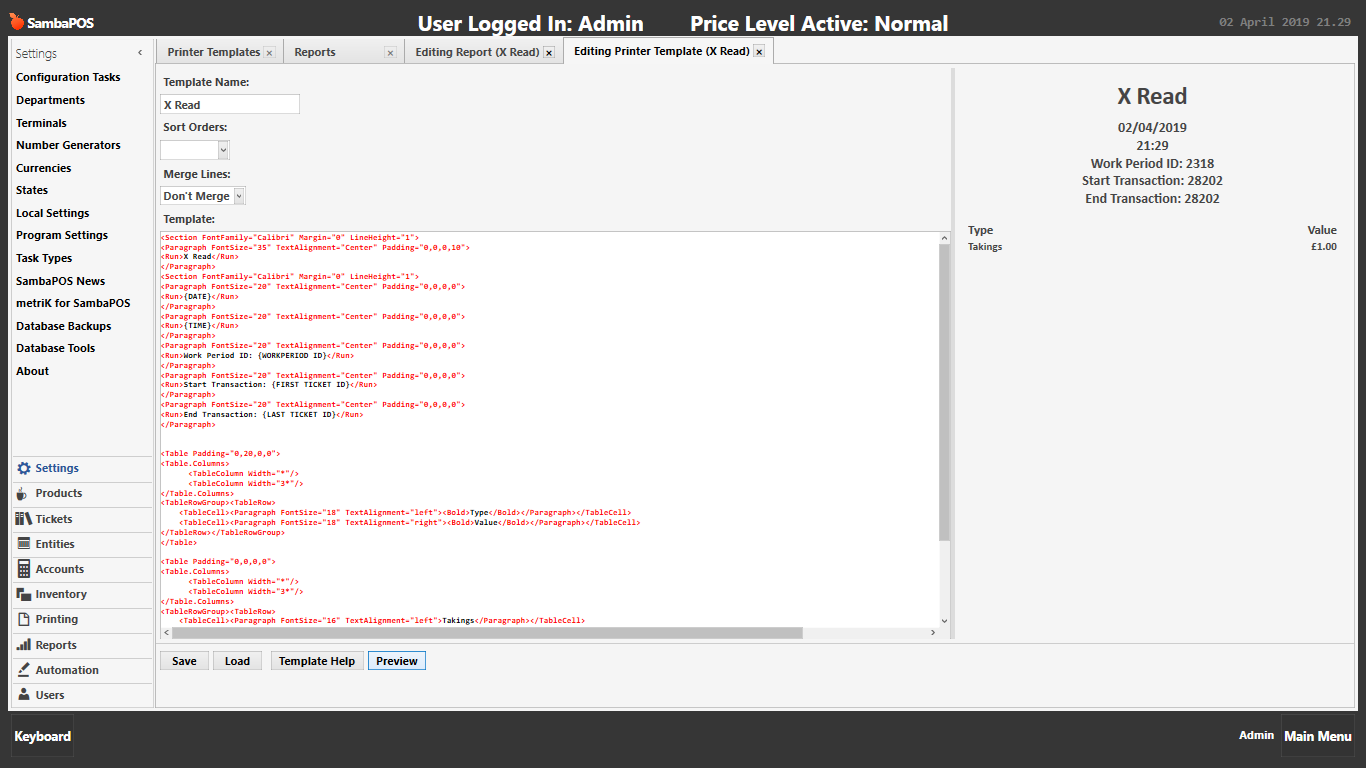
All looked good in the ticket template preview as shown below
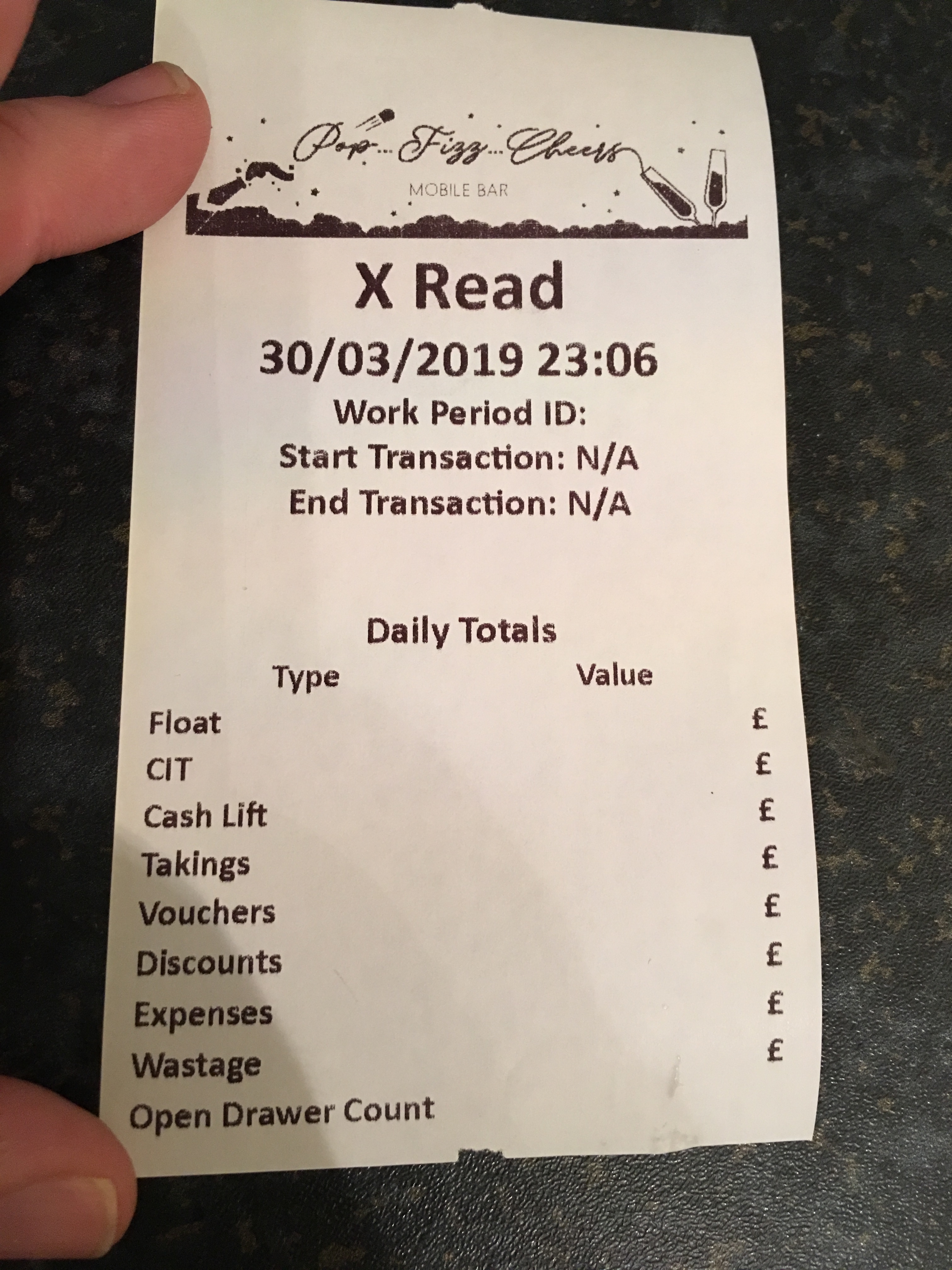
but when i actually print it out there are no values on the right hand side as shown in the preview above.
Is there something in the coding of the ticket template that needs to be fixed to display the values? Seems strange the preview shows it but the print out doesnt
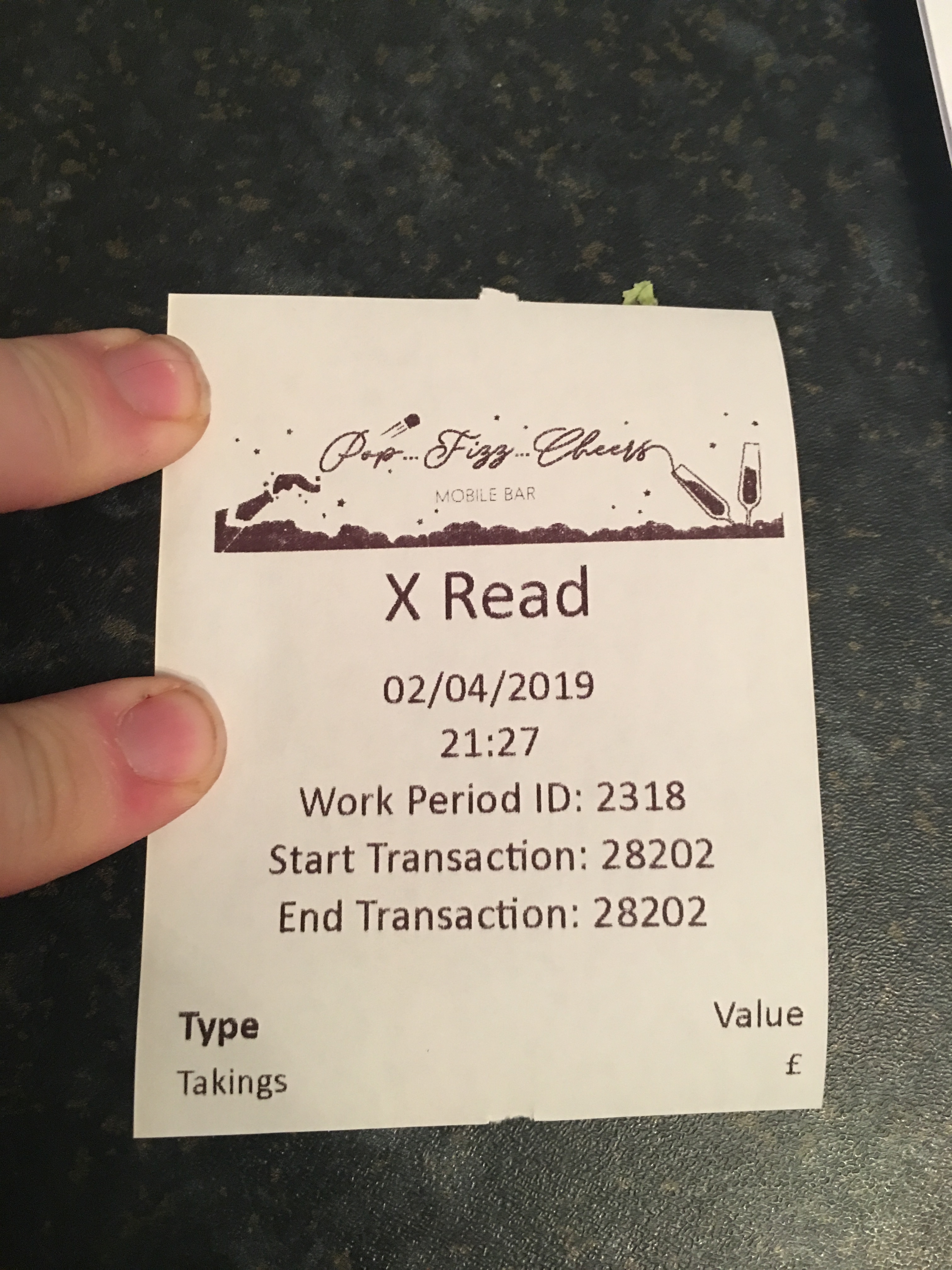
heres how it prints out
Jesse
March 30, 2019, 11:33pm
2
Looks like char count is off?
Jesse
March 30, 2019, 11:34pm
3
What’s your code? Can you show the template used?
RickH
March 30, 2019, 11:35pm
4
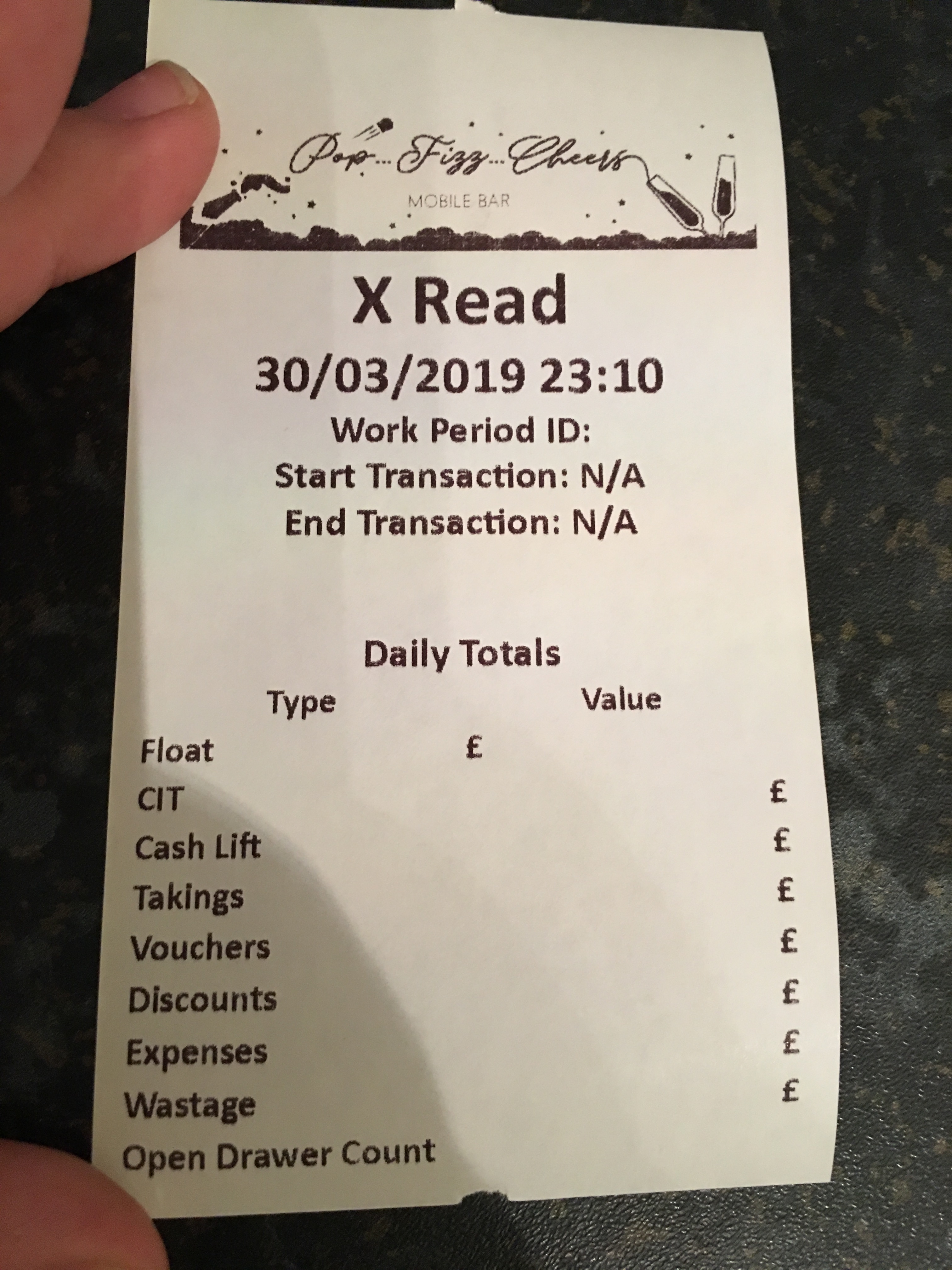
No its fine, even if i align the right column from right to left nothing is displayed, see below example, i moved the Float to the left
RickH
March 30, 2019, 11:36pm
5
<div style="font-size:35px;font-weight:bold;text-align:center;font-family:'Calibri'">X Read</div>
<div style="font-size:25px;font-weight:bold;text-align:center;font-family:'Calibri'">{DATE} {TIME}</div>
<div style="font-size:18px;font-weight:bold;text-align:center;font-family:'Calibri'">
Work Period ID: {WORKPERIOD ID}
Start Transaction: {FIRST TICKET ID}
End Transaction: {LAST TICKET ID}
</div>
<br/>
<br/>
<div style="font-size:18px;font-weight:bold;text-align:center;font-family:'Calibri'">Daily Totals<div/>
<div style="font-size:18px;font-weight:bold;text-align:justify;font-family:'Calibri'">
<table>
<tr>
<td align="left">Type</td>
<td align="Right">Value</td>
</tr>
</table>
</div>
<div style="font-size:15px;font-weight:normal;text-align:justify;font-family:'Calibri'">
<table>
<tr>
<td align="left">Float</td>
<td align="right">£[=F(TN('{GLOBAL SETTING:Float In}'),'0.00')]</td>
</tr>
</table>
</div>

</div>
<div style="font-size:15px;font-weight:normal;text-align:justify;font-family:'Calibri'">
<table>
<tr>
<td align="left">CIT</td>
<td align="right">£[=F(TN('{ACCOUNT TOTAL:Cash}')+TN('{GLOBAL SETTING:Float In}'),'0.00')]</td>
</tr>
</table>
</div>

</div>
<div style="font-size:15px;font-weight:normal;text-align:justify;font-family:'Calibri'">
<table>
<tr>
<td align="left">Cash Lift</td>
<td align="right">£[=F(TN('{ACCOUNT TOTAL:Cash Lifts}'),'0.00')]</td>
</tr>
</table>
</div>

</div>
<div style="font-size:15px;font-weight:normal;text-align:justify;font-family:'Calibri'">
<table>
<tr>
<td align="left">Takings</td>
<td align="right">£[=F(TN('{ACCOUNT TOTAL:Cash}')+TN('{ACCOUNT TOTAL:Credit/Debit Card}')+TN('{ACCOUNT TOTAL:Online Order}'),'0.00')]</td>
</tr>
</table>
</div>

</div>
<div style="font-size:15px;font-weight:normal;text-align:justify;font-family:'Calibri'">
<table>
<tr>
<td align="left">Vouchers</td>
<td align="right">£[=F(TN('{ACCOUNT TOTAL:Voucher - £5 OFF}')+TN('{ACCOUNT TOTAL:Voucher - 10% OFF}'),'0.00')]</td>
</tr>
</table>
</div>

</div>
<div style="font-size:15px;font-weight:normal;text-align:justify;font-family:'Calibri'">
<table>
<tr>
<td align="left">Discounts</td>
<td align="right">£[=F(TN('{ACCOUNT TOTAL:Manual Discount}')+TN('{ACCOUNT TOTAL:Staff Discount}')+TN('{ACCOUNT TOTAL:Loyal Discount Card}'),'0.00')]</td>
</tr>
</table>
</div>

</div>
<div style="font-size:15px;font-weight:normal;text-align:justify;font-family:'Calibri'">
<table>
<tr>
<td align="left">Expenses</td>
<td align="right">£[=F(TN('{ACCOUNT TOTAL:Petty Cash}'),'0.00')]</td>
</tr>
</table>
</div>

</div>
<div style="font-size:15px;font-weight:normal;text-align:justify;font-family:'Calibri'">
<table>
<tr>
<td align="left">Wastage</td>
<td align="right">£[=F(TN('{ACCOUNT TOTAL:Wastage}'),'0.00')]</td>
</tr>
</table>
</div>

</div>
<div style="font-size:15px;font-weight:normal;text-align:justify;font-family:'Calibri'">
<table>
<tr>
<td align="left">Open Drawer Count</td>
<td align="right">[=F(TN('{SETTING:Open Drawer}')+TN('{SETTING:No Sale}'),'0')]</td>
</tr>
</table>
</div>
RickH
March 30, 2019, 11:37pm
6
apart from the html part the expressions are copied from my x read report template and the work fine there
Jesse
March 30, 2019, 11:37pm
7
So it’s not an actual printer template? How are you printing it? Via report printer?
RickH
March 30, 2019, 11:38pm
8
yea its a printer template using html printer, exactly the same as my sale receipts
Jesse
March 30, 2019, 11:38pm
9
You need [LAYOUT] AT top for one. And you need the formatting for a printer template.
RickH
March 30, 2019, 11:40pm
10
i use exactly the same formatting in my receipt template and it works fine
Jesse
March 30, 2019, 11:40pm
11
Except you also have the J00 etc right?
And [LAYOUT]
RickH
March 30, 2019, 11:42pm
12
layout is there but no J00 etc as im using html
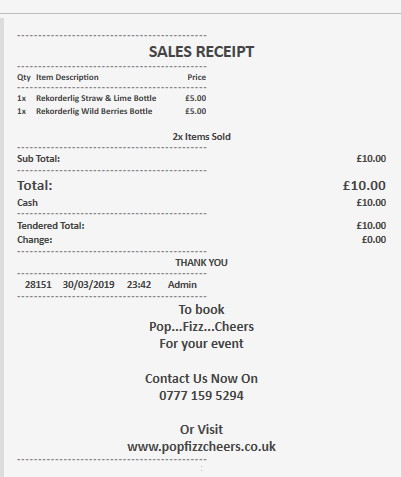
heres the ticket viewer
heres the code
[LAYOUT]
SALES RECEIPT
{ENTITIES}
-
Qty
Item Description
Price
-
{ORDERS}
-
Sub Total:
£[=F(TN(’{TICKET TOTAL}’)+TN(’{ORDER TAG TOTAL:Discount Item Custom Value}’)-1+TN(’{ORDER TAG TOTAL:Discount Item Custom Percent}’) -1+TN(’{ORDER TAG TOTAL:Price Override}’)-1+TN(’{CALCULATION TOTAL:Discount Ticket Total Percent}’) -1+TN(’{CALCULATION TOTAL:Staff Discount}’)-1+TN(’{CALCULATION TOTAL:Manager Discount}’) -1+TN(’{CALCULATION TOTAL:Loyalty Discount}’)*-1,‘0.00’)]
-
{DISCOUNTS}
[<div style="font-size:15px;font-weight:normal;text-align:justify;font-family:'Calibri'">
<table>
<tr>
<td align="left">Line Discount:</td><td align "right">-£[=F(TN('{ORDER TAG TOTAL:Discount Item Custom Value}')*-1+TN('{ORDER TAG TOTAL:Price Override}')*-1+TN('{ORDER TAG TOTAL:Discount Item Custom Percent}')*-1,'0.00')]</td>
</tr>
</table>
</div>]

[<div style="font-size:15px;font-weight:normal;text-align:justify;font-family:'Calibri'">
<table>
<tr>
<td align="left">Transaction Discount:</td><td align "right">-£[=F(TN('{CALCULATION TOTAL:Discount Ticket Total Percent}')*-1,'0.00')]</td>
</tr>
</table>
</div>]

[<div style="font-size:15px;font-weight:normal;text-align:justify;font-family:'Calibri'">
<table>
<tr>
<td align="left">Staff Discount 10%:</td><td align "right">-£[=F(TN('{CALCULATION TOTAL:Staff Discount}')*-1,'0.00')]</td>
</tr>
</table>
</div>]

[<div style="font-size:15px;font-weight:normal;text-align:justify;font-family:'Calibri'">
<table>
<tr>
<td align="left">Owner Discount 100%:</td><td align "right">-£[=F(TN('{CALCULATION TOTAL:Manager Discount}')*-1,'0.00')]</td>
</tr>
</table>
</div>]

[<div style="font-size:15px;font-weight:normal;text-align:justify;font-family:'Calibri'">
<table>
<tr>
<td align="left">Loyalty Discount 10%:</td><td align "right">-£[=F(TN('{CALCULATION TOTAL:Loyalty Discount}')*-1,'0.00')]</td>
</tr>
</table>
</div>]

[<div style="font-size:15px;font-weight:bold;text-align:justify;font-family:'Calibri'">
<table>
<tr>
<td align="left">Discount Total:</td><td align "right">-£[=F(TN('{ORDER TAG TOTAL:Discount Item Custom Value}')*-1+TN('{ORDER TAG TOTAL:Discount Item Custom Percent}')*-1+TN('{ORDER TAG TOTAL:Price Override}')*-1+TN('{CALCULATION TOTAL:Discount Ticket Total Percent}')*-1+TN('{CALCULATION TOTAL:Staff Discount}')*-1+TN('{CALCULATION TOTAL:Manager Discount}')*-1+TN('{CALCULATION TOTAL:Loyalty Discount}')*-1,'0.00')]</td>
</tr>
</table>
</div>
<F>-]
<div style="font-size:22px;font-weight:bold;text-align:justify;font-family:'Calibri'">
<table>
<tr>
<td align="left">Total:</td><td align "right">£{TICKET TOTAL}</td>
</tr>
</table>
</div>
{PAYMENTS}
<F>-
<div style="font-size:15px;font-weight:bold;text-align:justify;font-family:'Calibri'">
<table>
<tr>
<td align="left">Tendered Total:</td><td align="right">£{TENDERED TOTAL}</td>
</tr>
</table>
</div>
<div style="font-size:15px;font-weight:bold;text-align:justify;font-family:'Calibri'">
<table>
<tr>
<td align="left">Change:</td><td align="right">£{CHANGE TOTAL}</td>
</tr>
</table>
</div>
<F>-
</div>
<F>
<F>
<div style="font-size:15px;font-weight:bold;text-align:center;font-family:'Calibri'">
<L00>THANK YOU
</div>
<EC>
<EL>
<F>-
<div style="font-size:15px;font-weight:bold;text-align:center;font-family:'Calibri'">
<table>
<tr>
<td width=60 align=center>{TICKET ID}</td>
<td width=80 align=center>{TICKET DATE}</td>
<td width=60 align=center>{TIME}</td>
<td width=60 align=center>{USER NAME}</td>
</tr>
</table>
</div>
<F>-
<EC>
<div style="font-size:20px;font-weight:bold;text-align:center;font-family:'Calibri'">To book</div>
<div style="font-size:20px;font-weight:bold;text-align:center;font-family:'Calibri'">Pop...Fizz...Cheers</div>
<div style="font-size:20px;font-weight:bold;text-align:center;font-family:'Calibri'">For your event</div>
<div style="font-size:20px;font-weight:bold;text-align:center;font-family:'Calibri'">    </div>
<div style="font-size:20px;font-weight:bold;text-align:center;font-family:'Calibri'">Contact Us Now On</div>
<div style="font-size:20px;font-weight:bold;text-align:center;font-family:'Calibri'">0777 159 5294</div>
<div style="font-size:20px;font-weight:bold;text-align:center;font-family:'Calibri'">    </div>
<div style="font-size:20px;font-weight:bold;text-align:center;font-family:'Calibri'">Or Visit</div>
<div style="font-size:20px;font-weight:bold;text-align:center;font-family:'Calibri'">www.popfizzcheers.co.uk</div>
<F>-
<div style="font-size:5px;font-weight:bold;text-align:center;font-family:'Calibri'">.</div>
<div style="font-size:5px;font-weight:bold;text-align:center;font-family:'Calibri'">.</div>
<F>
<F>
<F>
<L>

[DISCOUNTS]

[PAYMENTS]
<div style="font-size:15px;font-weight:bold;text-align:justify;font-family:'Calibri'">
<table>
<tr>
<td align="left">{PAYMENT TYPE NAME}</td>
<td align="right">£{TENDERED}</td>
</tr>
</table>
</div>
[ORDERS]
-- Default format for orders
<div style="font-size:13px;text-align:left;font-family:'Calibri'">
<table>
<tr>
<td width="25">{QUANTITY}x</td>
<td width="196">{ITEM TAG:Receipt Name} {PORTION: }</td>
<td width=45 align=right>£{VISIBLE PRICE}</td>
</tr>
</table>
</div>
{ORDER TAGS}
[ORDERS:Gift]
-- Format for gifted orders
<J00>{QUANTITY} {NAME}|**FREE ITEM**


[ORDERS:Void]
-- Nothing will print for void lines

[ORDER TAGS]
-- Format for order tags
[<div style="font-size:10px;text-align:left;font-family:'Calibri'">
<table>
<tr>
<td width="25">***</td>
<td width="196">Line Discount: {ORDER STATE:DStatus}</td>
<td width=45 align=right>-£[=F(TN('{ORDER TAG TOTAL:Discount Item Custom Value}')+TN('{ORDER TAG TOTAL:Discount Item Custom Percent}')*-1),'0.00']</td>
</tr>
</table>
</div>]

[<div style="font-size:10px;text-align:left;font-family:'Calibri'">
<table>
<tr>
<td width="25">***</td>
<td width="196">Price Override: {ORDER STATE:PStatus}</td>
<td width=45 align=right>-£[=F(TN('{ORDER TAG TOTAL:Price Override}')*-1),'0.00']</td>
</tr>
</table>
</div>]

[<div style="font-size:13px;text-align:left;font-family:'Calibri'">
<table>
<tr>
<td width="196">          -  {ORDER TAG:Tonic}</td>
<td width=45 align=right></td>
</tr>
</table>
</div>]

[<div style="font-size:13px;text-align:left;font-family:'Calibri'">
<table>
<tr>
<td width="196">            {ORDER TAG:Mixers}</td>
<td width=45 align=right></td>
</tr>
</table>
</div>]


[ENTITIES:Customers]
-- Customer entity format
<F>
[<div style="font-size:12px;font-weight:bold;text-align:center;font-family:'Calibri'">Customer Number: {ENTITY NAME:Customers}</div>]
[<div style="font-size:12px;font-weight:bold;text-align:center;font-family:'Calibri'">Customer Name: {ENTITY DATA:Customers:Name}</div>]
[<div style="font-size:12px;font-weight:bold;text-align:center;font-family:'Calibri'">Date of Event: {ENTITY DATA:Customers:Date of Event}</div>]
[<div style="font-size:12px;font-weight:bold;text-align:center;font-family:'Calibri'">Initial Credit Limit: £{ENTITY DATA:Customers:Credit Limit}</div>]
[<div style="font-size:12px;font-weight:bold;text-align:center;font-family:'Calibri'">Notes: {ENTITY DATA:Customers:Notes}</div>]
<F>
[ENTITIES:Table]
-- Table entity format
<L00>Table: {ENTITY NAME}
<F>
<F>
RickH
March 30, 2019, 11:44pm
13
dont know why it isnt showing the top part properly, but from the discount bit down you can see
RickH
March 30, 2019, 11:46pm
15
so i know it can do the expressions just dont know why it show them on the viewer but doesnt print them in this “report” im making
Jesse
March 31, 2019, 2:43am
16
I think printer templates only work for tickets. If your not printing it from a ticket it probably will not work. Preview uses the last ticket.
RickH
March 31, 2019, 8:53am
17
That’s a shame because the reports templates don’t allow you to use html
Preview doesn’t just use last ticket because I can perform some functions that don’t print any tickets but will change some of those values, then ticket preview will show the updated values without any tickets being printed
Is there no way we can get this to work so I can use html to create these ticket printer reports??
What he’s saying g though is even if it’s not using printer template expressions the functionally needs to be accessable, like using order level expression in a ticket level event.
Jesse
March 31, 2019, 11:44am
19
You can probably use a custom printer have you tried that?
RickH
April 2, 2019, 8:27pm
20
Tried custom printer and exact same issue, the ticket template viewer show the figures but the print out does not
Takings should say £1.00 as per the screen shot below
<Section FontFamily="Calibri" Margin="0" LineHeight="1">
<Paragraph FontSize="35" TextAlignment="Center" Padding="0,0,0,10">
<Run>X Read</Run>
</Paragraph>
<Section FontFamily="Calibri" Margin="0" LineHeight="1">
<Paragraph FontSize="20" TextAlignment="Center" Padding="0,0,0,0">
<Run>{DATE}</Run>
</Paragraph>
<Paragraph FontSize="20" TextAlignment="Center" Padding="0,0,0,0">
<Run>{TIME}</Run>
</Paragraph>
<Paragraph FontSize="20" TextAlignment="Center" Padding="0,0,0,0">
<Run>Work Period ID: {WORKPERIOD ID}</Run>
</Paragraph>
<Paragraph FontSize="20" TextAlignment="Center" Padding="0,0,0,0">
<Run>Start Transaction: {FIRST TICKET ID}</Run>
</Paragraph>
<Paragraph FontSize="20" TextAlignment="Center" Padding="0,0,0,0">
<Run>End Transaction: {LAST TICKET ID}</Run>
</Paragraph>


<Table Padding="0,20,0,0">
<Table.Columns>
      <TableColumn Width="*"/>
      <TableColumn Width="3*"/>
</Table.Columns>
<TableRowGroup><TableRow>
	<TableCell><Paragraph FontSize="18" TextAlignment="left"><Bold>Type</Bold></Paragraph></TableCell>
	<TableCell><Paragraph FontSize="18" TextAlignment="right"><Bold>Value</Bold></Paragraph></TableCell>
</TableRow></TableRowGroup>
</Table>

<Table Padding="0,0,0,0">
<Table.Columns>
      <TableColumn Width="*"/>
      <TableColumn Width="3*"/>
</Table.Columns>
<TableRowGroup><TableRow>
	<TableCell><Paragraph FontSize="16" TextAlignment="left">Takings</Paragraph></TableCell>
	<TableCell><Paragraph FontSize="16" TextAlignment="right">£[=F(TN('{ACCOUNT TOTAL:Cash}')+TN('{ACCOUNT TOTAL:Credit/Debit Card}')+TN('{ACCOUNT TOTAL:Online Order}'),'0.00')]</Paragraph></TableCell>
</TableRow></TableRowGroup>
</Table>


</Section>
</Section>
Print Out
Is there any printer type that will accept report expressions so i can format the print out on a thermal receipt printer rather than the default fonts and style etc?
@VehbiEmiroglu any ideas how i can use report expressions in ticket templates so i can custom the layout?