Dear SambaPOS Support,
I am currently using SambaPOS and I have a few questions regarding reporting and bill customization:
How can I generate a report to see total sales categorized by table and by delivery ?
Is it possible to include the location (e.g., customer address or branch) on the bill print?
Can I assign each delivery bill to a specific driver and then generate a report showing how many deliveries that driver has completed?
Is there a way to calculate and report how much cash a driver should return at the end of the day , based on the deliveries assigned to them?
I would greatly appreciate your guidance on how to configure these features.
Best regards,
Nizam
August 27, 2025, 7:43am
2
Hello @Cafe_Barbera ,
You can check the below sources regarding your questions;
First of all you will need to have the Advanced Delivery Configuration on your SambaPOS;
4.12. Advanced Delivery Service Implementation V5.2.3 – SambaPOS Knowledgebase
1- How can I generate a report to see total sales categorized by table and by delivery?
Table revenue report sum, tables repeating itself over again - #14 by Bob_be
2- Is it possible to include the location (e.g., customer address or branch) on the bill print?
Search results for 'customer address bill' - SambaClub Forum
3- Can I assign each delivery bill to a specific driver and then generate a report showing how many deliveries that driver has completed?
Search results for 'driver report' - SambaClub Forum
4- Is there a way to calculate and report how much cash a driver should return at the end of the day, based on the deliveries assigned to them?
Deliverer Total - #25 by markjw
1 Like
Dear Nizam,
Nizam
September 17, 2025, 7:42am
4
Hello @Cafe_Barbera ,
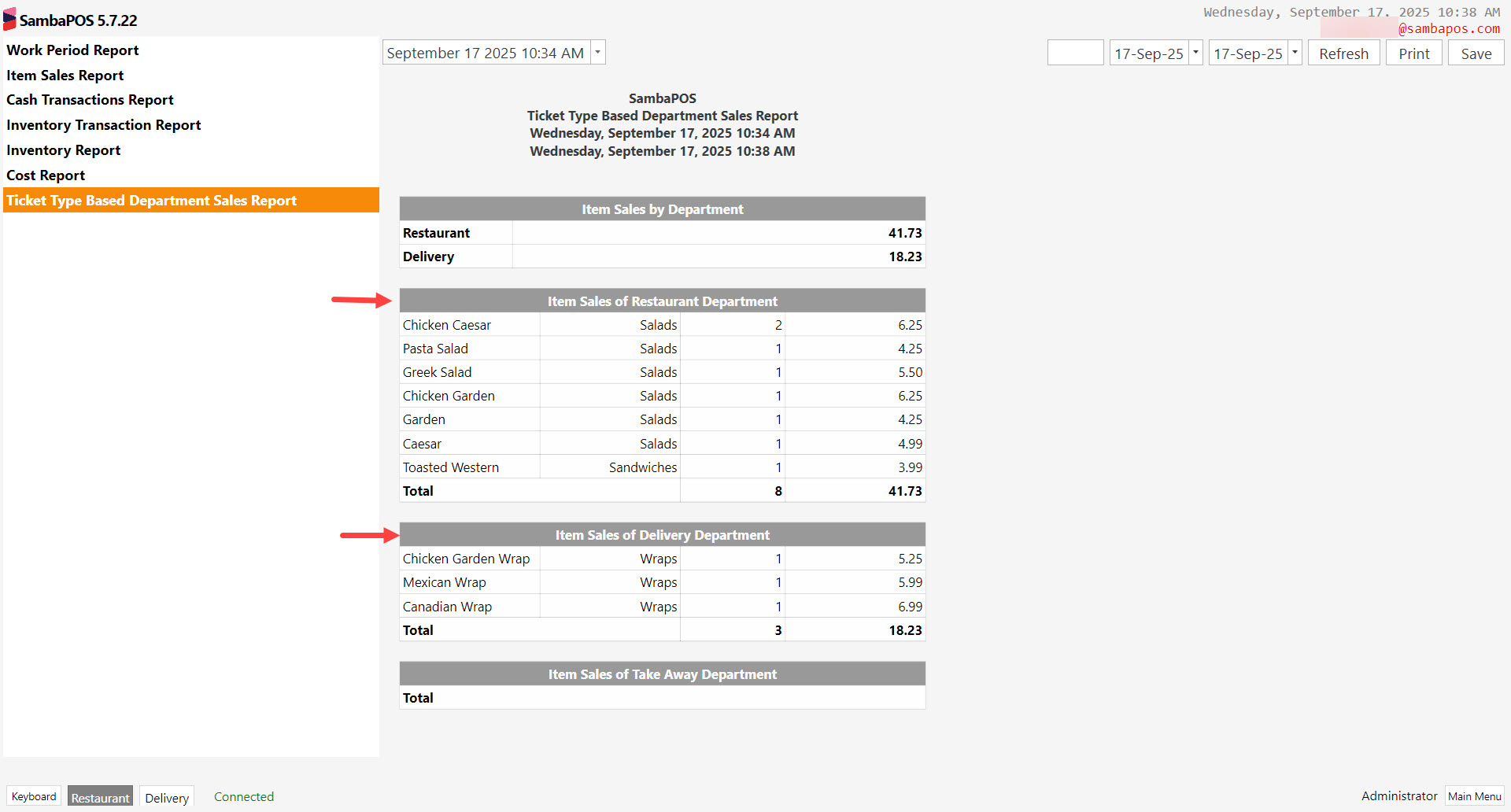
If you created separate Department/Ticket Types then you can use the below report code to achieve what you want;
Make sure to replace the Department/Ticket Type names with your owns.
[Item Sales by Department:3, 4, 3, 1, 2, 1]
>{REPORT ORDER DETAILS:O.Department,O.ExactTotal.Sum:(TY=Ticket)}
>{REPORT ORDER DETAILS:O.Department,O.ExactTotal.Sum:(TY=Delivery Ticket)}
>{REPORT ORDER DETAILS:O.Department,O.ExactTotal.Sum:(TY=Take Away)}

[Item Sales of Restaurant Department:4, 4, 3, 1, 2, 1]
{REPORT ORDER DETAILS:O.MenuItemName,O.ItemGroup,O.Quantity.Sum,O.Price:(TY=Ticket)}
>Total||{REPORT ORDER DETAILS:O.Quantity.Sum,O.ExactTotal.Sum:(TY=Ticket)}

[Item Sales of Delivery Department:4, 4, 3, 1, 2, 1]
{REPORT ORDER DETAILS:O.MenuItemName,O.ItemGroup,O.Quantity.Sum,O.Price:(TY=Delivery Ticket)}
>Total||{REPORT ORDER DETAILS:O.Quantity.Sum,O.ExactTotal.Sum:(TY=Delivery Ticket)}

[Item Sales of Take Away Department:4, 4, 3, 1, 2, 1]
{REPORT ORDER DETAILS:O.MenuItemName,O.ItemGroup,O.Quantity.Sum,O.Price:(TY=Take Away)}
>Total||{REPORT ORDER DETAILS:O.Quantity.Sum,O.ExactTotal.Sum:(TY=Take Away)}
You can check the below image as reference.
1 Like
Thanks Nizam for your help, I was a little confused but I want an Item sales report based on Entities (Customers and Tables) not based on department.
Thanks
Nizam
September 26, 2025, 6:43am
6
Hello @Cafe_Barbera ,
Alright then you can check the previously shared below source for what you need;
— This is just a suggestion —
If your client is concerned about keeping track of figures for each section/area and tables, you could add a custom field to the Tables Entity and fill in each table custom field with the appropriate section/area (Boat Tables, VIP Tables, . Then you run the below report to fill to list each section/area as the sales happen, if there is no sales in the section/area, it will not show up.
[Table Report:1, 1, 1]
>Table|Count|Amount
@{REPORT TICKET DETAILS:EC.Tables.Se…
Dear Nizam,
Item Sales report by Entities
Total Table: 15000
Customers Report
Water 7 7000
Total Customer: 47000
Veysel
September 29, 2025, 10:52am
8
Hello,
When you select a customer for a table, this item will be added to both the table report and the customer report. This could cause greater confusion. Did you ever consider this possibility ?
1 Like
Hello,