— This is just a suggestion —
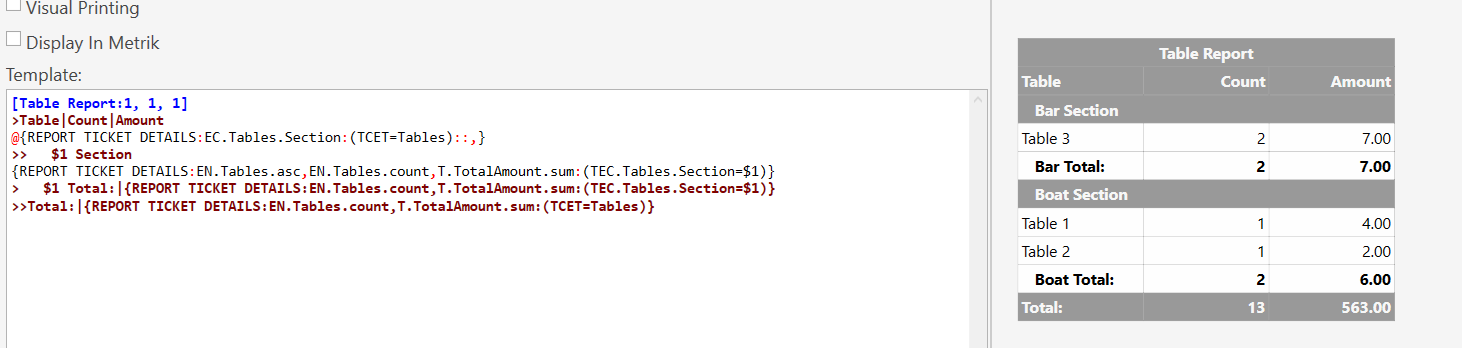
If your client is concerned about keeping track of figures for each section/area and tables, you could add a custom field to the Tables Entity and fill in each table custom field with the appropriate section/area (Boat Tables, VIP Tables, . Then you run the below report to fill to list each section/area as the sales happen, if there is no sales in the section/area, it will not show up.
[Table Report:1, 1, 1]
>Table|Count|Amount
@{REPORT TICKET DETAILS:EC.Tables.Section:(TCET=Tables)::,}
>>   $1 Section
{REPORT TICKET DETAILS:EN.Tables.asc,EN.Tables.count,T.TotalAmount.sum:(TEC.Tables.Section=$1)}
>   $1 Total:|{REPORT TICKET DETAILS:EN.Tables.count,T.TotalAmount.sum:(TEC.Tables.Section=$1)}
>>Total:|{REPORT TICKET DETAILS:EN.Tables.count,T.TotalAmount.sum:(TCET=Tables)}
The total below is not correct because I had some sales before testing the Tables Custom Fields. It will only show sales after implementing the custom fields.