Rules
Now we get to the Rules, which is where all the real magic happens. First, the obligatory notice…
ALL Rules require a default mapping (
* * * *)
###Reset HH Day & Time on Application Started
This Rule will blank out the Start/End Day & Time for Happy Hour when you start SambaPOS.
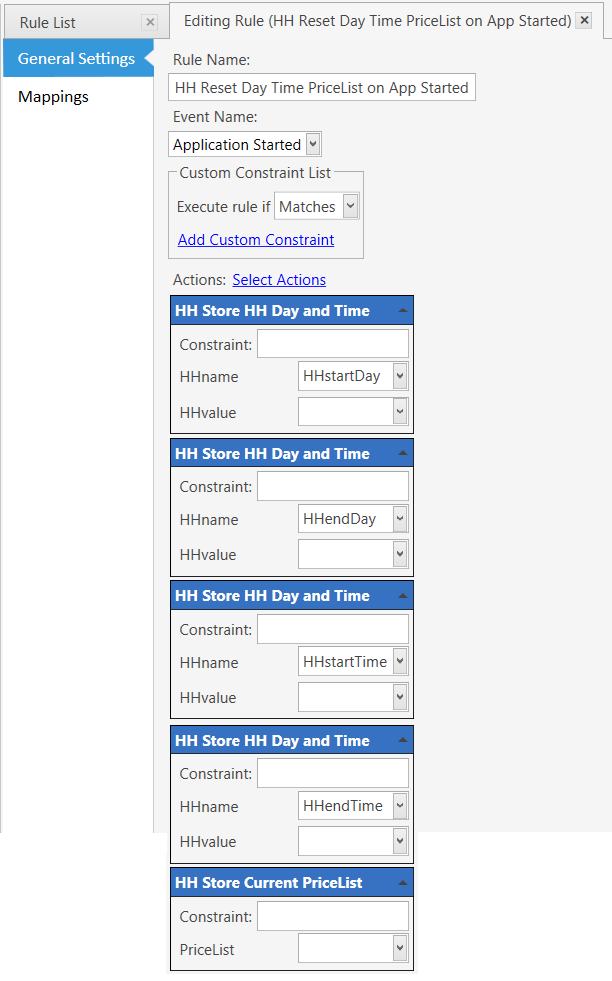
Event: Application Started
Execute Rule if Matches
HH Store HH DateTime
Constraint:
HHname: HHstartDay
HHvalue:
HH Store HH DateTime
Constraint:
HHname: HHendDay
HHvalue:
HH Store HH DateTime
Constraint:
HHname: HHstartTime
HHvalue:
HH Store HH DateTime
Constraint:
HHname: HHendTime
HHvalue:
HH Store Current Price Definition (optional)
Constraint:
PriceList:
###Set HH Start/End Time for Monday and Tuesday
This Rule sets the Start/End Time for Happy Hour to run from 3pm to 5pm on Monday and Tuesday.
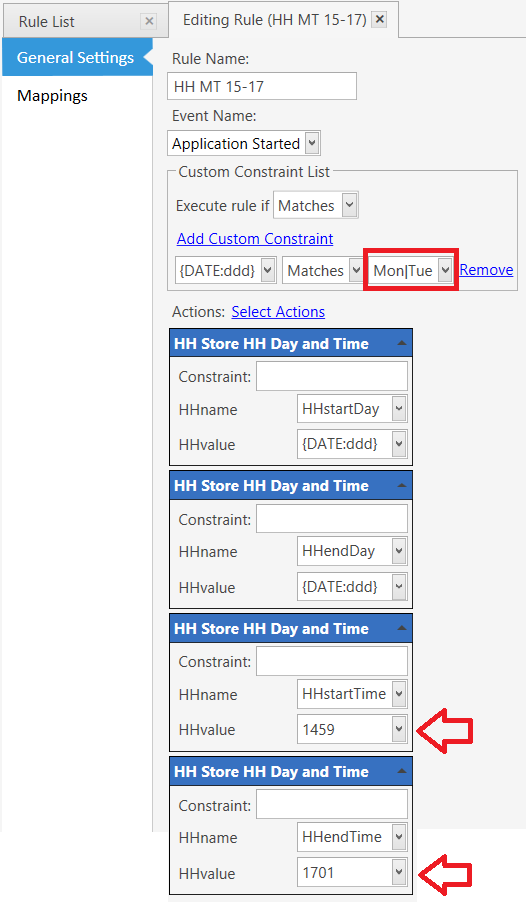
Event: Application Started
Execute Rule if Matches
Constraints:
{DATE:ddd} Matches Mon|Tue
HH Store HH DateTime
Constraint:
HHname: HHstartDay
HHvalue: {DATE:ddd}
HH Store HH DateTime
Constraint:
HHname: HHendDay
HHvalue: {DATE:ddd}
HH Store HH DateTime
Constraint:
HHname: HHstartTime
HHvalue: 1459
HH Store HH DateTime
Constraint:
HHname: HHendTime
HHvalue: 1701
###Set HH Start/End Time for Wednesday, Thursday and Friday
This Rule sets the Start/End Time for Happy Hour to run from 4pm to 7pm on Wednesday, Thursday, and Friday.
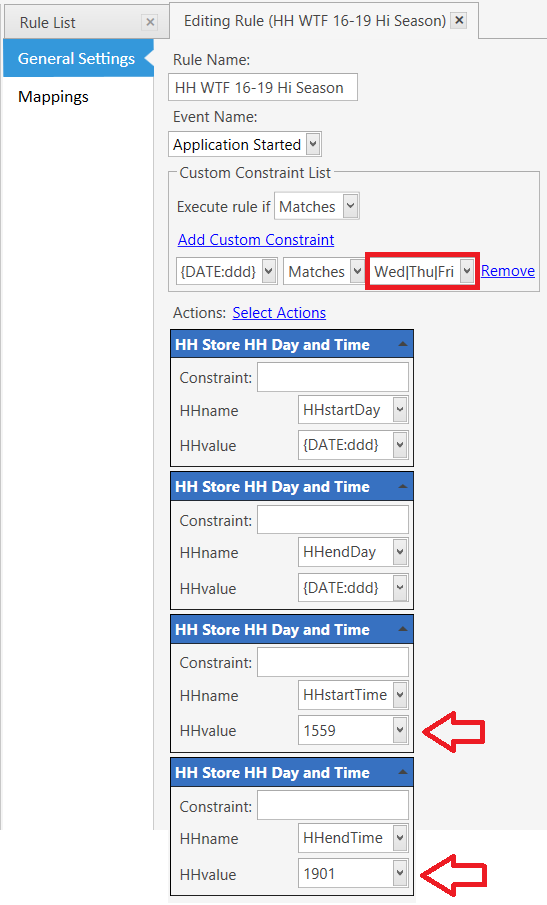
Event: Application Started
Execute Rule if Matches
Constraints:
{DATE:ddd} Matches Wed|Thu|Fri
HH Store HH DateTime
Constraint:
HHname: HHstartDay
HHvalue: {DATE:ddd}
HH Store HH DateTime
Constraint:
HHname: HHendDay
HHvalue: {DATE:ddd}
HH Store HH DateTime
Constraint:
HHname: HHstartTime
HHvalue: 1559
HH Store HH DateTime
Constraint:
HHname: HHendTime
HHvalue: 1901
###Modify Ticket VIP State when Entity Changed
This Rule sets the Ticket VIP State to Active or InActive based on whether the Customer has a VIP Level.
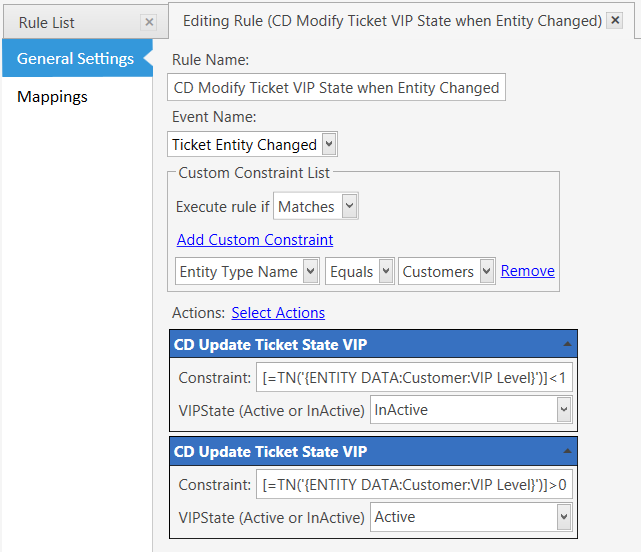
Event: Ticket Entity Changed
Execute Rule if Matches
Constraints:
Entity Type Name Equals Customers
Update Ticket VIP State
Constraint: [=TN('{ENTITY DATA:Customer:VIP Level}')] < 1
VIPState (Active or InActive): InActive
Update Ticket VIP State
Constraint: [=TN('{ENTITY DATA:Customer:VIP Level}')] > 0
VIPState (Active or InActive): Active
###DeActivate Ticket VIP State when Entity Removed
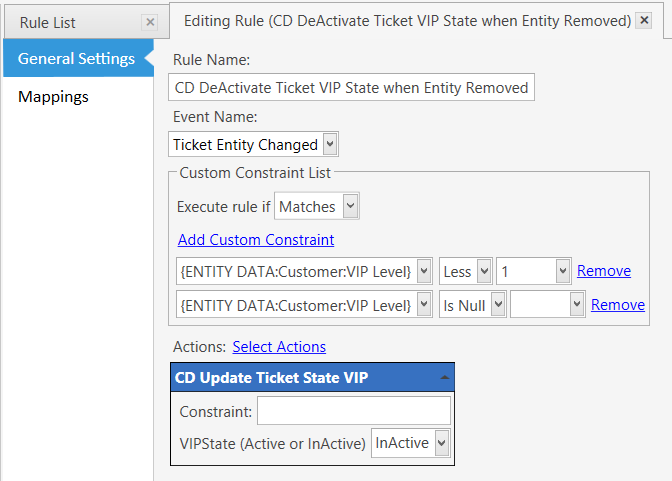
This Rule sets the Ticket VIP State to InActive when the Customer Entity is removed.
 img src=“/uploads/default/8371/082d6a52079a6c81.png” width=“690” height=“373”>
Event: Ticket Entity Changed
Execute Rule if Matches
Constraints:
{ENTITY DATA:Customer:VIP Level} Less 1
{ENTITY DATA:Customer:VIP Level} Is Null
CD Update Ticket VIP State
Constraint:
VIPState (Active or InActive): InActive
###Modify Ticket VIP State when Ticket Opened
This Rule sets the Ticket VIP State to Active or InActive when an existing Ticket is opened, based on whether the Customer has a VIP Level.
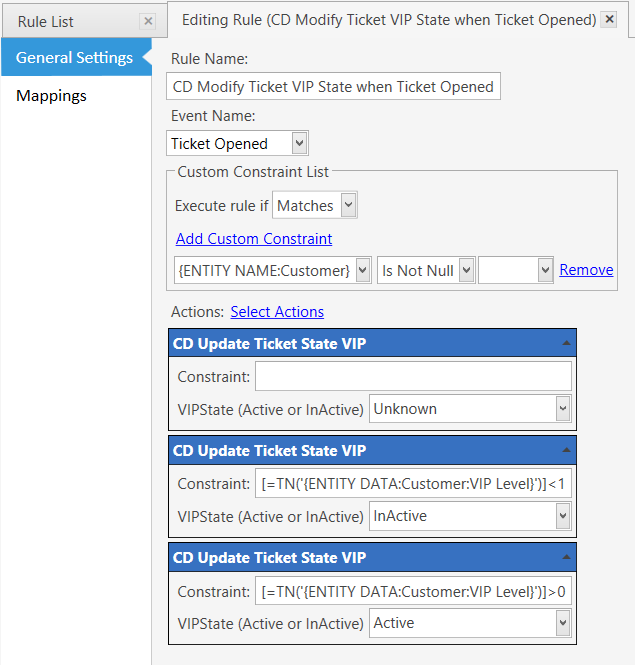
Event: Ticket Opened
Execute Rule if Matches
Constraints:
{ENTITY NAME:Customer} Is Not Null
CD Update Ticket VIP State
Constraint:
VIPState (Active or InActive): Unknown
CD Update Ticket VIP State
Constraint: [=TN('{ENTITY DATA:Customer:VIP Level}')] < 1
VIPState (Active or InActive): InActive
CD Update Ticket VIP State
Constraint: [=TN('{ENTITY DATA:Customer:VIP Level}')] > 0
VIPState (Active or InActive): Active
###Update Order DiscountType State for VIP
This Rule updates the Order State to VIP when the Ticket State changes to VIP Active.
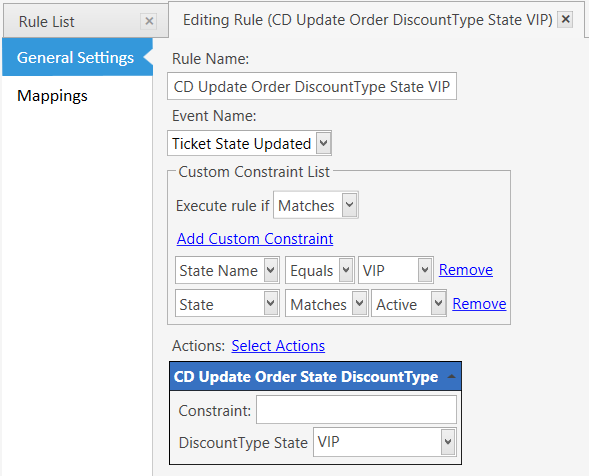
Event: Ticket State Updated
Execute Rule if Matches
Constraints:
State Name Equals VIP
State Matches Active
CD Update Order State DiscountType
Constraint:
DiscountType State: VIP
###Update Order DiscountType State for NonVIP
This Rule updates the Order State to HP (HH Pending) when the Ticket State changes to VIP InActive.
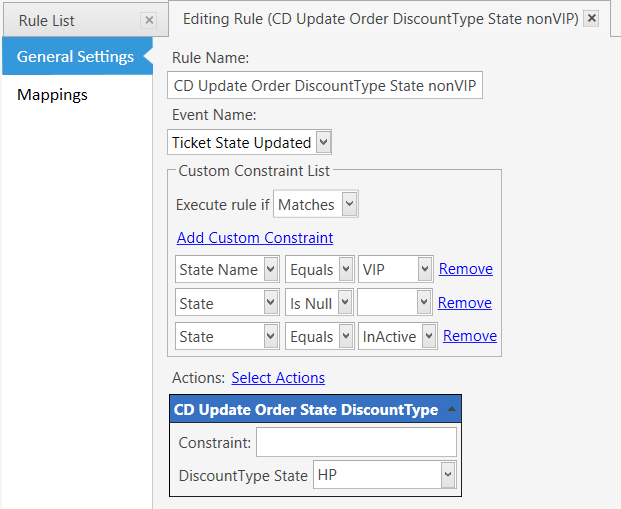
Event: Ticket State Updated
Execute Rule if Matches
Constraints:
State Name Equals VIP
State Equals InActive
State Is Null
**CD Update Order State DiscountType **
Constraint:
DiscountType State: HP
###Update Order State when Order Added to Ticket with Happy Hour Active
This Rule updates the Order State when an Order is added to the Ticket and the Ticket State is VIP InActive, and if the Order Time falls within the Day and Time of Happy Hour. When those conditions are met, the HH Product Tag value is checked. If the HH Tag value is greater than zero (0), the Order State becomes HH, otherwise it becomes ND (No Discount).

Event: Order Added to Ticket
Execute Rule if Matches All
Constraints:
[=FD('{ORDER DATE}','ddd')] Matches {SETTING:HHstartDay}
[=FD('{ORDER TIME}','HHmm')] Greater {SETTING:HHstartTime}
[=FD('{ORDER TIME}','HHmm')] Less {SETTING:HHendTime}
{TICKET STATE:VIP} Not Equals Active
CD Update Order State DiscountType
Constraint: [=TN('{ITEM TAG:HH}')] > 0
DiscountType State: HH
CD Update Order State DiscountType
Constraint: [=TN('{ITEM TAG:HH}')] < 1
DiscountType State: ND
###Update Order State when Order Added to Ticket with Ticket State VIP Active
This Rule updates the Order State when an Order is added to the Ticket and the Ticket State is VIP Active. When that condition is met, the D1, D2, or D3 Product Tag value is checked. If the Dx Tag value is greater than zero (0), the Order State becomes VIP, otherwise it becomes ND (No Discount)…
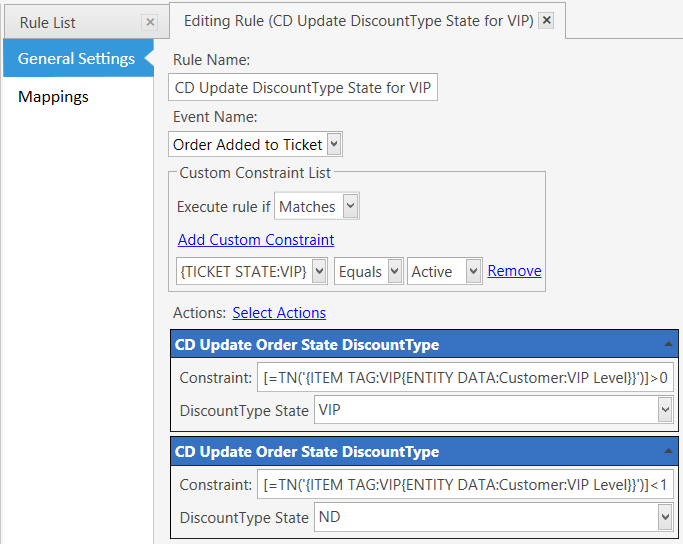
Event: Order Added to Ticket
Execute Rule if Matches
Constraints:
{TICKET STATE:VIP} Equals Active
CD Update Order State DiscountType
Constraint: [=TN('{ITEM TAG:VIP{ENTITY DATA:Customer:VIP Level}}')]>0
DiscountType State: VIP
CD Update Order State DiscountType
Constraint: [=TN('{ITEM TAG:VIP{ENTITY DATA:Customer:VIP Level}}')]<1
DiscountType State: ND
###Check Order Time from HP and set Order State to ND, HH, or VIP
This Rule fires when the Ticket State VIP becomes InActive, and the Order State has changed to HP (HH Pending). The Order State is then set to ND or HH by comparing the Order Time to the HH Start/Stop times.
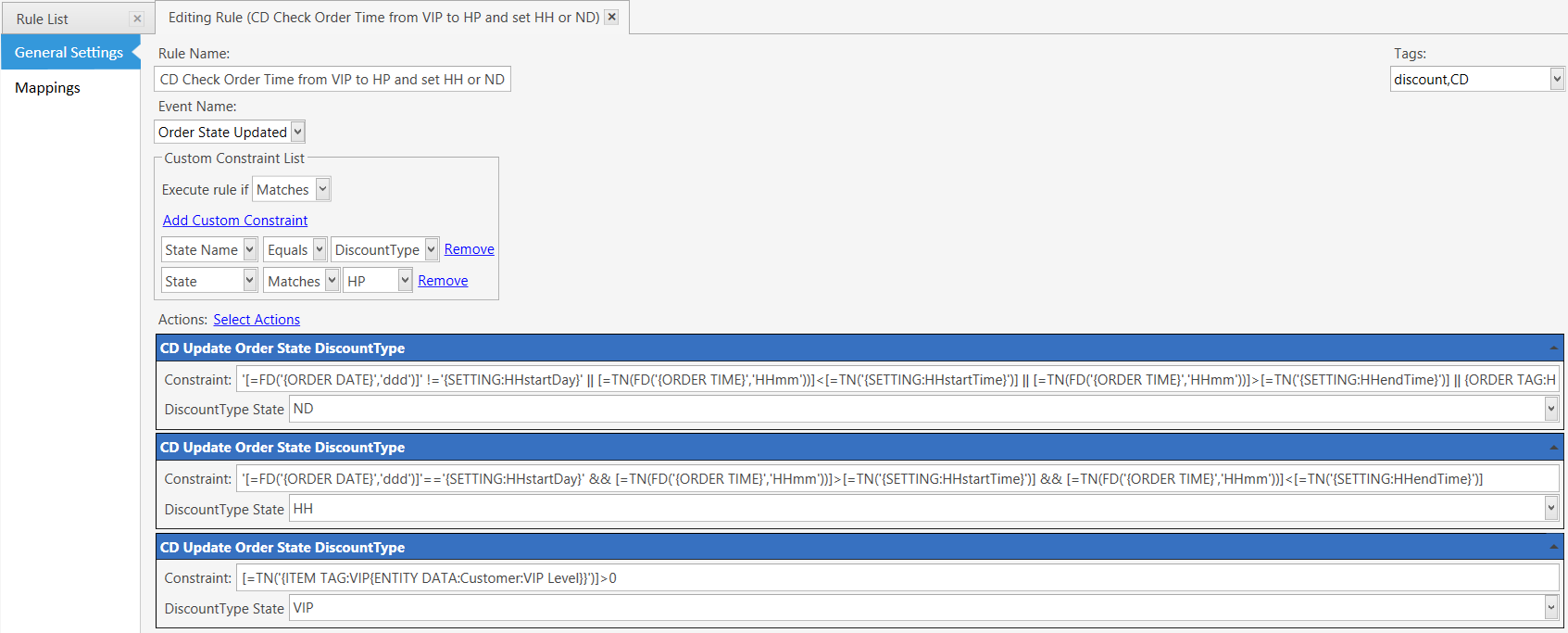
Event: Order State Updated
Execute Rule if Matches
Constraints:
State Name Equals DiscountType
State Matches HP
CD Update Order State DiscountType
Constraint: '[=FD('{ORDER DATE}','ddd')]' !='{SETTING:HHstartDay}' || [=TN(FD('{ORDER TIME}','HHmm'))]<[=TN('{SETTING:HHstartTime}')] || [=TN(FD('{ORDER TIME}','HHmm'))]>[=TN('{SETTING:HHendTime}')] || {ORDER TAG:HH Discount}<1
DiscountType State: ND
CD Update Order State DiscountType
Constraint: '[=FD('{ORDER DATE}','ddd')]'=='{SETTING:HHstartDay}' && [=TN(FD('{ORDER TIME}','HHmm'))]>[=TN('{SETTING:HHstartTime}')] && [=TN(FD('{ORDER TIME}','HHmm'))]<[=TN('{SETTING:HHendTime}')]
DiscountType State: HH
CD Update Order State DiscountType
Constraint: [=TN('{ITEM TAG:VIP{ENTITY DATA:Customer:VIP Level}}')]>0
DiscountType State: VIP
###Tag Order Discount for HH or VIP
This Rule will Tag an Order with a Discount amount when the Order State is HH or VIP. If the Order State is HH, and the Product Tag for HH is greater than zero (0), the Order is Tagged with the Happy Hour Discount. If the Order State is VIP, and the Product Tag for D1, D2, or D3 is greater than zero (0), the Order is Tagged with a VIP Discount.
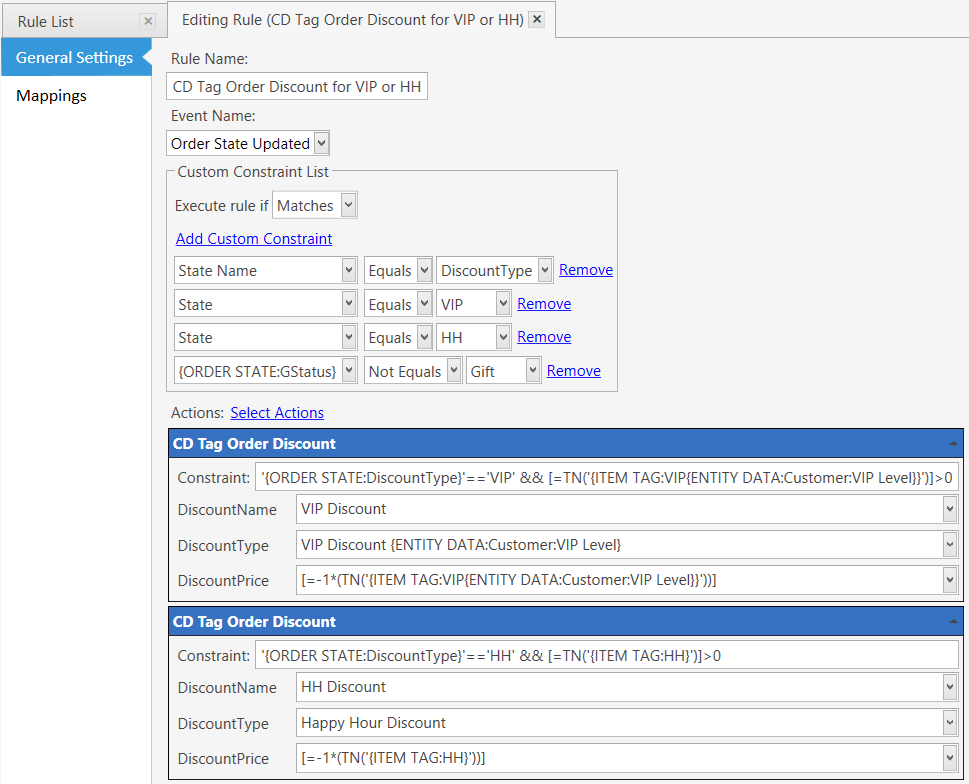
Event: Order State Updated
Execute Rule if Matches
Constraints:
State Name Equals DiscountType
State Matches VIP
State Matches HH
{ORDER STATE:GStatus} Not Equals Gift
CD Tag Order Discount
Constraint: '{ORDER STATE:DiscountType}'=='VIP' && [=TN('{ITEM TAG:VIP{ENTITY DATA:Customer:VIP Level}}')]>0
DiscountName: VIP Discount
DiscountType: VIP Discount {ENTITY DATA:Customer:VIP Level}
DiscountPrice: [=-1*(TN('{ITEM TAG:VIP{ENTITY DATA:Customer:VIP Level}}'))]
CD Tag Order Discount
Constraint: '{ORDER STATE:DiscountType}'=='HH' && [=TN('{ITEM TAG:HH}')]>0
DiscountName: HH Discount
DiscountType: Happy Hour Discount
DiscountPrice: [=-1*(TN('{ITEM TAG:HH}'))]
###UnTag Order from HH to VIP
This Rule removes the Happy Hour Discount when the Order State is VIP, so that the Order isn’t double-discounted.
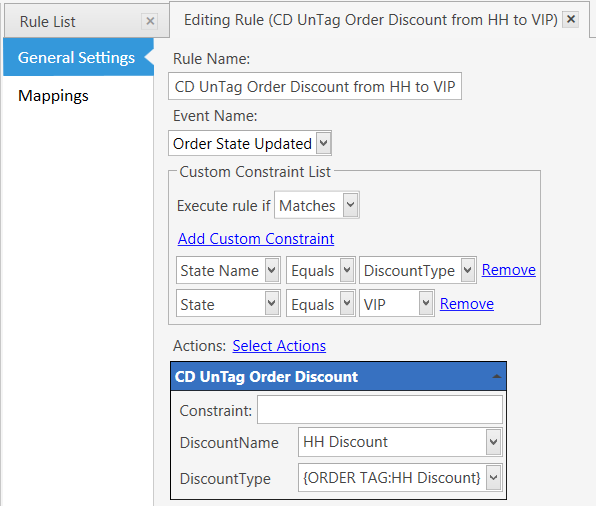
Event: Order State Updated
Execute Rule if Matches
Constraints:
State Name Equals DiscountType
State Matches VIP
CD UnTag Order Discount
Constraint:
DiscountName: HH Discount
DiscountType: {ORDER TAG:HH Discount}
###UnTag Order for ND or Gift
This Rule removes HH and VIP Discounts when the Order State is Gift.
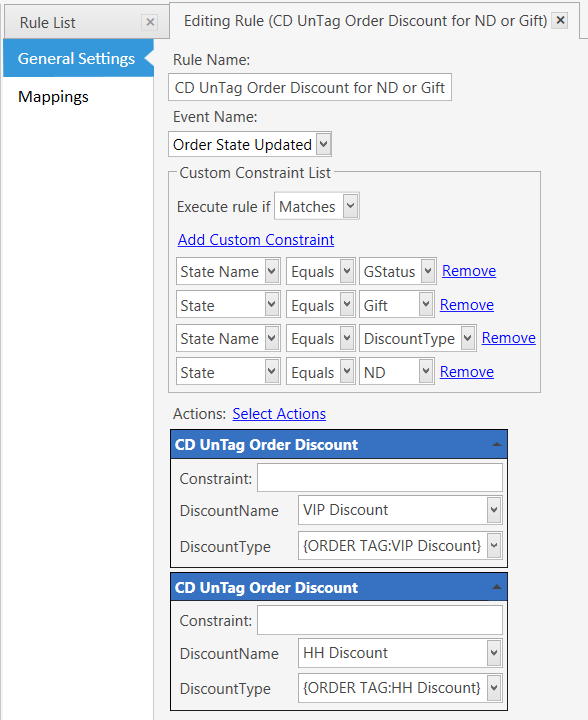
Event: Order State Updated
Execute Rule if Matches
Constraints:
State Name Equals GStatus
State Equals Gift
State Name Equals DiscountType
State Equals ND
CD UnTag Order Discount
Constraint:
DiscountName: VIP Discount
DiscountType: {ORDER TAG:VIP Discount}
CD UnTag Order Discount
Constraint:
DiscountName: HH Discount
DiscountType: {ORDER TAG:HH Discount}
###Tag Order Discount when UnGifted
This Rule will Tag an Order with a Discount when the Order is UnGifted.

Event: Order State Updated
Execute Rule if Matches
Constraints:
State Name -Equals- GStatus
State -Not Equals- Gift
CD Tag Order Discount
Constraint: '{ORDER STATE:DiscountType}'=='VIP' && [=TN('{ITEM TAG:VIP{ENTITY DATA:Customer:VIP Level}}')]>0
DiscountName: VIP Discount
DiscountType: VIP Discount {ENTITY DATA:Customer:VIP Level}
DiscountPrice: [=-1*(TN('{ITEM TAG:VIP{ENTITY DATA:Customer:VIP Level}}'))]
CD Tag Order Discount
Constraint: '{ORDER STATE:DiscountType}'=='HH' && [=TN('{ITEM TAG:HH}')]>0
DiscountName: HH Discount
DiscountType: Happy Hour Discount
DiscountPrice: [=-1*(TN('{ITEM TAG:HH}'))]