madiha
February 11, 2015, 5:08pm
1
i had this tag used to calculate the rounding
Rounding:|$[=F(TN(‘{ACCOUNT TRANSACTION TOTAL:Rounding Transaction:Rounding}’)+TN(‘{ACCOUNT TRANSACTION TOTAL:Auto Round +}’)+TN(‘{ACCOUNT TRANSACTION TOTAL:Auto Round -}’))]
but this is giving different sum from the work period report
so i try this
Rounding:|$[=F(TN(‘{REPORT CALCULATION TOTAL:(CT=Auto Round +)}’),‘0.00’)]
now its giving the same result as the default work period report
my question is what is the difference in the two tag
Jesse
February 11, 2015, 5:13pm
2
Second one is pulling only from the calculation total. THe first one is a sum of Rounding account + the two auto round accounts. If you had anything inside any of those 3 accounts that were not part of the calculation then it would be off.
madiha
February 11, 2015, 5:17pm
3
but the result should be the same
Jesse
February 11, 2015, 5:19pm
4
Show screenshot with those accounts? Also show screenshot of the report showing the calculation total.
madiha
February 11, 2015, 5:22pm
5
Rounding:|$[=F(TN(‘{REPORT CALCULATION TOTAL:(CT=Auto Round +)}’),‘0.00’)]
custom report:
Jesse
February 11, 2015, 5:26pm
6
Looks like its a syntax error. You actually have Auto Round + accounts and Auto Round accounts? I thought you put it all in just Rounding?
Show screenshot of the Manage screen setup of the account transactions?
Jesse
February 11, 2015, 5:30pm
8
Do you use the other rounding types? I thought you only rounded up and not down. Also do you use any other rounding?
madiha
February 11, 2015, 5:31pm
9
ya i am hust rounding up no other rounding
Jesse
February 11, 2015, 5:32pm
10
So delete Auto round - account and switch your Auto Round + to just use rounding or delete Rounding… You only need 1 transaction type. And that would make your expression easier and more accurate.
1 Like
madiha
February 11, 2015, 5:34pm
11
delete the account type or in report
Jesse
February 11, 2015, 5:37pm
12
Why have the account type if its not used?
madiha
February 11, 2015, 5:39pm
13
i have deleted the round - account but it made no difference
so if i use the calculation total tag is that enough
Jesse
February 11, 2015, 5:40pm
14
Yes its enough. If you remove that account then you would remove it in your syntax as well. Your getting 0 because its bad syntax something is wrong. Its not returning a value.
Jesse
February 11, 2015, 6:00pm
16
I think the problem is:
{ACCOUNT TRANSACTION TOTAL:Rounding Transaction:Rounding}
Your not actually using Rounding
You should probably use the Calculation expression anyway its going to always be right and not affected by accidently linking other transactions into an account.
madiha
February 11, 2015, 6:04pm
17
i haave try this also
Rounding:|$[=F((TN(’{ACCOUNT TRANSACTION TOTAL:Auto Round +:Rounding}’)),’#,#0 .00’)]#0 .00’)]
result 0
Jesse
February 11, 2015, 6:07pm
18
It should be [=F(TN('{ACCOUNT TRANSACTION TOTAL:Auto Round +:Rounding}'),'#.#0.00')]
Although I could be wrong but #.#0.00 looks strange to me what does this do?
madiha
February 11, 2015, 6:09pm
19
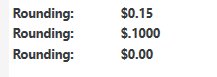
this is what i am getting now
Rounding:|$[=F(TN(‘{REPORT CALCULATION TOTAL:(CT=Auto Round +)}’),‘0.00’)]#0 .00’)]#0 .00’)]
a difference again
Jesse
February 11, 2015, 6:10pm
20
Bottom one is correct because your not using it… it will be 0
middle one is correct because you told it to convert the 5 from 0.15 to a 0
Try this:
Rounding:|$[=F(TN('{ACCOUNT TRANSACTION TOTAL:Auto Round +:Rounding}'),'0.00')]