In fact that’s not listed there to uninstall
You use the rollback to older version of windows feature.
I don’t have the rollback option, it seems in an update this was removed and other people have the same issue
1 Like
Hmmm, on recovery the other day I had 3 options, reset, earlier version and whatever the 3rd one is, now only 2 without restore earlier version, posibly because i ran restore earlier version… not sure.
I’m totally locked out of being able to run samba
Right click on sambapos icon and choose run as administrator. Or create a new windows user and try
Tried run as admin didn’t work I’ll try new user now
You have an option turned off that prevents rollback. I cant remember what it is but you need to enable that again.
New user also doesn’t work
Ok got an update.
Whatever causes this, it is not related to a windows update - at least I mean, it is not related to a new windows update causing the software to not run - the system I installed on was fresh out of the box Win 10 IoT Enterprise 2016, windows build 1607. No windows updates had been done yet it was only turned on for about an hour.
How did I resolve? I just uninstalled 5.2.20, installed 5.2.18 and it worked fine. This was my easiest option as I needed to send the system to the client and our dev system we built the setup on is still on 5.2.18.
@VehbiEmiroglu I think it’s a build setting when you created the build, it is requiring something as a prerequisite / an incorrect assumption is being made, possibly requiring a more recent .net framework version than would be available on a fresh install of Windows 10. I would guess this is not something required for new functionality so just need to investigate what it is and remove that prerequisite.
Now I just checked the other system I have Win 10 IoT Enterprise on, it was the system I had the problem with @Jesse the other week with the 64bit message service. That issue is now resolved. I just checked on that system, 5.2.20 build 21/03/2019 15:05 is running fine. This system has been turned on and connected to internet in our office for a couple weeks, so it’s done all the latest windows updates. Likely it has got whatever new prerequisite for a .net framework update that is now required in the latest build of 5.2.20.
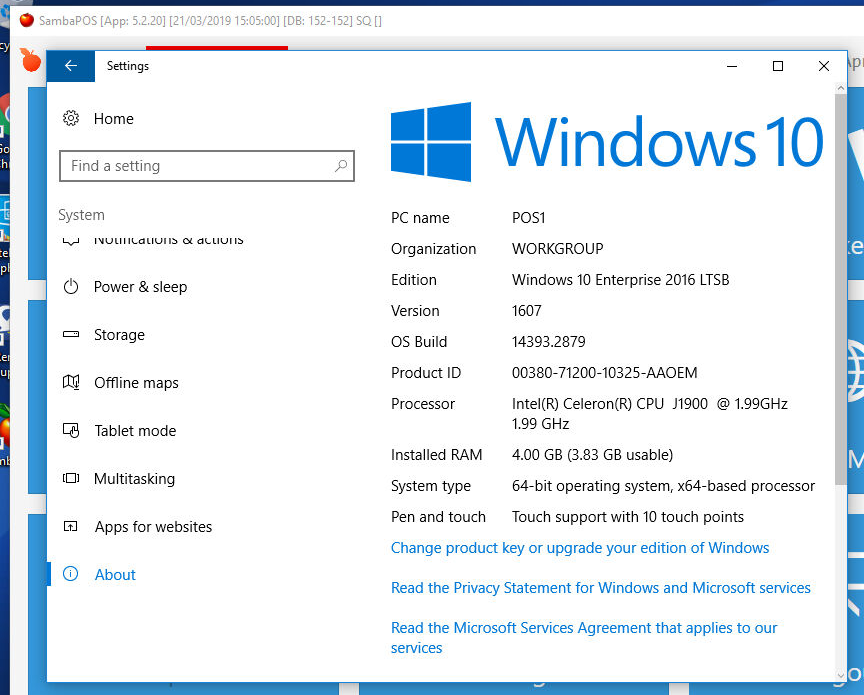
2 Likes
Ok im installing a fresh Windows 10 Enterprise for checking this situation.
1 Like
@VehbiEmiroglu do you have an update on this yet as I still cant access my dev machine?
He recently released new version in beta have you tried that?
No didn’t realise one had, when was it released?
I tried it when it was first released and it didn’t work either, has that original version been updated?
Yes it has. May not fix it but eh I
Thanks I’ll try tomorrow and let you know
Nope still doesnt work, it still shows in task manager as suspended and then disappears and samba does not open
@VehbiEmiroglu I really need to get this working, do you have a fix for this yet?
Are you using Windows 10 IoT enterprise too?
I think his issue is different. It’s listed on Microsoft discussion forums as happening to other apps. But I’m not sure.
@RickH try opening resmon just type that in windows taskbar search. Find sambapos right click it and see if you have a resume process function.